Apple's Merger of 'iCloud Documents and Data' Into iCloud Drive Now Complete - MacRumorsOpen MenuShow RoundupsShow Forums menuVisit ForumsOpen Sidebar
Skip to Content

Apple's Merger of 'iCloud Documents and Data' Into iCloud Drive Now Complete

Last May, Apple Apple announced that it would be merging its iCloud Documents and Data service into iCloud Drive in May of 2022, and that transition has now been completed.
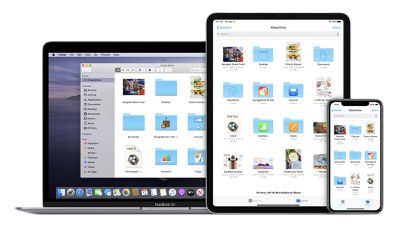
icloud drive mac ipad iphone
As noted in a support document updated today, users who previously relied on ‌iCloud‌ Documents and Data for syncing files across devices will need to turn ‌iCloud Drive‌ on in order to see their files.

iCloud Documents and Data, our legacy document syncing service, has been discontinued and replaced by iCloud Drive. If you used iCloud Documents and Data, your account has been migrated to iCloud Drive.

If you used the iCloud Documents and Data service, you need to turn on iCloud Drive to see your files. When you switch to iCloud Drive, the amount of storage space your saved files use in iCloud doesn't change.

Apple's support document provides instructions and minimum system requirements for ‌iCloud Drive‌ on iOS devices, Macs, and on the web at iCloud.com.

The vast majority of ‌iCloud‌ users already have ‌iCloud Drive‌ enabled, so they won't see any changes. But for users who had ‌iCloud‌ accounts prior to the introduction of ‌iCloud Drive‌ in 2014 and never enabled it, perhaps to maintain compatibility with pre-iOS 8 and pre-OS X Yosemite devices that couldn't support ‌iCloud Drive‌, they will now need to turn it on in order to regain access to their files.

The older ‌iCloud‌ Documents and Data service kept cloud-synced data stored in folders specific to a given app, only allowing access to the data from that app. With ‌iCloud Drive‌ being a more full-featured syncing service, all of those files can now be accessed from a single location: the Files app on iOS and iPadOS, the ‌iCloud Drive‌ section of Finder on macOS, or the ‌iCloud Drive‌ section of iCloud.com.

Popular Stories

imac video apple feature

Apple Released Yet Another New Product Today

Friday March 20, 2026 2:39 pm PDT by
Apple has unveiled a whopping nine new products so far this March, including an iPhone 17e, iPad Air models with the M4 chip, MacBook Air models with the M5 chip, MacBook Pro models with M5 Pro and M5 Max chips, the all-new MacBook Neo, an updated Studio Display, a higher-end Studio Display XDR, AirPods Max 2, and now the Nike Powerbeats Pro 2. iPhone 17e features the same overall design as...
iPhone 18 Pro Deep Red Feature

iPhone 18 Pro Launching Later This Year With These 12 New Features

Wednesday March 18, 2026 7:39 am PDT by
While the iPhone 18 Pro and iPhone 18 Pro Max are not expected to launch for another six months or so, there are already plenty of rumors about the devices. It was initially reported that the iPhone 18 Pro models would have fully under-screen Face ID, with only a front camera visible in the top-left corner of the screen. However, the latest rumors indicate that only one Face ID component...
ios 26 4 pastel

iOS 26.4: Top 10 New Features Coming to Your iPhone

Friday March 20, 2026 2:44 pm PDT by
iOS 26.4 isn't the major update with new Siri features that we hoped for, but there are some useful quality of life improvements, and a little bit of fun with an AI playlist generator and new emoji characters. Playlist Playground - Apple Music has a Playlist Playground option that lets you generate playlists from text-based descriptions. You can include moods, feelings, activities, or...

Top Rated Comments

eicca Avatar
51 months ago

Or you know, UPGRADE YOUR DEVICE!!!!!

If you are not upgrading, perhaps because you think your device works fine, why are you still using Apple device. Also it’s 2022. That device you own is too obsolete and really should upgrade…..
1) It's running the latest iOS so it's not the device's problem, genius.
2) You pay for the upgrade and I'll happily do it. Otherwise I have to spend my hard-earned money on other things.
Score: 36 Votes (Like | Disagree)
51 months ago
iCloud is a mess. With each passing day I ask myself again if anyone of influence at Apple actually uses their devices and services. They are probably connected to their own in-house system and are blissfully unaware that iCloud sync actually sucks for the plebeians. An option to force a refresh would be nice, but that would mean acknowledging that it doesn't "just work".
Score: 20 Votes (Like | Disagree)
tgwaste Avatar
51 months ago
Maybe the piece of absolutely complete garbage crap they call iCloud Drive should be fixed first before doing anything else. It has NEVER worked properly.


Computer 1 (this space usage is correct)

$ du -hd1 Documents/ | tail -n 1
408G Documents/

Computer 2 (and here we are at almost double used for the SAME files)

$ du -hd1 Documents | tail -n 1
740G Documents


2.5 TRILLION dollar company.
Score: 19 Votes (Like | Disagree)
eicca Avatar
51 months ago
Now can they make it so sync actually works and stops erasing my Pages docs on iPad?
Score: 18 Votes (Like | Disagree)
ratspg Avatar
51 months ago
About time! Now we can hope for restoring deleted files and file history like Dropbox :)
Score: 16 Votes (Like | Disagree)
51 months ago
The whole iCloud Drive needs a redesign. It isn’t as fluid as Google Drive or OneDrive.
Score: 13 Votes (Like | Disagree)
Related Apple News: World News | South Africa | Travel | Local News | Culture