iMovie for iOS Updated With 'Magic Movie' and 'Storyboards' Options, Final Cut Pro Optimized for Mac Studio

Apple today announced it has updated iMovie app for the iPhone and iPad with two new types of video projects called "Magic Movie" and "Storyboards."
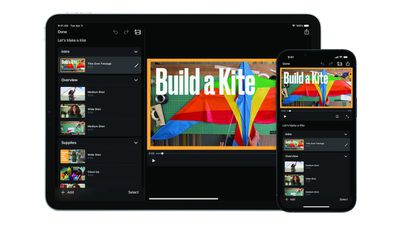
iMovie Magic Movie Feature
Apple says the "Magic Movie" function instantly creates a custom video from the clips and photos a user selects, with transitions, effects, and music automatically added. "Storyboards" helps users learn to edit and improve their video storytelling skills with pre-made templates for popular types of videos shared on social media platforms, such as DIY videos, cooking tutorials, product reviews, science experiments, and more.

iMovie for macOS was also updated today with support for importing "Magic Movie" and "Storyboard" projects created with the iOS app. The free updates are currently rolling out on the App Store across the iPhone, iPad, and Mac.

Apple also updated Final Cut Pro, Compressor, and Motion on macOS with optimized performance on the Mac Studio and more. The new version of Final Cut Pro also supports importing "Magic Movie" and "Storyboard" projects created with iMovie.

iMovie for iOS version 3.0 release notes:

• Get started, learn, and be inspired by two brand-new types of video projects: Magic Movie and Storyboards
• Create a Magic Movie to instantly make and share custom videos with titles, transitions, and music in just a few taps
• Select an album of photos and videos, and Magic Movie will create a polished video using your media
• Start with a Storyboard project to improve your storytelling skills using a template that guides you through the video-making process
• Choose from 20 Storyboards for common video projects like Cooking, DIY, Q&A, Product Review, and Book Report
• Customize and organize your storyboard video by adding, reordering, and grouping shots within the flexible shot list
• Learn different types of video framing and storytelling techniques with the shot tips provided in each type of storyboard
• Record video or take photos right into each Storyboard placeholder clip, or add media from your Photos library
• Enhance your Magic Movie or Storyboard video with 20 dynamic styles that include title layouts, fonts, filters, color palettes, and music
• Go further by editing clips with tools like trim, split, and clip speed
• Apply title treatments, record voiceover narration, or adjust the depth-of-field effect in Cinematic mode video clips* to further customize your videos
• Import Magic Movie and Storyboard projects into a timeline in iMovie for Mac or Final Cut Pro** to take your project further
• Save Magic Movie and Storyboard videos to your Photos library, send to friends and family via Messages or Mail, or share with your followers on social media
* Requires iPhone 13, iPad mini (6th generation), iPad Pro 11-inch or iPad Pro 12.9-inch (3rd generation or later)
** Requires iMovie for Mac version 10.3.2 or Final Cut Pro version 10.6.2

iMovie 3.0 requires a device running iOS 15.2 or later or iPadOS 15.2 or later.

Tag: iMovie

Popular Stories

Aston Martin CarPlay Ultra Screen

Apple's CarPlay Ultra to Expand to These Vehicle Brands Later This Year

Sunday February 1, 2026 10:08 am PST by
Last year, Apple launched CarPlay Ultra, the long-awaited next-generation version of its CarPlay software system for vehicles. Nearly nine months later, CarPlay Ultra is still limited to Aston Martin's latest luxury vehicles, but that should change fairly soon. In May 2025, Apple said many other vehicle brands planned to offer CarPlay Ultra, including Hyundai, Kia, and Genesis. In his Powe...
Apple Logo Black

Apple's Next Launch is 'Imminent'

Sunday February 1, 2026 12:31 pm PST by
The calendar has turned to February, and a new report indicates that Apple's next product launch is "imminent," in the form of new MacBook Pro models. "All signs point to an imminent launch of next-generation MacBook Pros that retain the current form factor but deliver faster chips," Bloomberg's Mark Gurman said on Sunday. "I'm told the new models — code-named J714 and J716 — are slated...
iOS 26

iOS 26.3 and iOS 26.4 Will Add These New Features to Your iPhone

Tuesday February 3, 2026 7:47 am PST by
We are still waiting for the iOS 26.3 Release Candidate to come out, so the first iOS 26.4 beta is likely still at least a week or two away. Following beta testing, iOS 26.4 will likely be released to the general public in March or April. Below, we have recapped known or rumored iOS 26.3 and iOS 26.4 features so far. iOS 26.3 iPhone to Android Transfer Tool iOS 26.3 makes it easier...
Apple MacBook Pro M4 hero

New MacBook Pros Reportedly Launching Alongside macOS 26.3

Sunday February 1, 2026 5:42 am PST by
Apple is planning to launch new MacBook Pro models with M5 Pro and M5 Max chips alongside macOS 26.3, according to Bloomberg's Mark Gurman. "Apple's faster MacBook Pros are planned for the macOS 26.3 release cycle," wrote Gurman, in his Power On newsletter today. "I'm told the new models — code-named J714 and J716 — are slated for the macOS 26.3 software cycle, which runs from...
iOS 26 Home Feature

Apple Gives Final Warning to Home App Users

Tuesday February 3, 2026 8:55 am PST by
In 2022, Apple introduced a new Apple Home architecture that is "more reliable and efficient," and the deadline to upgrade and avoid issues is fast approaching. In an email this week, Apple gave customers a final reminder to upgrade their Home app by February 10, 2026. Apple says users who do not upgrade may experience issues with accessories and automations, or lose access to their smart...

Top Rated Comments

Macropanda Avatar
50 months ago

It still does not support portrait video, though right?
Good! People that film in portrait don’t need encouraging.
Score: 23 Votes (Like | Disagree)
FCX Avatar
50 months ago
Would have been nice to see the Pro Apps get their own writeup, instead of buried in the iOS iMovie article. Jeez, people.
Score: 17 Votes (Like | Disagree)
Mr. Awesome Avatar
50 months ago
iMovie on iOS desperately needs a complete redesign - it’s so incredibly incapable compared for the macOS version it’s insane.
Score: 10 Votes (Like | Disagree)
Unregistered 4U Avatar
50 months ago

How in 2022 is the main video editing app made by Apple not even able to adjust the brightness, contrast, saturation etc?
The main video editing app made by Apple is Final Cut Pro. They have a free video editing app called iMovie, but it’s not their main focus.
Score: 9 Votes (Like | Disagree)
TheYayAreaLiving ?️ Avatar
50 months ago
This is awesome. I'm happy Apple is focused on updating all the stock apps. However, I do agree with the above comment. It needs a complete redesign. Starting with Podcast?
Score: 7 Votes (Like | Disagree)
tobybrut Avatar
50 months ago
With the release of the new Final Cut Pro, expect a lot of YouTube videos entitled, "Why I Re-bought the Mac Studio Ultra After I Returned It."
Score: 5 Votes (Like | Disagree)