

Apple Clarifies iCloud Private Relay Wording in iOS 15.3 to Prevent Confusion Over Carrier Support - MacRumorsOpen MenuShow RoundupsShow Forums menuVisit ForumsOpen Sidebar
Skip to Content

Apple Clarifies iCloud Private Relay Wording in iOS 15.3 to Prevent Confusion Over Carrier Support

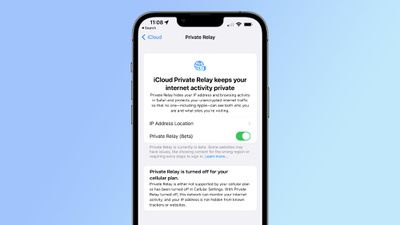
In today's iOS 15.3 beta, Apple has updated the wording that people see when iCloud Private Relay is disabled for a cellular or WiFi network, clarifying that when it's off, it's not always because of a lack of carrier support.
icloud private relay change ios 15 3
The new message says that Private Relay is turned off, but it explains that either a cellular plan does not support it or that it has been deactivated in Cellular Settings.

In iOS 15.2 and prior iOS 15.3 betas, if ‌iCloud‌ Private Relay was disabled for a cellular plan, Apple placed all of the blame on the carrier. Here's the previous wording:

"Private Relay is turned off for your cellular plan. Your cellular plan doesn't support ‌iCloud‌ Private Relay. With ‌iCloud‌ Private Relay turned off, this network can monitor your internet activity, and your IP address is not hidden from known trackers or websites."

And the new wording:

"Private Relay is turned off for your cellular plan. Private Relay is either not supported by your cellular plan or has been turned off in Cellular Settings. With Private Relay turned off, this network can monitor your internet activity, and your IP address is not hidden from known trackers or websites."

Apple's current wording does not allow for the possibility that ‌iCloud‌ Private Relay is unavailable because it has been disabled in the Settings app. ‌iCloud‌ Private Relay can be turned on or turned off for specific WiFi and cellular networks, and there may be an iOS 15.2 bug that is causing some users to have these settings disabled by default.

Going to your Cellular Settings and toggling on "Limit IP Address Tracking" will ensure that ‌iCloud‌ Private Relay is active for your cellular network, while going to WiFi, tapping the "i" button next to your network and toggling on "Limit IP Address Tracking" will turn it on for your WiFi network if it's not already enabled.

Apple's vague ‌iCloud‌ Private Relay wording got T-Mobile in some hot water earlier this week. The carrier was accused of disabling ‌iCloud‌ Private Relay for its users, preventing them from using the privacy-enhancing feature. Apple's messaging placed the blame on T-Mobile even if ‌iCloud‌ Private Relay was disabled simply due to being toggled off in the Settings app.

T-Mobile was silent on the accusations for a day, and then clarified that there appears to be an iOS 15.2 bug that can cause device settings for the Private Relay feature to be toggled to off. T-Mobile contacted Apple, and Apple updated its support document to instruct people how to make sure their settings are correct, and now the Cupertino company has also added this information into the ‌iCloud‌ Private Relay settings.

The major U.S. carriers, including T-Mobile, Verizon, and AT&T have all confirmed that they are not blocking ‌iCloud‌ Private Relay and do not have plans to do so. For T-Mobile users who have content filtering like parental controls enabled, ‌iCloud‌ Private Relay will be disabled because the services are not able to work with the feature turned on.

(Thanks, Steve Moser!)

Related Forum: iOS 15

Popular Stories

imac video apple feature

Apple Released Yet Another New Product Today

Friday March 20, 2026 2:39 pm PDT by
Apple has unveiled a whopping nine new products so far this March, including an iPhone 17e, iPad Air models with the M4 chip, MacBook Air models with the M5 chip, MacBook Pro models with M5 Pro and M5 Max chips, the all-new MacBook Neo, an updated Studio Display, a higher-end Studio Display XDR, AirPods Max 2, and now the Nike Powerbeats Pro 2. iPhone 17e features the same overall design as...
iPhone 18 Pro Deep Red Feature

iPhone 18 Pro Launching Later This Year With These 12 New Features

Wednesday March 18, 2026 7:39 am PDT by
While the iPhone 18 Pro and iPhone 18 Pro Max are not expected to launch for another six months or so, there are already plenty of rumors about the devices. It was initially reported that the iPhone 18 Pro models would have fully under-screen Face ID, with only a front camera visible in the top-left corner of the screen. However, the latest rumors indicate that only one Face ID component...
ios 26 4 pastel

iOS 26.4: Top 10 New Features Coming to Your iPhone

Friday March 20, 2026 2:44 pm PDT by
iOS 26.4 isn't the major update with new Siri features that we hoped for, but there are some useful quality of life improvements, and a little bit of fun with an AI playlist generator and new emoji characters. Playlist Playground - Apple Music has a Playlist Playground option that lets you generate playlists from text-based descriptions. You can include moods, feelings, activities, or...

Top Rated Comments

nwcs Avatar
55 months ago
Now if they can make this functionality work across all network activity on the iOS device instead of just Safari I'll be happy.
Score: 10 Votes (Like | Disagree)
55 months ago

If a carrier blocks private relay I’m changing carrier Simple as that I’m not staying with a carrier that wants my data
I don't understand your argument here. Private relay currently only applies to Safari and the Apple Mail app. So if you use Google Chrome or Firefox as your browser, the carrier still has visibility. Use the Gmail or Outlook or Yahoo Mail client, the carrier sees your data. Use any other application, the carrier sees your data. If you are concerned, swiching carriers is not your solution. Using a VPN instead of iCloud Private relay is what your solution.
Score: 7 Votes (Like | Disagree)
RouterCFW Avatar
55 months ago
If a carrier blocks private relay I’m changing carrier Simple as that I’m not staying with a carrier that wants my data
Score: 7 Votes (Like | Disagree)
Westside guy Avatar
55 months ago
So basically all the stories stating that these carriers were blocking it... were incorrect?
Score: 3 Votes (Like | Disagree)
55 months ago
Get a VPN and set it to auto connect on any network (Wi-Fi or cellular). No need for this. It’s buggy anyway and noticeably slows connection speeds.
Score: 2 Votes (Like | Disagree)
Mdracer Avatar
55 months ago
***Checks Carrier and Relay Settings***

'Still enabled' So my monthly payment to them continues...
Score: 2 Votes (Like | Disagree)
Related Apple News: Politics | Entertainment | Buyers Guide | Lifestyle | Mac















