macOS 12.1 Fixes Menu Bar Icons Obscured by Notch on 2021 MacBook Pros

Apple on Tuesday seeded the macOS Monterey 12.1 Release Candidate to developers for testing, and according to the release notes, the update resolves an issue with the notch obscuring "menu bar extras" on the 14-inch and 16-inch MacBook Pro.
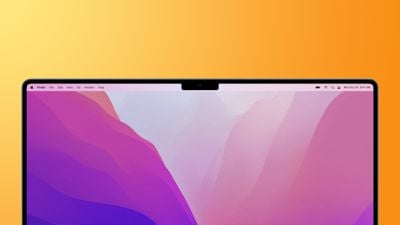
macbook pro 2021 notch feature
"Menu bar extras" are the tiny icons that appear on the right side of the menu bar, providing users with convenient access to app-specific controls. These icons could become overlapped by the notch on the new MacBook Pro models, causing the icons to be hidden or only partially visible, but Apple said this bug has been fixed in macOS 12.1.

As for top-level menus like File, Edit, and View on the left side of the menu bar, developers can update their Mac apps to play friendly with the notch. As a last resort for apps that have not yet been updated, users can enable a "scale to fit below built-in camera" setting for the app to adjust the active area of the MacBook Pro's display, ensuring that the app's menus appear below the notch and are always visible.

These changes come after several users complained about the notch interfering with menu bar items on the new MacBook Pro models.

macOS 12.1 also resolves several other bugs, including issues with Tap to Click, HDR video playback on YouTube, and MagSafe charging:

This release also includes bug fixes for your Mac:

- Desktop and Screen Saver may appear blank after selecting photos from the Photos library
- Trackpad could become unresponsive to taps or clicks
- External displays may not charge some MacBook Pro and MacBook Air computers when connected using Thunderbolt or USB-C
- HDR video playback on YouTube.com could cause 2021 MacBook Pro computers to panic
- Menu bar extras may be obscured by the camera housing on 2021 MacBook Pro computers
- MagSafe may stop charging on 2021 16-inch MacBook Pro computers when lid is closed and system is shut down

macOS 12.1 is expected to be released to all users as early as next week. When available, users can install the update by clicking on the Apple logo in the top-left corner of the screen, clicking on About This Mac, and clicking on the Software Update button.


Related Forum: macOS Monterey

Popular Stories

Aston Martin CarPlay Ultra Screen

Apple's CarPlay Ultra to Expand to These Vehicle Brands Later This Year

Sunday February 1, 2026 10:08 am PST by
Last year, Apple launched CarPlay Ultra, the long-awaited next-generation version of its CarPlay software system for vehicles. Nearly nine months later, CarPlay Ultra is still limited to Aston Martin's latest luxury vehicles, but that should change fairly soon. In May 2025, Apple said many other vehicle brands planned to offer CarPlay Ultra, including Hyundai, Kia, and Genesis. In his Powe...
iOS 26

iOS 26.3 and iOS 26.4 Will Add These New Features to Your iPhone

Tuesday February 3, 2026 7:47 am PST by
We are still waiting for the iOS 26.3 Release Candidate to come out, so the first iOS 26.4 beta is likely still at least a week or two away. Following beta testing, iOS 26.4 will likely be released to the general public in March or April. Below, we have recapped known or rumored iOS 26.3 and iOS 26.4 features so far. iOS 26.3 iPhone to Android Transfer Tool iOS 26.3 makes it easier...
Apple Logo Black

Apple's Next Launch is 'Imminent'

Sunday February 1, 2026 12:31 pm PST by
The calendar has turned to February, and a new report indicates that Apple's next product launch is "imminent," in the form of new MacBook Pro models. "All signs point to an imminent launch of next-generation MacBook Pros that retain the current form factor but deliver faster chips," Bloomberg's Mark Gurman said on Sunday. "I'm told the new models — code-named J714 and J716 — are slated...
Apple MacBook Pro M4 hero

New MacBook Pros Reportedly Launching Alongside macOS 26.3

Sunday February 1, 2026 5:42 am PST by
Apple is planning to launch new MacBook Pro models with M5 Pro and M5 Max chips alongside macOS 26.3, according to Bloomberg's Mark Gurman. "Apple's faster MacBook Pros are planned for the macOS 26.3 release cycle," wrote Gurman, in his Power On newsletter today. "I'm told the new models — code-named J714 and J716 — are slated for the macOS 26.3 software cycle, which runs from...
iOS 26 Home Feature

Apple Gives Final Warning to Home App Users

Tuesday February 3, 2026 8:55 am PST by
In 2022, Apple introduced a new Apple Home architecture that is "more reliable and efficient," and the deadline to upgrade and avoid issues is fast approaching. In an email this week, Apple gave customers a final reminder to upgrade their Home app by February 10, 2026. Apple says users who do not upgrade may experience issues with accessories and automations, or lose access to their smart...

Top Rated Comments

rpmurray Avatar
54 months ago

So that ends the whining about the notch, right? Right?!
Notch so fast!
Score: 26 Votes (Like | Disagree)
anshuvorty Avatar
54 months ago
Can someone show us how this fix works in practice?
Score: 16 Votes (Like | Disagree)
Apple Knowledge Navigator Avatar
54 months ago

Jony Ive wouldn't allowed this.


You sure about that?
Score: 15 Votes (Like | Disagree)
terminator-jq Avatar
54 months ago
That’s awesome but let’s get the memory leak fixed…

These new macs have the awesome ability to use their RAM as VRAM and system memory opening up a lot of doors but it doesn’t help if Control center is using up 15gb of RAM…
Score: 8 Votes (Like | Disagree)
TheKrs1 Avatar
54 months ago

There was no need for the ugly notch when the webcam is so bad if it was amazing then I would be happy with it, the webcam is terrible quality so it could of been in the small bezel like on dell
... What's wrong with the webcam? It's been reviewed as one of the highest quality on the market?
Score: 7 Votes (Like | Disagree)
Kylo83 Avatar
54 months ago
All I want is 120hz smooth scrolling in safari
Score: 6 Votes (Like | Disagree)