Apple Music App for LG Smart TVs Now Available - MacRumorsOpen MenuShow RoundupsShow Forums menuVisit ForumsOpen Sidebar
Skip to Content

Apple Music App for LG Smart TVs Now Available

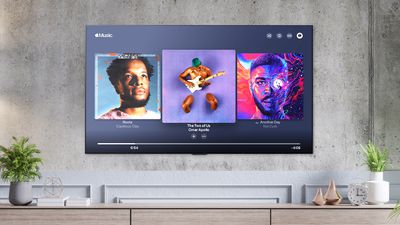
The Apple Music app for LG smart TVs is today rolling out to users, with LG now promoting the app on social media.
apple music lg tv
The Apple Music app for LG smart TVs allows subscribers to stream over 90 million songs, as well as playlists, radio stations, and music videos, with no need for any external hardware such as an Apple TV. The app supports a range of core ‌Apple Music‌ features, such as synced realtime lyrics.

The user interface appears to be very visually similar to the ‌Apple Music‌ app for tvOS. The ‌Apple Music‌ app is now gradually rolling out to LG users, with a large number of posts emerging on Twitter showing the new app in action.

It is as yet unclear which exact LG TV models support the app, but it is likely that more recent model years will be supported. Users can find out if they have a supported TV by simply searching for "‌Apple Music‌" in the LG content store.

Popular Stories

imac video apple feature

Apple Released Yet Another New Product Today

Friday March 20, 2026 2:39 pm PDT by
Apple has unveiled a whopping nine new products so far this March, including an iPhone 17e, iPad Air models with the M4 chip, MacBook Air models with the M5 chip, MacBook Pro models with M5 Pro and M5 Max chips, the all-new MacBook Neo, an updated Studio Display, a higher-end Studio Display XDR, AirPods Max 2, and now the Nike Powerbeats Pro 2. iPhone 17e features the same overall design as...
ios 26 4 pastel

iOS 26.4: Top 10 New Features Coming to Your iPhone

Friday March 20, 2026 2:44 pm PDT by
iOS 26.4 isn't the major update with new Siri features that we hoped for, but there are some useful quality of life improvements, and a little bit of fun with an AI playlist generator and new emoji characters. Playlist Playground - Apple Music has a Playlist Playground option that lets you generate playlists from text-based descriptions. You can include moods, feelings, activities, or...
iPhone 18 Pro Deep Red Feature

iPhone 18 Pro Launching Later This Year With These 12 New Features

Wednesday March 18, 2026 7:39 am PDT by
While the iPhone 18 Pro and iPhone 18 Pro Max are not expected to launch for another six months or so, there are already plenty of rumors about the devices. It was initially reported that the iPhone 18 Pro models would have fully under-screen Face ID, with only a front camera visible in the top-left corner of the screen. However, the latest rumors indicate that only one Face ID component...


Top Rated Comments

Techwatcher Avatar
57 months ago
How did an LG TV get the app before Xbox? Come on now.
Score: 9 Votes (Like | Disagree)
57 months ago
Love it, but it’s missing Dolby Atmos, Lossless and HDR support. Hopefully soon…
Score: 7 Votes (Like | Disagree)
57 months ago

I love my LG OLED TV but what about "burn-in" problems because of the static logo and layout of the app ?
I just used the app on my C9 and found that the screen sleeps after a while, just as if it were a paused video. (You can wake it up, of course). So that may help avoid burn in.
Score: 3 Votes (Like | Disagree)
F4C4 Avatar
57 months ago

Disappointed Apple and Tesla hasn't added it. I understand Tesla not wanting to add CarPlay, but I thought Apple Music and Apple TV+ would be a slam dunk.
I watched Apple TV+ on my Tesla:
1 - Go to the YouTube app in the Theater menu
2 - Search for Apple TV plus
3 - Click on the Apple TV plus channel
4 - On the right lower corner of the main banner you will see "Watch Apple TV" --> click on that
5 - Log in and watch full screen!

You're Welcome! :)
Score: 3 Votes (Like | Disagree)
57 months ago

With the regular LG media player app, a screen saver cuts in after a few minutes of listening to music.

Or, you can always turn the screen off while you’re listening to music - it’s just a pity that the “screen off” option is in the bottom of a locked filing cabinet in a disused lavatory with a sign on the door saying “beware of the leopard”. (Actually, Settings - OLED care - Device self-care - Energy Saving - Screen Off, but near enough...)

Better solution would be to get a sound bar/AV amp with Airplay and cut the TV (and it’s not very good speakers) out of the loop... my sound system is a bit pre-airplay, though :)
You can add "Screen Off" to the quick settings menu or whatever it's called, if you use it often. (LG CX, may differ on other models.)
Score: 3 Votes (Like | Disagree)
57 months ago
I just installed it on my 2018 LG TV (non OLED) running WebOS 5.
Score: 3 Votes (Like | Disagree)
Related Apple News: Technology | Sport | Education | Local News | World News