

The upcoming sixth-generation iPad mini will feature volume buttons on the top side of the device to accommodate a full-size Apple Pencil, according to images seemingly from an accessory maker shared by the Twitter user known as "Majin Bu."

The images purportedly depict the sixth-generation iPad mini with an iPad Air-style all-screen design, featuring squared-off edges, a Touch ID fingerprint scanner in the power button, and no Home Button, as has been previously rumored. The most noticeable change that differentiates the sixth-generation iPad mini's design from that of the iPad Air is the relocation of the volume buttons, with the buttons being moved opposite the Touch ID power button on the top edge of the device. This is an unprecedented iPad design change, with all previous iPad models to date featuring the volume buttons on the right side of the device.
The main reason for moving the volume buttons appears to be to fit the Apple Pencil on the right edge of the device. The iPad Air and iPad Pro models are able to fit both the volume buttons and a magnetically attached Apple Pencil on the right edge of the device, but this does not seem to be the case on the next-generation iPad mini due to its considerably smaller size. This likely prompted Apple to move the volume buttons elsewhere.
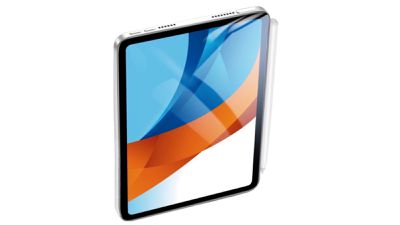
Relocated volume buttons were depicted in previous images of alleged iPad mini aluminum production molds. Third-party accessory makers often get their hands on accurate dimensions for upcoming devices well ahead of launch to develop the likes of screen protectors and accessories so that they are available as soon as the device is released. Given this is the second appearance of relocated volume buttons from accessory makers, the change may be more likely to be accurate, especially in light of the expected need to accommodate an Apple pencil.
Relocating the volume buttons to the top right of the device could also make sense for larger iPads that are often used in landscape mode and with keyboards, since the user would no longer need to lift their hand up past the display to the top edge of the device to change the volume. In landscape, volume buttons in this new location would be much closer to an external keyboard. It is unknown if the relocated volume buttons will expand to other iPad models for consistency in the future.
Friday December 12, 2025 10:56 am PST by Joe Rossignol
Macworld's Filipe Espósito today revealed a handful of features that Apple is allegedly planning for iOS 26.4, iOS 27, and even iOS 28.
The report said the features are referenced within the code for a leaked internal build of iOS 26 that is not meant to be seen by the public. However, it appears that Espósito and/or his sources managed to gain access to it, providing us with a sneak peek...
Monday December 15, 2025 2:05 pm PST by Juli Clover
Last week, details about unreleased Apple devices and future iOS features were shared by Macworld. This week, we learned where the information came from, plus we have more findings from the leak.
As it turns out, an Apple prototype device running an early build of iOS 26 was sold, and the person who bought it shared the software. The OS has a version number of 23A5234w, and the first...
The first foldable iPhone will feature a series of design and hardware firsts for Apple, according to details shared by the Weibo leaker known as Digital Chat Station.
According to a new post, via machine translation, Apple is developing what the leaker describes as a "wide foldable" device, a term used to refer to a horizontally oriented, book-style foldable with a large internal display....
Friday December 12, 2025 10:10 am PST by Juli Clover
Apple today released iOS 26.2, the second major update to the iOS 26 operating system that came out in September, iOS 26.2 comes a little over a month after iOS 26.1 launched. iOS 26.2 is compatible with the iPhone 11 series and later, as well as the second-generation iPhone SE.
The new software can be downloaded on eligible iPhones over-the-air by going to Settings >...
Monday December 15, 2025 3:05 pm PST by Juli Clover
Software from an iPhone prototype running an early build of iOS 26 leaked last week, giving us a glimpse at future Apple devices and iOS features. We recapped device codenames in our prior article, and now we have a list of some of the most notable feature flags that were found in the software code.
In some cases, it's obvious what the feature flags are referring to, while some are more...
Thursday December 11, 2025 8:49 am PST by Joe Rossignol
Apple seeded the second iOS 26.2 Release Candidate to developers earlier this week, meaning the update will be released to the general public very soon.
Apple confirmed iOS 26.2 would be released in December, but it did not provide a specific date. We expect the update to be released by early next week.
iOS 26.2 includes a handful of new features and changes on the iPhone, such as a new...
Friday December 12, 2025 10:08 am PST by Juli Clover
Apple today released macOS Tahoe 26.2, the second major update to the macOS Tahoe operating system that came out in September. macOS Tahoe 26.2 comes five weeks after Apple released macOS Tahoe 26.1.
Mac users can download the macOS Tahoe update by using the Software Update section of System Settings.
macOS Tahoe 26.2 includes Edge Light, a feature that illuminates your face with soft...
Thursday December 11, 2025 11:28 am PST by Juli Clover
Apple today released new firmware designed for the AirPods Pro 3 and the prior-generation AirPods Pro 2. The AirPods Pro 3 firmware is 8B30, up from 8B25, while the AirPods Pro 2 firmware is 8B28, up from 8B21.
There's no word on what's include in the updated firmware, but the AirPods Pro 2 and AirPods Pro 3 are getting expanded support for Live Translation in the European Union in iOS...
I dont get why they dont put the buttons on the top right side when held landscape. So above the charging port. Does anyone ever rest or charge an iPad in portrait orientation? I think it would make so much more sense if Apple just accepted its a landscape device and put the front camera on the long edge too.
The iPad mini in particular is an excellent portrait device because you can actually hold it with one hand in portrait and read it like a book.
Not saying it can't also be used in landscape but I prefer using my ipad mini in portrait.
I dont get why they dont put the buttons on the top right side when held landscape. So above the charging port. Does anyone ever rest or charge an iPad in portrait orientation? I think it would make so much more sense if Apple just accepted its a landscape device and put the front camera on the long edge too.
I am a pilot and only use the iPad mini in portrait. That's how it is mounted on the yoke of the airplane and holds all my charts and geo-referenced approach plates. I put the power port at the top so it can be more easily plugged into the aircraft panel to charge.


















