iOS 15 Beta 2 Tidbits: Redesigned Apple Maps Icon, Memoji Outfits, and More - MacRumorsOpen MenuShow RoundupsShow Forums menuVisit ForumsOpen Sidebar
Skip to Content

iOS 15 Beta 2 Tidbits: Redesigned Apple Maps Icon, Memoji Outfits, and More

Apple seeded the second betas of iOS 15 and iPadOS 15 to developers today for testing, and in addition to SharePlay being enabled in FaceTime, there are some other smaller changes and details that we've gathered up below.
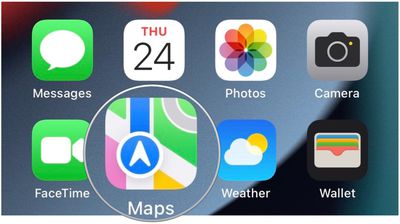
apple maps icon ios 15 beta 2
First and foremost, Apple has fixed a long list of bugs in the second betas, as outlined in the release notes. For example, Apple has resolved an issue that caused iCloud Private Relay to function unexpectedly and more. The release notes also indicate the second beta of iPadOS 15 is not available for the 9.7-inch iPad Pro (WiFi + Cellular) released in 2015, although Apple did not provide a reason why.

There's a new Apple Maps icon visible in the second betas, with the Interstate 280 shield removed from the bottom-right corner.


As noted by Bloomberg's Mark Gurman, the second beta of iPadOS 15 allows users to swipe from the bottom right to open the Quick Note toggle using a finger. This feature was announced at WWDC earlier this month, but it required an Apple Pencil in the first beta.


There are also new Memoji outfits and customization options, user interface tweaks across Safari and other apps, and a new splash screen for the redesigned Weather app, so be sure to check out the MacRumors forum thread with a running list of changes in the second betas.


As a developer beta, iOS 15 is officially only available to those enrolled in the Apple Developer Program, which costs $99 per year. A free public beta will be available in July, and the software update will be released in the fall.

Let us know in the comments section if you spot any other changes.

Related Forum: iOS 15

Popular Stories

imac video apple feature

Apple Released Yet Another New Product Today

Friday March 20, 2026 2:39 pm PDT by
Apple has unveiled a whopping nine new products so far this March, including an iPhone 17e, iPad Air models with the M4 chip, MacBook Air models with the M5 chip, MacBook Pro models with M5 Pro and M5 Max chips, the all-new MacBook Neo, an updated Studio Display, a higher-end Studio Display XDR, AirPods Max 2, and now the Nike Powerbeats Pro 2. iPhone 17e features the same overall design as...
iPhone 18 Pro Deep Red Feature

iPhone 18 Pro Launching Later This Year With These 12 New Features

Wednesday March 18, 2026 7:39 am PDT by
While the iPhone 18 Pro and iPhone 18 Pro Max are not expected to launch for another six months or so, there are already plenty of rumors about the devices. It was initially reported that the iPhone 18 Pro models would have fully under-screen Face ID, with only a front camera visible in the top-left corner of the screen. However, the latest rumors indicate that only one Face ID component...
ios 26 4 pastel

iOS 26.4: Top 10 New Features Coming to Your iPhone

Friday March 20, 2026 2:44 pm PDT by
iOS 26.4 isn't the major update with new Siri features that we hoped for, but there are some useful quality of life improvements, and a little bit of fun with an AI playlist generator and new emoji characters. Playlist Playground - Apple Music has a Playlist Playground option that lets you generate playlists from text-based descriptions. You can include moods, feelings, activities, or...

Top Rated Comments

kenni417 Avatar
62 months ago
quite like the new maps icon !
Score: 16 Votes (Like | Disagree)
MrGimper Avatar
62 months ago
Just give me back 6 icons in each row on portrait Home Screen in iPadOS.

Thanks
Score: 10 Votes (Like | Disagree)
WiseAJ Avatar
62 months ago
No option for a bow tie on the memoji :( so I submitted feedback suggesting it.
Score: 10 Votes (Like | Disagree)
Kylo83 Avatar
62 months ago

Making a design change like that would negatively affect new users. Also, some apps (like games) dim the home bar so that you have to swipe twice, once to activate it and twice to actually go home preventing you from accidentally leaving the app and losing progress. Without a visual indicator it would make it confusing to leave those apps for multitasking, Home Screen, etc.

A better option would be for users to be allowed to set it to auto minimize a few seconds after opening an app, then it would still pop up in scenarios like I mentioned above, but be out the way otherwise.
Set it in by default but let us remove if we want
Score: 10 Votes (Like | Disagree)
Kylo83 Avatar
62 months ago
just let us remove the home bar
Score: 10 Votes (Like | Disagree)
TheDailyApple Avatar
62 months ago

just let us remove the home bar
Making a design change like that would negatively affect new users. Also, some apps (like games) dim the home bar so that you have to swipe twice, once to activate it and twice to actually go home preventing you from accidentally leaving the app and losing progress. Without a visual indicator it would make it confusing to leave those apps for multitasking, Home Screen, etc.

A better option would be for users to be allowed to set it to auto minimize a few seconds after opening an app, then it would still pop up in scenarios like I mentioned above, but be out the way otherwise.
Score: 9 Votes (Like | Disagree)
Related Apple News: South Africa | Travel | Ipad | Iphone | Politics