iCloud Users Continue to Be Plagued by Calendar Spam - MacRumorsOpen MenuShow RoundupsShow Forums menuVisit ForumsOpen Sidebar
Skip to Content

iCloud Users Continue to Be Plagued by Calendar Spam

Despite previous attempts to put the situation at rest, some iCloud users continue to experience spam calendar invitations, causing their calendars to be filled with random events.
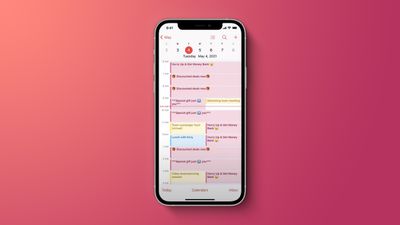
iOS Spam Calendar Feature
The situation received widespread coverage in 2016, where Apple said that it was "actively working to address this issue" by "identifying and blocking suspicious senders." Victims are targeted in various ways. The most common method is by receiving a normal iCloud calendar invitation through their calendar app.

Interacting with the invitation, including declining, accepting, or choosing "Maybe," lets the spammer know that the email is valid, so it can continue to be targeted.

Other users are targeted through web pop-ups on potentially malicious or adult websites. Apple has not publicly commented on what specific measures it has taken to solve the issue, but through a video posted by Apple Support, that has so far garnered more than 97,000 views, it has a solution.

The video advises that users, logically, unsubscribe from these spam calendars. The video doesn't offer any insight into what proactive measures users can take to not receive the invitations in the first place.

One measure that some users have found to be helpful is to redirect calendar invitations to their email, rather than an in-app calendar invitation. By redirecting invitations to their email, users can better manage and delete calendar invitations. For more detailed instructions, make sure to check out our how to.


Popular Stories

imac video apple feature

Apple Released Yet Another New Product Today

Friday March 20, 2026 2:39 pm PDT by
Apple has unveiled a whopping nine new products so far this March, including an iPhone 17e, iPad Air models with the M4 chip, MacBook Air models with the M5 chip, MacBook Pro models with M5 Pro and M5 Max chips, the all-new MacBook Neo, an updated Studio Display, a higher-end Studio Display XDR, AirPods Max 2, and now the Nike Powerbeats Pro 2. iPhone 17e features the same overall design as...
HomePod mini and Apple TV Sage

New Apple TV and HomePod Mini Remain 'Ready' to Launch

Sunday March 22, 2026 6:33 am PDT by
Apple has unveiled nine new products this month, but the wait continues for the next-generation Apple TV 4K and HomePod mini models. In his Power On newsletter today, Bloomberg's Mark Gurman said new versions of the Apple TV and HomePod mini have been "ready" since last year, but he reiterated that Apple has held off on releasing them until the more personalized version of Siri and other...
ios 26 4 pastel

iOS 26.4: Top 10 New Features Coming to Your iPhone

Friday March 20, 2026 2:44 pm PDT by
iOS 26.4 isn't the major update with new Siri features that we hoped for, but there are some useful quality of life improvements, and a little bit of fun with an AI playlist generator and new emoji characters. Playlist Playground - Apple Music has a Playlist Playground option that lets you generate playlists from text-based descriptions. You can include moods, feelings, activities, or...

Top Rated Comments

62 months ago
You have to approve it for it to be added to your calendar. Stop clicking OK without reading the pop up window and you’ll be fine lol.
Score: 30 Votes (Like | Disagree)
pgiguere1 Avatar
62 months ago
Part of the issue is that some users tend to click "OK" to popups without reading them, which is what makes them subscribed to spam calendars in the first place.

Apple could make this less likely simply by respecting their own Human Interface Guidelines.

This ('https://pbs.twimg.com/media/E4V_TS9WUAEXbem?format=jpg&name=4096x4096') is what the modal looks like.

"Cancel" button should be on the left, and "OK" button should be a verb like "Subscribe".

From Apple's HIG ('https://developer.apple.com/design/human-interface-guidelines/ios/views/alerts/'):

* "Cancel buttons should always be on the left."
* "To the extent possible, use verbs and verb phrases that relate directly to the alert title and message—for example, View All, Reply, or Ignore. Use OK for simple acceptance."
Score: 21 Votes (Like | Disagree)
62 months ago
This is news to me.
Score: 13 Votes (Like | Disagree)
62 months ago
I've never had this happen. Been using iCloud since inception. Probably has a lot to do with sketchy websites people visit for their personal entertainment and clicking on stuff that leads them to this.
Score: 11 Votes (Like | Disagree)
HiVolt Avatar
62 months ago
Odd, never happened to me. Maybe by default this is off?
Score: 8 Votes (Like | Disagree)
62 months ago
The video shows how simple it is to just unsubscribe the calendar (how did one even subscribe to a spam calendar in the first place?).

What else can Apple do?
Score: 7 Votes (Like | Disagree)
Related Apple News: Macos Share Weblink Jumps To Specific Line | Macos | Iphone | Iphone Deals | 2025 Apple Tv