

iOS 15 Reminders Gains New 'Smart List' Feature for Easily Filtering Reminders Based on Locations, Tags, and More

In iOS 15, iPadOS 15, and macOS Monterey, Apple is expanding the features built into the stock Reminders app, which received a major overhaul in 2019. With the new updates shipping this fall, users will be able to create "Smart Lists" that corral reminders based on different filters, such as their location, due date, flag, priority, and more.
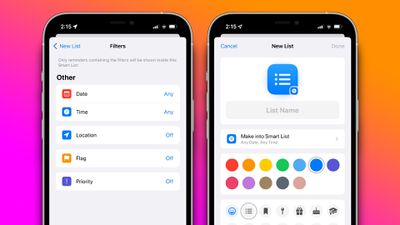
ios 15 reminders smart list feature
With the new functionality, users can create powerful lists that show reminders based only on several filters. For example, users may create a Smart List with a filter to show reminders due on the weekend, with their location set to home. Apple offers five filters as of the current betas for the software, including date, time, location, flag, and priority.

For date, users can select to show reminders only due on a specific date, a relative range, a specified range, such as over the weekend or longer, and reminders due on any date. Users can select a filter for any time of day or more granular options for morning, afternoon, evening, and night. The location filter allows users to see only reminders due in a specific location. Users can also select the flag filter to show only flagged reminders and the priority filter.

iOS 15, iPadOS 15, and macOS Monterey are all currently in beta testing for members of the Apple Developer Program, with public beta versions set to be released soon.

(Thanks, Rubèn)

Related Forum: iOS 15

Popular Stories

iOS 26

iOS 26.3 and iOS 26.4 Will Add These New Features to Your iPhone

Tuesday February 3, 2026 7:47 am PST by
While the iOS 26.3 Release Candidate is now available ahead of a public release, the first iOS 26.4 beta is likely still at least a week away. Following beta testing, iOS 26.4 will likely be released to the general public in March or April. Below, we have recapped known or rumored iOS 26.3 and iOS 26.4 features so far. iOS 26.3 iPhone to Android Transfer Tool iOS 26.3 makes it easier...
imac video apple feature

Apple Makes Its Second-Biggest Acquisition Ever

Tuesday February 3, 2026 12:45 pm PST by
Apple recently acquired Israeli startup Q.ai for close to $2 billion, according to Financial Times sources. That would make this Apple's second-biggest acquisition ever, after it paid $3 billion for the popular headphone maker Beats in 2014. This is also the largest known Apple acquisition since the company purchased Intel's smartphone modem business and patents for $1 billion in 2019....
iOS 26 Home Feature

Apple Gives Final Warning to Home App Users

Tuesday February 3, 2026 8:55 am PST by
In 2022, Apple introduced a new Apple Home architecture that is "more reliable and efficient," and the deadline to upgrade and avoid issues is fast approaching. In an email this week, Apple gave customers a final reminder to upgrade their Home app by February 10, 2026. Apple says users who do not upgrade may experience issues with accessories and automations, or lose access to their smart...
maxresdefault

M5 Pro and M5 Max MacBook Pro Launch Imminent as Reseller Stock Dwindles

Tuesday February 3, 2026 12:12 pm PST by
New M5 Pro and M5 Max MacBook Pro models are slated to launch in the near future, according to information shared with MacRumors by an Apple Premium Reseller. Subscribe to the MacRumors YouTube channel for more videos. The third-party Apple retailer said that MacBook Pro stock is very low currently because there is an imminent new product introduction. Apple typically coordinates supply with...
Apple Logo Black

Apple's Next Launch is 'Imminent'

Sunday February 1, 2026 12:31 pm PST by
The calendar has turned to February, and a new report indicates that Apple's next product launch is "imminent," in the form of new MacBook Pro models. "All signs point to an imminent launch of next-generation MacBook Pros that retain the current form factor but deliver faster chips," Bloomberg's Mark Gurman said on Sunday. "I'm told the new models — code-named J714 and J716 — are slated...

Top Rated Comments

ignatius345 Avatar
61 months ago
I hope they fix the way notifications sync. Presently, I find myself dismissing a notification three times: on my iPhone and then each of my Macs, because the dismissal of the notification isn't synced. [S]When I dismiss a notification in Things, by contrast, it disappears across all three devices.[/S] (Apparently I was wrong about Things doing this)
Score: 4 Votes (Like | Disagree)
amartinez1660 Avatar
61 months ago

The only thing preventing me from using reminders is that I cannot quickly add a reminder without opening the reminders app.
Like others have alluded to, Siri with a natural language works amazingly well.
“Hey Siri” (or long press the lock button or raise the Apple Watch close to you) followed by:
- “Remind me to pay the credit card bill next friday”
- “Remind me to watch Top Gear when I arrive back home (or leave/arrive from/to work/home/etc)”. This one relies on your own contacts work/home/etc addresses tags, don’t know what’s the extent of these… haven’t tried “buy things at my favorite supermarket (or closest Costco or gym)” for example.
- Remind me in 15mins that I left a coke can in the freezer.
- Suppose recycling trucks changed schedule: Remind me on Thursday’s weekly to take out the recycling bags.

The coke can in the freezer is an extreme example, for that I would probably just say “Hey Siri set a timer for 15mins” as the alarm is more chaotic (either louder sounds or taps on the wrist if a watch is being worn by the time it triggers) than a reminder. But hopefully won’t forget what the alarm was for.
Would be great to label a timer for when it triggers: “set a timer for 30mins, label it as ‘oven’ ”.

Between Reminders and Timers I get by daily chores and life quite more smoothly than without them.

My .002 cents for how it can work.
Score: 3 Votes (Like | Disagree)
Apple_Robert Avatar
61 months ago

The only thing preventing me from using reminders is that I cannot quickly add a reminder without opening the reminders app.
Using Siri works fairly well for creating reminders.
Score: 3 Votes (Like | Disagree)
coffeeplease Avatar
61 months ago

I hope they fix the way notifications sync. Presently, I find myself dismissing a notification three times: on my iPhone and then each of my Macs, because the dismissal of the notification isn't synced. When I dismiss a notification in Things, by contrast, it disappears across all three devices.
I have the same issue with Things. How do you get notifications to dismiss across all devices?
Score: 2 Votes (Like | Disagree)
Apple_Robert Avatar
61 months ago

I just wish Apple would buy Fantastical! The mix of events and reminders is perfect.
I wish Apple would work on natural language for events. Natural language with Reminders is not too bad (about 60% for me).
Score: 2 Votes (Like | Disagree)
Apple Knowledge Navigator Avatar
61 months ago
I’ll still go “Oh yeah” and avoid them (like everything else in my sad life), but anything to help me is appreciated.
Score: 2 Votes (Like | Disagree)
















