iOS 15 Tidbits: Text Cursor Magnifier, New Dial Picker, Custom Text Size Per App, and More

Apple this week released the first iOS 15 beta to developers, and away from the brouhaha surrounding its many tentpole features, many notable tweaks and improvements are continuing to be uncovered. Here, we've pulled out a few that we think are worth highlighting.
ios 15
Bear in mind that Apple hasn't mentioned all of these changes in its iOS 15 marketing, and there's no guarantee that they'll make the final cut when iOS 15 is released to the public in the fall.

Original Wheel Picker Returns

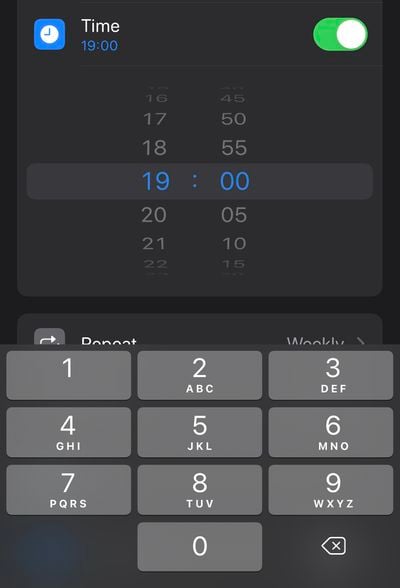
In iOS 14, Apple removed the original large wheel-style dial picker used for selecting times, and replaced it with a smaller dial picker that's sort of hidden behind a boxed number input field. This new design was supposed to unify the two selection modes, but it also made it somewhat slower to wheel through numbers.
ios 15 tidbits3
Happily, iOS 15 sees the return of the larger dial picker, but with a neater, more modern design. You can also tap the wheel to input digits with the number pad, so it basically retains the added functionality of the less-coveted version seen in iOS 14.

Custom Text Size Per App

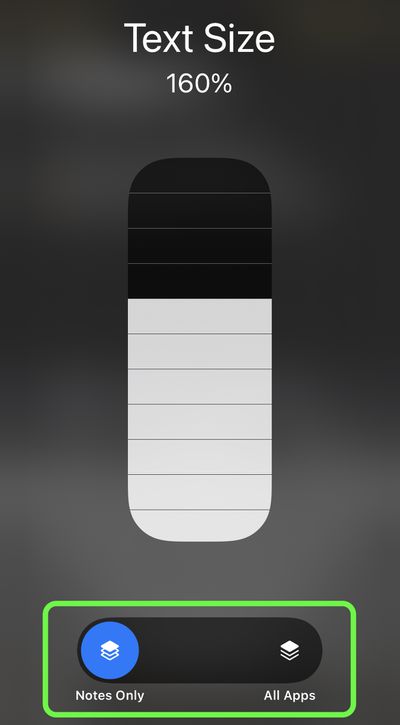
In iOS 14, you can add a button to the Control Center that allows you to change the text size on the screen on the fly. Any change that you make is reflected systemwide regardless of your preference, but in iOS 15 that's no longer the case.
ios 15 tidbits2
Bring up the Text Size selector in Control Center, and you'll see new options to apply the text size adjustment to the system, or just the app that's currently open. iOS 15 will also remember your selection, so you can exit out of the app to do something else and then return to it with your chosen text size for that particular app intact.

Text Selection Magnifier Returns

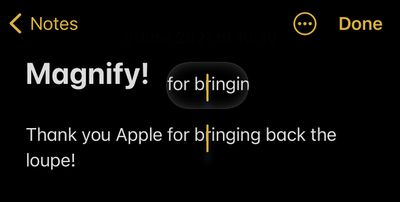
After its removal in iOS 13, Apple has reintroduced a new version of the magnifying glass for text selection. The new magnifier is a little smaller than the original one, but the fact that it has reappeared is likely to be welcomed.
ios 15 tidbits4
From a user perspective, removing the loupe felt like an odd decision on Apple's part, as it makes it harder to see where the cursor is situated under your finger. Fortunately, this tweak is likely to stay, since Apple lists it as a feature on its iOS 15 page.

Drag Apps From Spotlight to Home Screen

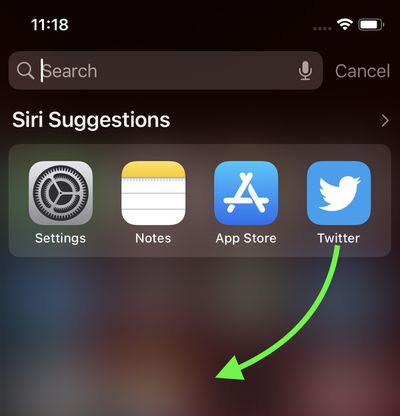
In iOS 14, the functionality of app icons that appear in Siri Suggestions and Spotlight search results is limited to opening the app. In iOS 15, however, it's possible to drag an app from Spotlight and place it right onto the Home Screen, which means you no longer need to continually drag app icons between ‌Home Screen‌ pages to rearrange them.

ios 15 tidbits1
You can also now directly delete apps from within Spotlight via a long-press Quick Action that wasn't available in previous versions of iOS, meaning you can make short work of any apps that have lain forgotten in your App Library.


Related Forum: iOS 15

Popular Stories

Aston Martin CarPlay Ultra Screen

Apple's CarPlay Ultra to Expand to These Vehicle Brands Later This Year

Sunday February 1, 2026 10:08 am PST by
Last year, Apple launched CarPlay Ultra, the long-awaited next-generation version of its CarPlay software system for vehicles. Nearly nine months later, CarPlay Ultra is still limited to Aston Martin's latest luxury vehicles, but that should change fairly soon. In May 2025, Apple said many other vehicle brands planned to offer CarPlay Ultra, including Hyundai, Kia, and Genesis. In his Powe...
Apple Logo Black

Apple's Next Launch is 'Imminent'

Sunday February 1, 2026 12:31 pm PST by
The calendar has turned to February, and a new report indicates that Apple's next product launch is "imminent," in the form of new MacBook Pro models. "All signs point to an imminent launch of next-generation MacBook Pros that retain the current form factor but deliver faster chips," Bloomberg's Mark Gurman said on Sunday. "I'm told the new models — code-named J714 and J716 — are slated...
Apple MacBook Pro M4 hero

New MacBook Pros Reportedly Launching Alongside macOS 26.3

Sunday February 1, 2026 5:42 am PST by
Apple is planning to launch new MacBook Pro models with M5 Pro and M5 Max chips alongside macOS 26.3, according to Bloomberg's Mark Gurman. "Apple's faster MacBook Pros are planned for the macOS 26.3 release cycle," wrote Gurman, in his Power On newsletter today. "I'm told the new models — code-named J714 and J716 — are slated for the macOS 26.3 software cycle, which runs from...
iOS 26

iOS 26.3 and iOS 26.4 Will Add These New Features to Your iPhone

Tuesday February 3, 2026 7:47 am PST by
We are still waiting for the iOS 26.3 Release Candidate to come out, so the first iOS 26.4 beta is likely still at least a week or two away. Following beta testing, iOS 26.4 will likely be released to the general public in March or April. Below, we have recapped known or rumored iOS 26.3 and iOS 26.4 features so far. iOS 26.3 iPhone to Android Transfer Tool iOS 26.3 makes it easier...
14 inch MacBook Pro Keyboard

Apple Changes How You Order a Mac

Saturday January 31, 2026 10:51 am PST by
Apple recently updated its online store with a new ordering process for Macs, including the MacBook Air, MacBook Pro, iMac, Mac mini, Mac Studio, and Mac Pro. There used to be a handful of standard configurations available for each Mac, but now you must configure a Mac entirely from scratch on a feature-by-feature basis. In other words, ordering a new Mac now works much like ordering an...

Top Rated Comments

gsmornot Avatar
61 months ago
My favorite on this list is text size per app. Now, away from home without readers, I can make the street names in maps readable. It’s driven me nuts over the years that when you zoom maps, the text stays the same small size all the way to full zoom. Now, I can see the street names. Woot woot.
Score: 17 Votes (Like | Disagree)
macintoshmac Avatar
61 months ago
Let’s remove some features and call it a new iOS release. Let’s add those features back with some tweaks and call it another iOS release.
Score: 14 Votes (Like | Disagree)
DinkThifferent Avatar
61 months ago
Thank goodness for the return of the magnifying glass! I missed that thing SO MUCH!
Score: 9 Votes (Like | Disagree)
meetajhu Avatar
61 months ago
Glad the magnifier is back. The 3d touch keyboard was manageable but the haptic touch keyboard just sucks to move the cursor.
Score: 9 Votes (Like | Disagree)
Macropanda Avatar
61 months ago
would be great if you could use custom dark mode per app.
Score: 8 Votes (Like | Disagree)
bobmans Avatar
61 months ago

How does it work with the small iPhone screen?
[MEDIA=twitter]1401999674899419143[/MEDIA]
Score: 6 Votes (Like | Disagree)