

Microsoft Edge 89 Brings Vertical Tabs and New History View
Microsoft has officially released version 89 of its popular Chromium-based Edge browser, bringing its long-trialed vertical tabs feature to Mac for the first time.
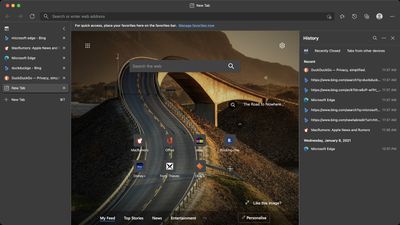
Vertical tabs are intended to make more efficient use of screen space, and should prove a welcome addition for users browsing on 16:9 ratio displays in particular. Users can click vertical tabs to switch between them and optionally group related tabs together.
"To make tab management and organization easier, vertical tabs is now generally available this month," said Microsoft corporate VP Liat Ben-Zur in a company blog post. "Now everyone can view and manage their tabs from a pane on the side with a single click. This allows you to clearly see the tab titles and controls, making it easier to find and switch between the tabs you need, regardless of how many you have open."
Edge users can toggle between horizontal and vertical tabs by clicking the new "Turn on/off vertical tabs" icon at the far left of the tab row. By default, vertical tabs are displayed as icons unless hovered over with the mouse pointer, but the expanded pane can also be pinned to the left side of the browser window so that each page's title remains visible.
In addition to vertical tabs, Edge now includes a new way to view browsing history. Now when users go to history, it opens as a lightweight dropdown from the toolbar instead of opening the full page view in settings. The idea is that it allows users to easily search, open and manage their history without navigating away. For users who prefer the original style, this drop-down can also be pinned to the right side of the browser window as a pane.
Microsoft Edge has won over many users with its frequent feature updates and the tight integration of Microsoft's design language with the design signature of macOS. The last major update came in January and introduced several new features, including system resource-releasing "sleeping tabs," a password generator and monitor, new visual themes, and more.
The browser can be downloaded from the Microsoft Edge website.

Popular Stories
Macworld's Filipe Espósito today revealed a handful of features that Apple is allegedly planning for iOS 26.4, iOS 27, and even iOS 28.
The report said the features are referenced within the code for a leaked internal build of iOS 26 that is not meant to be seen by the public. However, it appears that Espósito and/or his sources managed to gain access to it, providing us with a sneak peek...
Apple today released iOS 26.2, the second major update to the iOS 26 operating system that came out in September, iOS 26.2 comes a little over a month after iOS 26.1 launched. iOS 26.2 is compatible with the iPhone 11 series and later, as well as the second-generation iPhone SE.
The new software can be downloaded on eligible iPhones over-the-air by going to Settings >...
The first foldable iPhone will feature a series of design and hardware firsts for Apple, according to details shared by the Weibo leaker known as Digital Chat Station.
According to a new post, via machine translation, Apple is developing what the leaker describes as a "wide foldable" device, a term used to refer to a horizontally oriented, book-style foldable with a large internal display....
Apple seeded the second iOS 26.2 Release Candidate to developers earlier this week, meaning the update will be released to the general public very soon.
Apple confirmed iOS 26.2 would be released in December, but it did not provide a specific date. We expect the update to be released by early next week.
iOS 26.2 includes a handful of new features and changes on the iPhone, such as a new...
Apple today released macOS Tahoe 26.2, the second major update to the macOS Tahoe operating system that came out in September. macOS Tahoe 26.2 comes five weeks after Apple released macOS Tahoe 26.1.
Mac users can download the macOS Tahoe update by using the Software Update section of System Settings.
macOS Tahoe 26.2 includes Edge Light, a feature that illuminates your face with soft...
Apple today released new firmware designed for the AirPods Pro 3 and the prior-generation AirPods Pro 2. The AirPods Pro 3 firmware is 8B30, up from 8B25, while the AirPods Pro 2 firmware is 8B28, up from 8B21.
There's no word on what's include in the updated firmware, but the AirPods Pro 2 and AirPods Pro 3 are getting expanded support for Live Translation in the European Union in iOS...
Apple today released iPadOS 26.2, the second major update to the iPadOS 26 operating system released in September. iPadOS 26.2 comes a month after iPadOS 26.1.
The new software can be downloaded on eligible iPads over-the-air by going to Settings > General > Software Update.
iPadOS 26.2 continues with the multitasking improvements that were added with iPadOS 26.1. You can now drag and...
Apple released the AirPods Max on December 15, 2020, meaning the over-ear headphones launched five years ago today. While the AirPods Max were updated with a USB-C port and new color options last year, followed by support for lossless audio and ultra-low latency audio this year, the headphones lack some of the features that have been introduced for newer generations of the regular AirPods and the ...
















