Halide Developer Explains How Apple's ProRAW Option Works on iPhone 12 Pro

Apple yesterday introduced a new ProRAW format that's available on the iPhone 12 Pro and iPhone 12 Pro Max, allowing pro photographers to have more control over their images without losing the benefits of Apple's computational photography software.
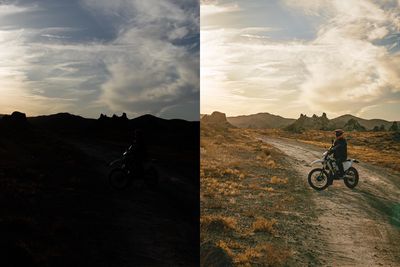
halide proraw comparison

An image with ProRAW and without, from Halide

Ben Sandofsky, one of the developers behind popular camera app Halide, did a deep dive into ProRAW to explain how the feature works. ProRAW, says Sandofsky, is about making RAW a more approachable format, and he believes that it could change how beginners and experts alike shoot and edit photos.

A standard RAW photo includes no processing so that people can make edits on their own and tailor an image to personal preference. It's great on DSLRs, but on iPhones, there's so much going on behind the scenes that a standard RAW was never going to be an option.

As Sandofsky explains, iPhones have a lot of computational tricks going on behind the scenes. For many shots, iPhones take several photos and then combine them all into one to make the best possible image, none of which works with a RAW file. Standard RAW modes in third-party camera apps were also not able to work with all of the ‌iPhone‌ cameras.

That's why ProRAW is a great step forward. It keeps the behind-the-scenes magic that the iPhones do when capturing a photo, but gives photographers control over white balance, noise control, and more by storing computational photography inside the RAW format. Plus ProRAW works with the front-facing camera and all of the rear cameras on the ‌iPhone‌ 12 Pro and Pro Max.

ProRAW preserves Smart HDR info, Deep Fusion, and Apple's depth detection functionality, all of which goes into making ‌iPhone‌ photos look the way they do through software enhancements.

Apple worked with Adobe to introduce a new type of tag into the DNG standard, called a "Profile Gain Table Map." This data gives your editor everything it needs to know to tone map your photo image and end up with results identical to the first party camera. Because it's separate data, you can turn down its strength, turn it off completely.

Sandofsky also points out the RAW editing functionality that's been added in iOS 14.3, iPadOS 14.3, and macOS Big Sur 11.1, making it much easier to work with ProRAW photos. Casual users who don't often deal with RAW files will be able to use Apple's tools.

The most underrated improvement in iOS 14.3 is that the native Photos app now supports RAW editing. This is huge, because it abstracts away all the complexity of higher-end apps. No fiddling with "black point" and "color profiles." Casual users who only know how to edit photos in the built-in apps don't have to do anything different. It just works.

ProRAW does have a few downsides, such as working on the Pro iPhones only and slower processing times, plus it doesn't work with Burst Mode nor can ProRAW photos be shared as is on social networks at this time. It still lags behind traditional RAW files in terms of sharpness and noise reduction, according to Sandofsky, and the file size is around 25MB, which is going to eat up storage space fast.

The Halide app has been updated with ProRAW support, and the app features a new ProRAW+ mode that captures a ProRAW image and a JPG for simple sharing. There are options to toggle between the standard RAW format and ProRAW, along with a few other benefits for Halide users.

The full post from Halide's developers delves further into the benefits of ProRAW with a full explanation of how a digital camera works and how ProRAW is different than a traditional RAW, and it's well worth reading for those who want to learn more about Apple's newest photography feature.


Related Forum: iPhone

Popular Stories

iOS 26

iOS 26.3 and iOS 26.4 Will Add These New Features to Your iPhone

Tuesday February 3, 2026 7:47 am PST by
We are still waiting for the iOS 26.3 Release Candidate to come out, so the first iOS 26.4 beta is likely still at least a week or two away. Following beta testing, iOS 26.4 will likely be released to the general public in March or April. Below, we have recapped known or rumored iOS 26.3 and iOS 26.4 features so far. iOS 26.3 iPhone to Android Transfer Tool iOS 26.3 makes it easier...
Apple Logo Black

Apple's Next Launch is 'Imminent'

Sunday February 1, 2026 12:31 pm PST by
The calendar has turned to February, and a new report indicates that Apple's next product launch is "imminent," in the form of new MacBook Pro models. "All signs point to an imminent launch of next-generation MacBook Pros that retain the current form factor but deliver faster chips," Bloomberg's Mark Gurman said on Sunday. "I'm told the new models — code-named J714 and J716 — are slated...
iOS 26 Home Feature

Apple Gives Final Warning to Home App Users

Tuesday February 3, 2026 8:55 am PST by
In 2022, Apple introduced a new Apple Home architecture that is "more reliable and efficient," and the deadline to upgrade and avoid issues is fast approaching. In an email this week, Apple gave customers a final reminder to upgrade their Home app by February 10, 2026. Apple says users who do not upgrade may experience issues with accessories and automations, or lose access to their smart...
Aston Martin CarPlay Ultra Screen

Apple's CarPlay Ultra to Expand to These Vehicle Brands Later This Year

Sunday February 1, 2026 10:08 am PST by
Last year, Apple launched CarPlay Ultra, the long-awaited next-generation version of its CarPlay software system for vehicles. Nearly nine months later, CarPlay Ultra is still limited to Aston Martin's latest luxury vehicles, but that should change fairly soon. In May 2025, Apple said many other vehicle brands planned to offer CarPlay Ultra, including Hyundai, Kia, and Genesis. In his Powe...
Apple Foldable Thumb

First Foldable iPhone Design Details Revealed

Monday February 2, 2026 7:19 am PST by
Apple's first foldable iPhone will feature relocated volume buttons, an all-black camera plateau, a smaller Dynamic Island, and more, according to design leaks from a known Weibo leaker. The user known as "Instant Digital" today claimed to share several key details about the design of the foldable iPhone: The volume buttons will be located on the top edge of the device, aligned to the...

Top Rated Comments

BlueShirt11 Avatar
67 months ago

Is there an app that offers raw capabilities on non-pro models?
Yes, the Apple Card on the Wallet App.
Score: 25 Votes (Like | Disagree)
erthquake Avatar
67 months ago

I often wonder how Mathew Brady or Ansel Adams would react to today's photography technology.
Ansel Adams could make great art with a pinhole camera. He was an artist who chose photography as his medium. Today's technology would only expand his palette. He would be great in any era.
Score: 12 Votes (Like | Disagree)
RaoulDuke42 Avatar
67 months ago

Is there an app that offers raw capabilities on non-pro models?
I've been quite happy with Adobe Lightroom mobile's uncompressed DNG images, and even more so with the HDR DNG's it can produce. It works on a broad range of iPhones too. iPhone 6s and original SE or newer. A nice option you can turn on is to have the app save the middle exposure, single shot DNG alongside the HDR version— useful if there's a lot of motion happening. The app used to remember all my settings, but these days I find I have to continually remind it I like shooting a stop under... but other than that, it's pretty great. Since I throw some money at Adobe every month, every shot I shoot with the LR Mobile app syncs back to my Lightroom Classic library on my desktop Mac (that I don't let sleep), so if I really want to spend some time futzing with levels and such on a right proper large screen, I can get to it as soon as I'm back home. Oh, and there's a lock screen widget for LR Mobile too, so I can get to the LR camera nearly as fast as the native camera.

All that being said, I do wish Apple would bring ProRAW to my shiny new 12 mini... and wouldn't be at all surprised if they somehow "figured out" how to do it with two gigs less RAM in iOS 15.

Here's an uncompressed (and un-futzed with) HDR image and it's single shot DNG sibling I shot on my 2016 iPhone SE three years ago.

Attachment Image

Attachment Image
Score: 11 Votes (Like | Disagree)
Zak Ray Avatar
67 months ago

it's a differentiator ... it would work but it's marketing ...

I wish it would be available on my 11 Pro max, don't see why it would be technically not possible nor requires that much CPU, but, its marketing. And as a hobby photographer, with my DSLR, I only shoot in RAW so I can appreciate the advantages ...
According to the Halide article, the difference is actually the amount of RAM required. Pro models have double that of the non-pro.


Is there an app that offers raw capabilities on non-pro models?
Halide.
Score: 6 Votes (Like | Disagree)
koruki Avatar
67 months ago

I often wonder how Mathew Brady or Ansel Adams would react to today's photography technology.
Not sure what you are suggesting here, Adams manipulated his shots in the darkroom with every trick he could think of, he would have loved current technology if you ask me.
Score: 4 Votes (Like | Disagree)
hugodrax Avatar
67 months ago

it's a differentiator ... it would work but it's marketing ...

I wish it would be available on my 11 Pro max, don't see why it would be technically not possible nor requires that much CPU, but, its marketing. And as a hobby photographer, with my DSLR, I only shoot in RAW so I can appreciate the advantages ...
If I am gonna be shooting raw etc.. thats when I break out my DSLR. I shoot with the phone when I just want to take snapshots etc.. nothing that requires high technical requirements.

But even without using raw what you get out of,phones is quite impressive.
Score: 4 Votes (Like | Disagree)