Apple Releases Fourth Public Betas of iOS 14.2 and iPadOS 14.2 With New Emoji and Shazam Control Center Options - MacRumorsOpen MenuShow RoundupsShow Forums menuVisit ForumsOpen Sidebar
Skip to Content

Apple Releases Fourth Public Betas of iOS 14.2 and iPadOS 14.2 With New Emoji and Shazam Control Center Options

Apple today seeded the fourth public betas of upcoming iOS 14.2 and iPadOS 14.2 updates to its public beta testing group, one week after releasing the third betas and a day after providing the fourth betas to developers.
iOS 14
Public beta testers who have signed up for Apple's beta testing program can download the iOS and iPadOS‌ 14.2 updates over the air after installing the proper certificate from the Public Beta website on an iOS device.

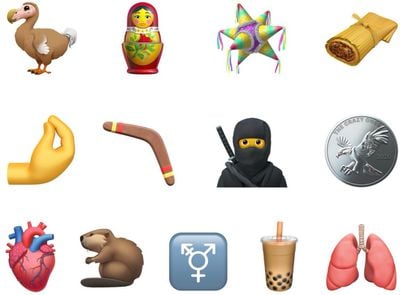
Apple in iOS and iPadOS 14.2 is adding new Emoji 13 emoji characters, with options that include smiling face with tear, ninja, pinched fingers, anatomical heart, black cat, mammoth, polar bear, dodo, fly, bell pepper, tamale, bubble tea, potted plant, piñata, plunger, wand, feather, hut, and more, with a full list available here.
2020emoji
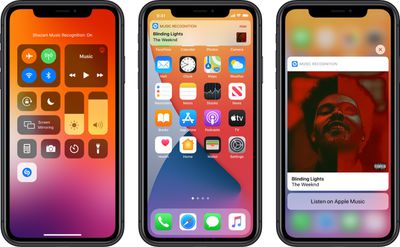
iOS 14.2 introduces a new Music Recognition control for the Control Center, deepening the integration of the Apple-owned Shazam app in the iOS operating system. Music Recognition lets you discover music playing around you and it can recognize music playing in apps even when you're wearing AirPods.


The Shazam Music Recognition feature can be added to Control Center through the Control Center options in the Settings app. To use the feature, open up Control Center and then tap on the Shazam icon to initiate a single recognition.
musicrecognitioncontrol
The update brings a redesigned Now Playing widget for the Control Center that lists recently played albums that you might want to listen to when you have no music playing. There's also a redesigned interface for AirPlay, making it easier to play music across multiple ‌AirPlay‌ 2-enabled devices in the home.

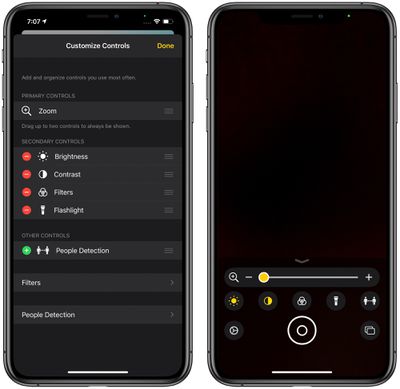
For those who have low vision, Apple added a "People Detection" feature in the Magnifier app that uses the camera to let iPhone users know how far away other people are, which can be useful for social distancing purposes.
magnifierpeopledetection
For Apple Card users, the iOS 14.2 update adds a yearly spending history option so ‌Apple Card‌ holders can see how much they've spent in the current calendar year and how much Daily Cash they've earned. Prior to iOS 14.2, ‌Apple Card‌ offered spending activity information in a weekly or monthly summary.
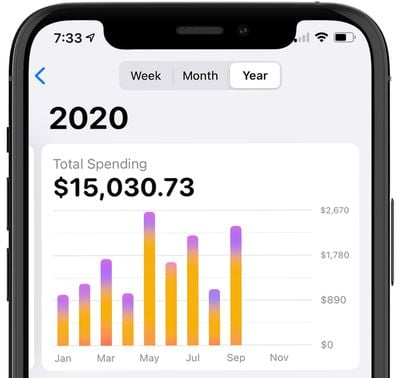
apple card yearly spending activity
As for smaller but interesting tweaks, iOS 14.2 brings a new icon for the Apple Watch app, with the watch now sporting one of Apple's new Solo Loop bands.
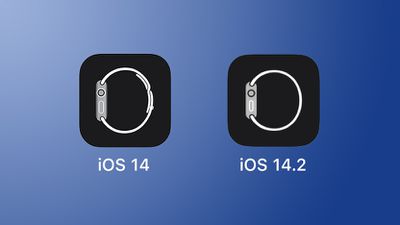
iOS14
The fourth beta released for developers yesterday confirmed that there are several new wallpapers in the update, which work in both light and dark modes.
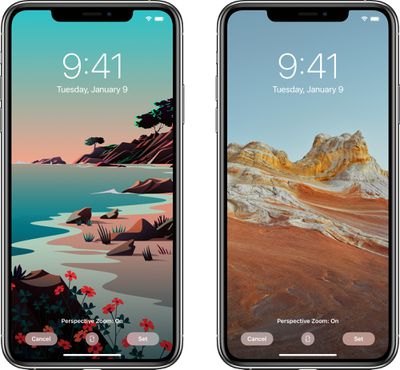
iphonewallpaperios142
For info on all of the new features that were introduced with the initial iOS 14 update, make sure to check out our iOS 14 roundup.


Related Forum: iOS 14

Popular Stories

iPhone 18 Pro Deep Red Feature

iPhone 18 Pro Launching Later This Year With These 12 New Features

Wednesday March 18, 2026 7:39 am PDT by
While the iPhone 18 Pro and iPhone 18 Pro Max are not expected to launch for another six months or so, there are already plenty of rumors about the devices. It was initially reported that the iPhone 18 Pro models would have fully under-screen Face ID, with only a front camera visible in the top-left corner of the screen. However, the latest rumors indicate that only one Face ID component...
imac video apple feature

Apple Released Yet Another New Product Today

Friday March 20, 2026 2:39 pm PDT by
Apple has unveiled a whopping nine new products so far this March, including an iPhone 17e, iPad Air models with the M4 chip, MacBook Air models with the M5 chip, MacBook Pro models with M5 Pro and M5 Max chips, the all-new MacBook Neo, an updated Studio Display, a higher-end Studio Display XDR, AirPods Max 2, and now the Nike Powerbeats Pro 2. iPhone 17e features the same overall design as...
ios 26 4 yellow

Here Are Apple's Release Notes for iOS 26.4

Wednesday March 18, 2026 11:56 am PDT by
Apple provided developers and public beta testers with the release candidate versions of iOS 26.4 and iPadOS 26.4, which means we're going to see a public launch as soon as next week. The RC versions of the software include Apple's official release notes, giving us final details on what's included in the update. Apple Music - Playlist Playground (beta) generates a playlist from your...

Top Rated Comments

hirsthirst Avatar
71 months ago
PSA: don't update your main iPhone to 14.2 beta (not that you should anyway) if you have a new one coming on 14.1 GA - will be a nuisance for iCloud backup / restores ...
Score: 4 Votes (Like | Disagree)
71 months ago

Apple's obsession with emoji's versus making the software actually work is crazy.
There's the Unicode Consortium which is more of a standard essentially well beyond Apple. Furthermore, those work on something like emojis aren't the same people that work on other functional pieces of software, so one thing doesn't really detract from the other.
Score: 3 Votes (Like | Disagree)
71 months ago

Folk actually use icloud!
Depends on what for. I wouldn't waste my time with it for contacts/calendar/email, and *certainly* not for iCloud Drive, but it's not bad for letting random iOS apps sync random bits of themselves. And when it breaks, at least you're not losing much. Apple services... just say no.
Score: 2 Votes (Like | Disagree)
71 months ago

PSA: don't update your main iPhone to 14.2 beta (not that you should anyway) if you have a new one coming on 14.1 GA - will be a nuisance for iCloud backup / restores ...
You realize that the Entitled have already done so, and it will certainly be anyone's fault but theirs.
Score: 2 Votes (Like | Disagree)
CarlJ Avatar
71 months ago
I’m just here with the popcorn for the inevitable anti-emoji comments.
Score: 2 Votes (Like | Disagree)
4jasontv Avatar
71 months ago
Waiting for the easily triggered to notice Apple replaced ‘e pluribus unum’ with the crazy one.
Score: 2 Votes (Like | Disagree)
Related Apple News: Iphone | News | Iphone | Entertainment | Politics