Microsoft Begins Beta Testing Trackpad Support in Word and Excel Apps for iPad

Microsoft this week began testing mouse and trackpad support in the latest beta versions of its Word and Excel apps for iPad. The functionality was introduced in version 2.42 of each app, available through Apple's beta testing service TestFlight.
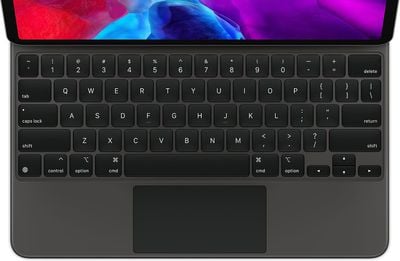
ipadpromagickeyboardtrackpad
Mouse and trackpad support provides rich visual feedback when editing documents or spreadsheets. When using a trackpad, the cursor displays as a circle on the screen, popping up only when you have a finger on the trackpad. The circle then morphs into various other shapes when hovering over app icons, text fields, or other on-screen elements.

iPadOS 13.4 introduced trackpad and mouse support on all iPad Pro models, the iPad Air 2 and later, the fifth-generation iPad and later, and the iPad mini 4 and later. Keyboards with built-in trackpads include Apple's Magic Keyboard, Brydge's Pro+ for the iPad Pro, Logitech's Combo for the 10.2-inch iPad and the 10.5-inch iPad Air, and more.

Microsoft previously said that mouse and trackpad support in the Word, Excel, and PowerPoint apps will be made available to all users at some point this fall.

Popular Stories

Aston Martin CarPlay Ultra Screen

Apple's CarPlay Ultra to Expand to These Vehicle Brands Later This Year

Sunday February 1, 2026 10:08 am PST by
Last year, Apple launched CarPlay Ultra, the long-awaited next-generation version of its CarPlay software system for vehicles. Nearly nine months later, CarPlay Ultra is still limited to Aston Martin's latest luxury vehicles, but that should change fairly soon. In May 2025, Apple said many other vehicle brands planned to offer CarPlay Ultra, including Hyundai, Kia, and Genesis. In his Powe...
Apple Logo Black

Apple's Next Launch is 'Imminent'

Sunday February 1, 2026 12:31 pm PST by
The calendar has turned to February, and a new report indicates that Apple's next product launch is "imminent," in the form of new MacBook Pro models. "All signs point to an imminent launch of next-generation MacBook Pros that retain the current form factor but deliver faster chips," Bloomberg's Mark Gurman said on Sunday. "I'm told the new models — code-named J714 and J716 — are slated...
iOS 26

iOS 26.3 and iOS 26.4 Will Add These New Features to Your iPhone

Tuesday February 3, 2026 7:47 am PST by
We are still waiting for the iOS 26.3 Release Candidate to come out, so the first iOS 26.4 beta is likely still at least a week or two away. Following beta testing, iOS 26.4 will likely be released to the general public in March or April. Below, we have recapped known or rumored iOS 26.3 and iOS 26.4 features so far. iOS 26.3 iPhone to Android Transfer Tool iOS 26.3 makes it easier...
Apple MacBook Pro M4 hero

New MacBook Pros Reportedly Launching Alongside macOS 26.3

Sunday February 1, 2026 5:42 am PST by
Apple is planning to launch new MacBook Pro models with M5 Pro and M5 Max chips alongside macOS 26.3, according to Bloomberg's Mark Gurman. "Apple's faster MacBook Pros are planned for the macOS 26.3 release cycle," wrote Gurman, in his Power On newsletter today. "I'm told the new models — code-named J714 and J716 — are slated for the macOS 26.3 software cycle, which runs from...
iOS 26 Home Feature

Apple Gives Final Warning to Home App Users

Tuesday February 3, 2026 8:55 am PST by
In 2022, Apple introduced a new Apple Home architecture that is "more reliable and efficient," and the deadline to upgrade and avoid issues is fast approaching. In an email this week, Apple gave customers a final reminder to upgrade their Home app by February 10, 2026. Apple says users who do not upgrade may experience issues with accessories and automations, or lose access to their smart...

Top Rated Comments

Powermax Avatar
70 months ago
I am still waiting for Pause/Play with the Spacebar in the YouTube App.
Score: 8 Votes (Like | Disagree)
GeoStructural Avatar
70 months ago

Better late than never?
What? Trackpad for iOS/iPad OS was released just recently.


I'm still waiting for the day when I can advance slides in Powerpoint on iOS with a keyboard like on a Mac or PC.
This is already possible with the current app and it has been possible for a long time.

I am actually waiting for full-fledged versions of the Apps, iPad Pro is particularly powerful enough to run the entire suite smoothly, Excel for iPad is pretty much a file viewer, no where near the desktop app I use daily and rely so much on. PowerPoint is better featured but it is still missing so much. Word can get the job done, but still not ideal.
Score: 7 Votes (Like | Disagree)
Aluminum213 Avatar
70 months ago
Please take your time Microsoft, I know you’re a small company with limited resources. Don’t stress yourself too much
Score: 6 Votes (Like | Disagree)
justiny Avatar
70 months ago
I am actually waiting for full-fledged versions of the Apps, iPad Pro is particularly powerful enough to run the entire suite smoothly, Excel for iPad is pretty much a file viewer, no where near the desktop app I use daily and rely so much on. PowerPoint is better featured but it is still missing so much. Word can get the job done, but still not ideal.
This x1000

I travel for work and carry both my iPad Pro and MBP with me. I would love to leave my MBP at home but the fact is, I need it because the iPadOS Office apps only get me 80% to completing my work. Even on Word, I can't get the job done without needing 3 other apps and switching back and forth, it's just not worth it.
Score: 5 Votes (Like | Disagree)
Spock Avatar
70 months ago

Can we just make a touch screen MacBook already. All of this just seems to be beating around the bush.
Adding touchpad support to the iPad somehow equals beating around the bush for a touchscreen MacBook? If anything it shows that Apple shouldn’t use a touchscreen in the MacBook..
Score: 4 Votes (Like | Disagree)
G5isAlive Avatar
70 months ago

Adding touchpad support to the iPad somehow equals beating around the bush for a touchscreen MacBook? If anything it shows that Apple shouldn’t use a touchscreen in the MacBook..
Why? I don't follow your logic here. Why does an iPad with touchpad support have anything to do with whether a MacBook would or would not benefit from a touch screen? Serious question. I get that iOS has been designed from ground up to be a touch screen, and a MacBook would not be as good of one, but that doesn't mean it would be bad with one.
Score: 3 Votes (Like | Disagree)