

Apple Seeds Third Beta of macOS Big Sur to Developers - MacRumorsOpen MenuShow RoundupsShow Forums menuVisit ForumsOpen Sidebar
Skip to Content

Apple Seeds Third Beta of macOS Big Sur to Developers

Apple today seeded the third beta of the upcoming macOS Big Sur update to developers for testing purposes, two weeks after releasing the second beta and a month after the new update was unveiled at the Worldwide Developers Conference.

macOS BS Beta 1
The macOS Big Sur beta can be downloaded through the Apple Developer Center and once the appropriate profile is installed, subsequent betas will be available through the Software Update mechanism in System Preferences. As with all of the new betas, Apple recommends not installing ‌macOS Big Sur‌ on a primary machine because it is early release software and could have major bugs.

macOS Big Sur introduces a refreshed design to the Mac operating system, overhauling the entire look from the curvature of the window corners to the dock icons to the system sounds. Everything feels fresh but familiar, with a lighter and more modern appearance. There's a new customizable Control Center that mirrors the Control Center on iOS devices, putting key system controls right at your fingertips.

The Notification Center has been redesigned with iOS-style widgets that are available in multiple sizes, plus there are more interactive notifications that are now grouped by app to make it easier to see what's going on.

Safari is faster and more battery efficient, plus there's a new start page that can be customized with wallpapers and sections that include Reading List and iCloud Tabs, which makes Safari more tailored to your individual usage needs.

Tabs have been redesigned, there's a built-in language translation feature, and Chrome and Firefox Extensions can be ported to Safari. There's also an option to choose which sites an extension works with for greater privacy. Speaking of privacy, a new Privacy Report feature lets users know the trackers Safari is blocking when you visit websites.

Messages is now more similar to the Messages app on iOS with support for pinned conversations, mentions, inline replies, and Memoji creation, plus the built-in search feature has been overhauled to make it easier to find links, photos, and conversations in the app.

Apple redesigned the Maps app to add support for Look Around, indoor maps, and Guides, which are lists of notable attractions, restaurants, and more created by trusted sources. Maps can also be used to generate directions for cycling routes and electric vehicle trips that can be sent to iPhone, and shared ETA updates are now viewable on the Mac.

Photos has a better Retouch tool, Apple Music's For You section has been replaced with a Listen Now section, HomeKit Secure Video cameras support Face Recognition and Activity zones, and Siri can answer a wider range of questions than before.

As of macOS Big Sur beta 2, Apple Pay support is available for Mac Catalyst apps. Developers will now be able to easily get ‌Apple Pay‌ up and running in Mac Catalyst apps. From the iOS 14 release notes: "‌Apple Pay‌ support is now available to Mac Catalyst apps. Two methods have been added to existing delegate protocols. No changes are required for iPad apps, but one or both of these methods must be implemented when building for Catalyst."

In the future, the macOS Big Sur App Store will help users better understand privacy practices with clear info on the information that an app collects, and after installing macOS Big Sur, you'll see faster updates that begin in the background and then finish more quickly to make it easier to keep your Mac up to date.

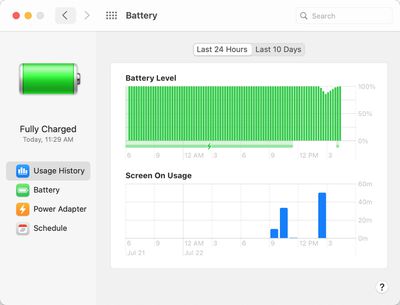
Apple in the third beta of macOS Big Sur changed the battery icon for the Battery section in System Preferences, refining the design to make it look more clean and streamlined. There's also a new design for the Music app icon (it's red), and there are some color changes to the buttons and icons inside the music app.
batteryhealthbigsur
For more on everything that's new in macOS Big Sur, make sure to check out our roundup.

Related Forum: macOS Big Sur

Popular Stories

imac video apple feature

Apple Released Yet Another New Product Today

Friday March 20, 2026 2:39 pm PDT by
Apple has unveiled a whopping nine new products so far this March, including an iPhone 17e, iPad Air models with the M4 chip, MacBook Air models with the M5 chip, MacBook Pro models with M5 Pro and M5 Max chips, the all-new MacBook Neo, an updated Studio Display, a higher-end Studio Display XDR, AirPods Max 2, and now the Nike Powerbeats Pro 2. iPhone 17e features the same overall design as...
iPhone 18 Pro Deep Red Feature

iPhone 18 Pro Launching Later This Year With These 12 New Features

Wednesday March 18, 2026 7:39 am PDT by
While the iPhone 18 Pro and iPhone 18 Pro Max are not expected to launch for another six months or so, there are already plenty of rumors about the devices. It was initially reported that the iPhone 18 Pro models would have fully under-screen Face ID, with only a front camera visible in the top-left corner of the screen. However, the latest rumors indicate that only one Face ID component...
ios 26 4 pastel

iOS 26.4: Top 10 New Features Coming to Your iPhone

Friday March 20, 2026 2:44 pm PDT by
iOS 26.4 isn't the major update with new Siri features that we hoped for, but there are some useful quality of life improvements, and a little bit of fun with an AI playlist generator and new emoji characters. Playlist Playground - Apple Music has a Playlist Playground option that lets you generate playlists from text-based descriptions. You can include moods, feelings, activities, or...

Top Rated Comments

nortonandreev Avatar
74 months ago
- Music app has the iOS 14 icon. To be honest, in the context of the bundle of media apps (Music, Podcasts and TV), I think that the new icon makes more sense and looks more in line with the other icons. Furthermore, it makes sense for the pink accent colour of the app. I liked the previous icon more, but I can see why Apple might have wanted to change it
- Battery icon is changed
- Notifications icon is updated and is no longer a low resolution one
- There's a separator after the sidebar
- The results box in the Music app now appears properly (and the app doesn't crash when having input larger than the size of the search field)
- In the Music app, right clicking on an item within the “Browse” and “Listen Now” content areas no longer opens the contextual menu at a random location. I believe the issue started occurring in Catalina, but it is resolved now.
- In the Music app, the "Play" icon is new. Not sure if I'm a fan of it. It is also inconsistent with the Podcasts app which uses the old one. Seems more like a bug (hopefully)
- The dialog box when choosing a profile picture in "Users & Groups" has been redesigned, before the text was going out of the selection
- Safari no longer crashes when I try to select a background image from the file dialog
- Spotlight seems to have been fixed
- Both the date and time appear in the menu bar. I think it was just the time before, but might be wrong about this one.
- Some of the highlighted controls across the system weren't rendering properly in the previous betas, this seems to have been fixed as well
- AirPods are no longer showing twice under "Sound" in the menu bar
- AirPods case battery charge now shows correctly
- New sounds when making screenshots and moving files
- The window with the saved passwords in Safari has been updated - before the background of the hovered state was overflowing from the right, now it's centred.

New issues:
- The menu bar says that battery service is recommended (battery capacity is at 93%). I saw another person on reddit having the same issue, so I assume it's a bug.
- Sidecar seems slightly broken. I'm getting lots of empty space on top of the screen and also very awkward extension of the sidebar (highlighted with a white circle)

Attachment Image

Attachment Image

Attachment Image

Attachment Image

Attachment Image

Attachment Image

Attachment Image

Attachment Image

Attachment Image
Score: 35 Votes (Like | Disagree)
74 months ago

I'm installing the smaller one!
That's macOS Little Sur.
Score: 28 Votes (Like | Disagree)
m4mario Avatar
74 months ago
The original iPhone's battery charging icon is still the best ever made.


Attachment Image

Attachment Image
Score: 25 Votes (Like | Disagree)
LFC2020 Avatar
74 months ago

Curious as to how the music app icon looks like... :oops:
Most people will be looking to see if the battery icon has been changed. 😂
Score: 14 Votes (Like | Disagree)
DaveMcM76 Avatar
74 months ago
They've finally fixed the update notification to say 11.0 rather than 10.16 for the first 2 betas.

12.88Gb on a Late 2013 MacBook Pro - it's a biggie!


Attachment Image
Score: 9 Votes (Like | Disagree)
imnotthewalrus Avatar
74 months ago
Hoping for a public beta...
Score: 9 Votes (Like | Disagree)
Related Apple News: News | Reviews | Sport | Business | Culture















