

macOS 'Big Sur' Unveiled With Updated Design, New Features for Safari and Messages, and More

Apple today previewed the latest version of macOS, called "Big Sur," and Apple is referring to this update as the biggest update since macOS X. Big Sur introduces a new redesign, new features for Safari, updates to Messages, and more.
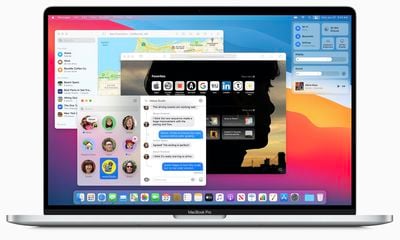
big sur macbook pro
Apple describes the new design as "spacious," that encourages easier navigation while putting more controls at the user's fingertips. Apple has refined everything from the curvature of window corners to the palette of colors and materials.

Dock icons were redesigned to be more consistent with icons across Apple's ecosystem, "while retaining their Mac personality." Overall, Apple says the new design reduces visual complexity and brings users' content front and center.
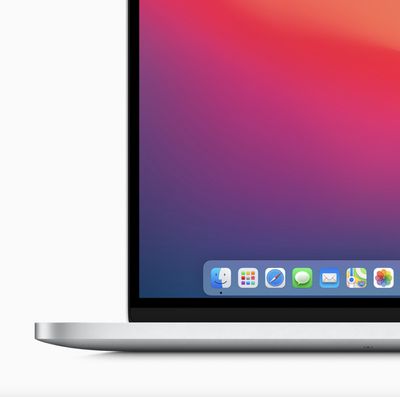
big sur close up
New to macOS is Control Center, which delivers quick access to controls right from the desktop. Notification Center has been updated with more interactive notifications and redesigned widgets in different sizes, matching the design of iOS 14.

For Safari, Apple is launching "the biggest update to Safari since its original launch in 2003." Tabs have been redesigned to make navigating Safari faster, with favicons displayed by default so it's easier to see where to click at a glance.

When opening Safari, users will browse a new start page. They can customize this area with a background image and sections like a Reading List and iCloud Tabs. While browsing Safari, foreign languages can be translated with built-in translation tools covering seven languages.

In terms of privacy, Safari now supports a new Privacy Report that delivers added visiblity into how Safari protects browsing activity across the web. Users will be able to choose when and which websites a Safari extension can work with.
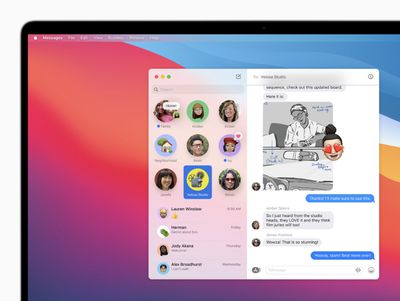
big sur messages
In Messages, Apple has introduced pinned conversations and a refined search function. Screen effects are finally supported on macOS, and users will be able to create and customize their Memoji on a Mac. In conversations, there will be a new photo picker and #images support, making it possible to share GIFs on the macOS Messages app without a third-party app.

Group messaging features streamline conversations with inline replies and @mentions, making it easy to directly address someone, or a specific text, amid a large group. They can also set a photo or an emoji for their group conversation that's shared with all members of the group.

macOS Big Sur will be available this fall as a free software update. Ahead of that date, it's available to Apple Developer Program members today and a public beta will launch in July.

Popular Stories

iOS 26

iOS 26.3 and iOS 26.4 Will Add These New Features to Your iPhone

Tuesday February 3, 2026 7:47 am PST by
We are still waiting for the iOS 26.3 Release Candidate to come out, so the first iOS 26.4 beta is likely still at least a week or two away. Following beta testing, iOS 26.4 will likely be released to the general public in March or April. Below, we have recapped known or rumored iOS 26.3 and iOS 26.4 features so far. iOS 26.3 iPhone to Android Transfer Tool iOS 26.3 makes it easier...
Apple Logo Black

Apple's Next Launch is 'Imminent'

Sunday February 1, 2026 12:31 pm PST by
The calendar has turned to February, and a new report indicates that Apple's next product launch is "imminent," in the form of new MacBook Pro models. "All signs point to an imminent launch of next-generation MacBook Pros that retain the current form factor but deliver faster chips," Bloomberg's Mark Gurman said on Sunday. "I'm told the new models — code-named J714 and J716 — are slated...
iOS 26 Home Feature

Apple Gives Final Warning to Home App Users

Tuesday February 3, 2026 8:55 am PST by
In 2022, Apple introduced a new Apple Home architecture that is "more reliable and efficient," and the deadline to upgrade and avoid issues is fast approaching. In an email this week, Apple gave customers a final reminder to upgrade their Home app by February 10, 2026. Apple says users who do not upgrade may experience issues with accessories and automations, or lose access to their smart...
Aston Martin CarPlay Ultra Screen

Apple's CarPlay Ultra to Expand to These Vehicle Brands Later This Year

Sunday February 1, 2026 10:08 am PST by
Last year, Apple launched CarPlay Ultra, the long-awaited next-generation version of its CarPlay software system for vehicles. Nearly nine months later, CarPlay Ultra is still limited to Aston Martin's latest luxury vehicles, but that should change fairly soon. In May 2025, Apple said many other vehicle brands planned to offer CarPlay Ultra, including Hyundai, Kia, and Genesis. In his Powe...
Apple Foldable Thumb

First Foldable iPhone Design Details Revealed

Monday February 2, 2026 7:19 am PST by
Apple's first foldable iPhone will feature relocated volume buttons, an all-black camera plateau, a smaller Dynamic Island, and more, according to design leaks from a known Weibo leaker. The user known as "Instant Digital" today claimed to share several key details about the design of the foldable iPhone: The volume buttons will be located on the top edge of the device, aligned to the...

Top Rated Comments

redheeler Avatar
73 months ago
The iOS icons on MacOS are kind of yucky.
Score: 29 Votes (Like | Disagree)
MacFather Avatar
73 months ago
Deleted.
Score: 27 Votes (Like | Disagree)
Feyl Avatar
73 months ago
Exactly what I expected. Horrible flat iOS look. They’re not even trying at this point.
Score: 21 Votes (Like | Disagree)
viettanium Avatar
73 months ago
iPadOS Pro :)
Score: 21 Votes (Like | Disagree)
Mythos99 Avatar
73 months ago
I dont know if i like MacOS looking more and more like iPadOS.
Score: 18 Votes (Like | Disagree)
zorinlynx Avatar
73 months ago
This trend to waste more and more screen area in the UI is really getting on my nerves.

Do they just want to sell bigger screens? It's maddening.
Score: 18 Votes (Like | Disagree)















