

Apple today released iOS and iPadOS 13.5, major updates that come more than a month after the launch of iOS and iPadOS 13.4.1. iOS 13.5 is a major health-related update that brings many features related to the ongoing public health crisis.

The iOS and iPadOS 13.5 updates are available on all eligible devices over-the-air in the Settings app. To access the updates, go to Settings > General > Software Update. Apple has also released iOS 12.4.7 for older devices, with the update bringing security fixes.
The iOS 13.5 update introduces the Exposure Notification API created by Apple and Google, which is designed to allow public health authorities to create COVID-19 contact tracing apps with the aim of slowing the spread of the virus.
Exposure Notification is a behind-the-scenes Bluetooth-based API that will be incorporated into apps created by public health authorities in each country. It does not work without an accompanying app installed, but Apple has added details about Exposure Logging in the Privacy section of the Settings app.
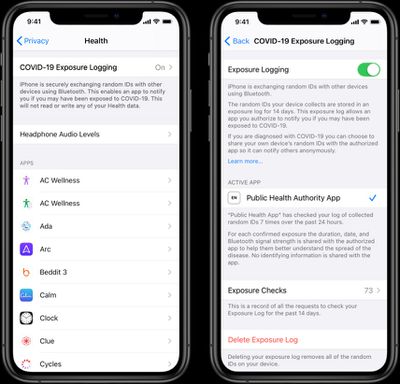
There is an Exposure Logging toggle that will let users opt out of participating in COVID-19 exposure notifications if a COVID-19 app is installed, and the section will provide details on which public health app a user has downloaded.
iOS 13.5 lays the groundwork for Exposure Notifications, and now that the update has been released to the public, health apps from governments and health authorities will be able to be released. So far, more than 22 countries have signed up to participate, and apps that use the API should be coming in the near future. From Apple and Google:
What we’ve built is not an app — rather public health agencies will incorporate the API into their own apps that people install. Our technology is designed to make these apps work better. Each user gets to decide whether or not to opt-in to Exposure Notifications; the system does not collect or use location from the device; and if a person is diagnosed with COVID-19, it is up to them whether or not to report that in the public health app. User adoption is key to success and we believe that these strong privacy protections are also the best way to encourage use of these apps.
Today, this technology is in the hands of public health agencies across the world who will take the lead and we will continue to support their efforts.
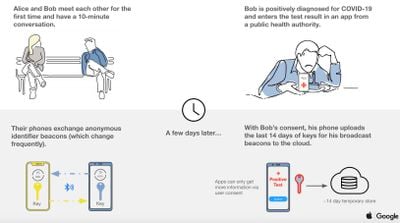
Apps that take advantage of the Exposure Notification API will use Bluetooth to communicate with the smartphones of the people around you, and you will be provided with notifications should you come into contact with someone who has been diagnosed with COVID-19 that chooses to share that information. Google and Apple have focused heavily on privacy with the Exposure Notification API, and full details on how Exposure Notification works can be found in our guide.
In addition to creating a foundation for apps to use the Exposure Notification API, iOS (and iPadOS) 13.5 make it easier to unlock an iPhone or iPad with a passcode when wearing a mask, due to the large number of people that are regularly wearing face coverings.

With the update, the passcode interface is displayed more quickly when an iOS device detects that a user is wearing a mask that obscures the face after the person swipes up, so it's quicker getting into an iPhone using a passcode than before.
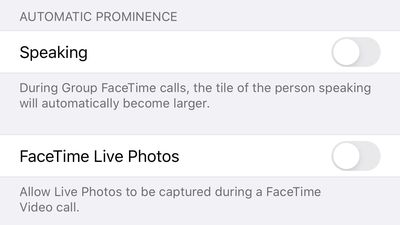
Apple has tweaked Group FaceTime, adding a new toggle to disable the feature that automatically enlarges the tile of the person who is speaking. By default, Group FaceTime features a dynamic view with a tile for each person in the conversation, and the person speaking has a larger tile while the tiles representing the other people fade into the background.

A new "Automatic Prominence" section in the FaceTime part of the Settings app allows the shifting tile sizes to be disabled, displaying all of the people in a Group FaceTime chat in a grid with equal-sized windows regardless who of speaking. A tile can be enlarged with a tap.
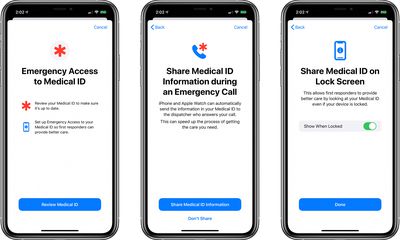
There's a new feature in iOS 13.5 for sharing Medical ID information automatically with emergency dispatchers when placing an emergency call. A toggle lets this feature be turned on or off, and there's also a new toggle in the Health app for showing Medical ID info on the Lock screen when an iPhone is locked.
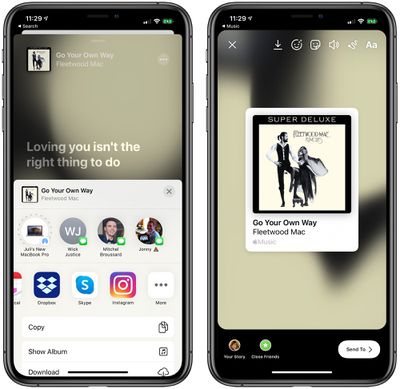
For Apple Music, there's a new feature that lets Apple Music songs be shared directly to Instagram Stories. Tapping the Share button on a song in Apple Music creates a story with a song title, album name, and animated background, but there's no way to get to Apple Music from the shared information.
The update patches two security vulnerabilities that affect the Mail app on the iPhone and the iPad. One of the vulnerabilities allowed an attacker to remotely infect an iOS device by sending emails that consume a significant amount of memory, while another allowed remote code executions.
There are additional bug fixes and features included, as outlined in Apple's release notes:
iOS 13.5 speeds up access to the passcode field on devices with Face ID when you are wearing a face mask and introduces the Exposure Notification API to support COVID-19 contact tracing apps from public health authorities. This update also introduces an option to control automatic prominence of video tiles on Group FaceTime calls and includes bug fixes and other improvements.
Face ID and Passcode
- Simplified unlock process for devices with Face ID when you are wearing a face mask
- Passcode field automatically presented after swiping up from the bottom of the Lock screen when you are wearing a face mask
- Also works when authenticating with the App Store, Apple Books, Apple Pay, iTunes, and other apps that support signing in with Face IDExposure Notification
- Exposure Notification API to support COVID-19 contact tracing apps from public health authoritiesFaceTime
- Option to control automatic prominence on Group FaceTime calls so video tiles do not change size when a participant speaksEmergency Services
- Option to automatically share health and other essential information from your Medical ID with emergency services when you place an emergency call (US only)This update also includes bug fixes and other improvements.
- Fixes an issue where users may see a black screen when trying to play streaming video from some websites
- Addresses an issue in the share sheet where suggestions and actions may not load
Apple has separate release notes for iPadOS:
iPadOS 13.5 speeds up access to the passcode field on devices with Face ID when you are wearing a face mask and introduces an option to control automatic prominence of video tiles on Group FaceTime calls. This update includes bug fixes and other improvements.
Face ID and Passcode
- Simplified unlock process for devices with Face ID when you are wearing a face mask
- Passcode field automatically presented after swiping up from the bottom of the Lock screen when you are wearing a face mask
- Also works when authenticating with the App Store, Apple Books, Apple Pay, iTunes, and other apps that support signing in with Face IDFaceTime
- Option to control automatic prominence on Group FaceTime calls so video tiles do not change size when a participant speaksThis update also includes bug fixes and other improvements.
- Fixes an issue where users may see a black screen when trying to play streaming video from some websites
- Addresses an issue in the share sheet where suggestions and actions may not load
iOS 13.5 could be one of the last updates to the iOS 13 operating system as Apple prepares to shift its focus to iOS 14. Apple will unveil iOS 14 on June 22, when its virtual WWDC event kicks off.























