

Facebook App Gains 'Quiet Mode' Setting to Help Manage Usage - MacRumorsOpen MenuShow RoundupsShow Forums menuVisit ForumsOpen Sidebar
Skip to Content

Facebook App Gains 'Quiet Mode' Setting to Help Manage Usage

by

Facebook is rolling out a new feature in its iOS app that lets users temporarily mute push notifications and put the app on hold if they think it's taking up too much of their time.
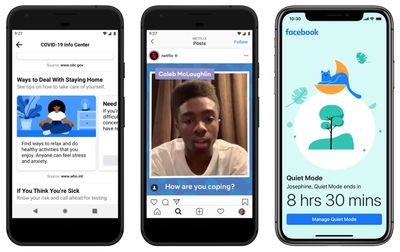
facebook quiet mode
Called "Quiet Mode," the new setting can turned on for a certain period of time or scheduled to come on at specific intervals. Quiet Mode be found by tapping the hamburger icon in the bottom right corner of the mobile app's interface and looking under the section titled "Your time on Facebook."

Quiet Mode forms part of a series of measures that Facebook is implementing to help users better manage their time on the social network while keeping people connected during the current health crisis. As Facebook explains in a blog post:

As we all adjust to new routines and staying home, setting boundaries for how you spend your time online can be helpful. Whether it’s to help you focus on your family and friends, sleep without distraction or manage how you spend your time at home, we have tools that can help you find the right balance for how you use Facebook.

If Quiet Mode is enabled and the user opens the Facebook app, a splash screen reminds them that they opted to take a break and shows how long is left before Quiet Mode ends. It's not a total block, though – a Manage Quite Mode button on the same screen lets you turn off the setting.

Facebook has included options for monitoring usage for a while now, but Quiet Mode is supposed to be an easier way to keep tabs on how much time you spend on the social network. The company has also updated and refined the way its usage stats let you see how long you've spent in the app.

Apple also offers Screen Time in iOS that allows you to put daily usage limits on individual apps. You can learn more about Screen Time here.

Of course, if any app turns into a distraction black hole for you, the easiest way to deal with that is to just delete it from your device.


Top Rated Comments

Wanted797 Avatar
78 months ago
I activated quiet mode years ago.

Jokes aside this is a good thing.

Attachment Image
Score: 20 Votes (Like | Disagree)
JosephAW Avatar
78 months ago
When I have to access Facebook to watch a video or view a family thread I use Safari browser, no app. Most secure way now to control fb access on my device.
Score: 5 Votes (Like | Disagree)
clayj Avatar
78 months ago
Great.

Now where is Dark Mode?
Score: 3 Votes (Like | Disagree)
Reason077 Avatar
78 months ago
I deleted the Facebook app years ago. And also set up an email filter to get rid of most Facebook notification emails (at the time, turning off emails in Facebook's settings wasn't effective).

I still do use Facebook, occasionally, but from my laptop. I find not having the app means you waste far less time on it.
Score: 3 Votes (Like | Disagree)
Gorms Avatar
78 months ago
Ahhhhh man, everyone’s already made the joke/truth that i came here to make.

Anyways, you should delete Facebook
Score: 2 Votes (Like | Disagree)
tha_man Avatar
78 months ago
Good feature. A bit late though, I've completely disabled facebook notifications I while ago, it was too damn annoying, and now it isn't :) I do find FB very useful for it's events with ability to show them directly on calendar. I would miss a lot of concert and festivals without it. It has also replaced certain forums (sadly, because I liked forums better) and it's good for keeping contact with certain people without handing a phone number.
Score: 1 Votes (Like | Disagree)

Popular Stories

imac video apple feature

Apple Released Yet Another New Product Today

Friday March 20, 2026 2:39 pm PDT by
Apple has unveiled a whopping nine new products so far this March, including an iPhone 17e, iPad Air models with the M4 chip, MacBook Air models with the M5 chip, MacBook Pro models with M5 Pro and M5 Max chips, the all-new MacBook Neo, an updated Studio Display, a higher-end Studio Display XDR, AirPods Max 2, and now the Nike Powerbeats Pro 2. iPhone 17e features the same overall design as...
iPhone 18 Pro Deep Red Feature

iPhone 18 Pro Launching Later This Year With These 12 New Features

Wednesday March 18, 2026 7:39 am PDT by
While the iPhone 18 Pro and iPhone 18 Pro Max are not expected to launch for another six months or so, there are already plenty of rumors about the devices. It was initially reported that the iPhone 18 Pro models would have fully under-screen Face ID, with only a front camera visible in the top-left corner of the screen. However, the latest rumors indicate that only one Face ID component...
ios 26 4 pastel

iOS 26.4: Top 10 New Features Coming to Your iPhone

Friday March 20, 2026 2:44 pm PDT by
iOS 26.4 isn't the major update with new Siri features that we hoped for, but there are some useful quality of life improvements, and a little bit of fun with an AI playlist generator and new emoji characters. Playlist Playground - Apple Music has a Playlist Playground option that lets you generate playlists from text-based descriptions. You can include moods, feelings, activities, or...
Related Apple News: Airpods Deals | Never Miss Doorbell Wearing Iphone | Airtag | Check Airtag Battery Life | Displays














