

2020 iPad Pro Includes Microphone Hardware Disconnect Security Feature - MacRumorsOpen MenuShow RoundupsShow Forums menuVisit ForumsOpen Sidebar
Skip to Content

2020 iPad Pro Includes Microphone Hardware Disconnect Security Feature

Apple has added an anti-eavesdropping feature to the 2020 iPad Pro that ensures the microphone hardware is disabled when a case is attached to the iPad and closed.
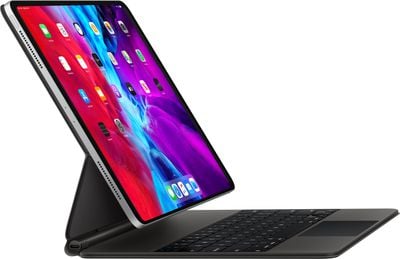
ipadpromagickeyboard
The security feature was first introduced in 2018 in MacBook models using Apple's T2 security chip, which includes a hardware microphone disconnect feature that disables the mics when the notebook's lid is closed.

As spotted by 9to5Mac, an updated version of Apple's Platform Security document makes clear that the anti-eavesdropping is also available on all 2020 ‌iPad Pro‌ models when using an MFi-compliant case.

iPad models beginning in 2020 also feature the hardware microphone disconnect. When an MFi compliant case (including those sold by Apple) is attached to the iPad and closed, the microphone is disconnected in hardware, preventing microphone audio data being made available to any software—even with root or kernel privileges in iPadOS or in case the firmware is compromised.

Apple updated the 11-inch and 12.9-inch ‌iPad Pro‌ models last month with a faster A12Z Bionic chip, a new 10MP Ultra Wide camera to complement the traditional 12MP camera, and a LiDAR depth scanner for improved augmented reality experiences.

For some 2018 ‌iPad Pro‌ owners at least, these updates are relatively modest, but the new security features outlined in Apple's documentation may be enough to tempt more privacy-conscious users.


Related Roundup: iPad Pro
Buyer's Guide: iPad Pro (Buy Now)

Popular Stories

imac video apple feature

Apple Released Yet Another New Product Today

Friday March 20, 2026 2:39 pm PDT by
Apple has unveiled a whopping nine new products so far this March, including an iPhone 17e, iPad Air models with the M4 chip, MacBook Air models with the M5 chip, MacBook Pro models with M5 Pro and M5 Max chips, the all-new MacBook Neo, an updated Studio Display, a higher-end Studio Display XDR, AirPods Max 2, and now the Nike Powerbeats Pro 2. iPhone 17e features the same overall design as...
iPhone 18 Pro Deep Red Feature

iPhone 18 Pro Launching Later This Year With These 12 New Features

Wednesday March 18, 2026 7:39 am PDT by
While the iPhone 18 Pro and iPhone 18 Pro Max are not expected to launch for another six months or so, there are already plenty of rumors about the devices. It was initially reported that the iPhone 18 Pro models would have fully under-screen Face ID, with only a front camera visible in the top-left corner of the screen. However, the latest rumors indicate that only one Face ID component...
ios 26 4 pastel

iOS 26.4: Top 10 New Features Coming to Your iPhone

Friday March 20, 2026 2:44 pm PDT by
iOS 26.4 isn't the major update with new Siri features that we hoped for, but there are some useful quality of life improvements, and a little bit of fun with an AI playlist generator and new emoji characters. Playlist Playground - Apple Music has a Playlist Playground option that lets you generate playlists from text-based descriptions. You can include moods, feelings, activities, or...

Top Rated Comments

MakeAppleAwesomeAgain Avatar
78 months ago

What if I want Siri to work?
Doesn't matter if the cover is closed or not, it's still unworkable and incredibly stupid after 8 years.
Score: 37 Votes (Like | Disagree)
78 months ago

I appreciate this kind of thing, Apple.

This also seems to give validity to camera covers.


An optional setting would be good. But if not, only options would be to use Hey Siri on another device if you have one, and to leave your ipad uncovered during the lecture.
The thing I love about the Mac is that the camera and green light are linked together through hardware. If the camera is switched on, that light will show. Because of that, I’ve never worried about a cover on my laptop.
Score: 19 Votes (Like | Disagree)
Falhófnir Avatar
78 months ago
Good, ultimately nothing software based is 100% secure, this at least will be.


Siri works really well for me and I would like it to work even if I have a keyboard case with the cover closed. I hope they have a setting for that.

And this isn’t just about Siri. What if I’m recording a voice memo or something similar. I used to do that a lot with the Smart cover on my iPad 2 to record lectures at the university.
If it's a hardware deactivation of the mic, there's definitely no software path around it, that's the whole point!
Score: 10 Votes (Like | Disagree)
Deimos-7 Avatar
78 months ago
When The camera is activated, the electricity used to power the camera also powers the led for the indicator light. It simply added in series electrically, so it can’t be bypassed with a software hack. If the light is on, the camera is receiving electricity, if it’s off, so is the camera.
It’s a really nice attention to detail by Apple.


Is that true! I didn’t know that :)
Score: 6 Votes (Like | Disagree)
Kabeyun Avatar
78 months ago
Yet more Apple privacy goodness. This is where Apple shines. I will never go Android because I will never trust it. And yes, you can thank Tim Cook for doubling down on privacy as the defining tech issue of our time.

What if I want Siri to work?

Doesn't matter if the cover is closed or not, it's still unworkable and incredibly stupid after 8 years.
True, Siri is a pain in the ass. But I’ll tolerate that pain in exchange for a trustworthy container for my personal data. That’s a far bigger consideration that Siri’s feebleness.
Score: 6 Votes (Like | Disagree)
78 months ago
I appreciate this kind of thing, Apple.

This also seems to give validity to camera covers.


Siri works really well for me and I would like it to work even if I have a keyboard case with the cover closed. I hope they have a setting for that.

And this isn’t just about Siri. What if I’m recording a voice memo or something similar. I used to do that a lot with the Smart cover on my iPad 2 to record lectures at the university.
An optional setting would be good. But if not, only options would be to use Hey Siri on another device if you have one, and to leave your ipad uncovered during the lecture.
Score: 6 Votes (Like | Disagree)
Related Apple News: Ipad | Culture | Reviews | Local News | Education














