Google Testing New Double-Tap Gesture on Back of Pixel Phones for Launching Camera, Assistant, and More - MacRumorsOpen MenuShow RoundupsShow Forums menuVisit ForumsOpen Sidebar
Skip to Content

Google Testing New Double-Tap Gesture on Back of Pixel Phones for Launching Camera, Assistant, and More

Google is reportedly testing an interesting new gesture for its Pixel smartphones that lets users double-tap the back of the handset to control various functions.
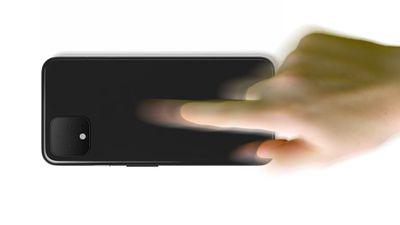
Doubletap
XDA-Developers discovered the new gesture system, codenamed "Columbus," in the Android 11 developer preview for Pixel phones. According to the site, the double-tap gesture can be used to perform the following actions:

  • Dismiss timers
  • Snooze alarms
  • Launch the camera
  • Invoke Google Assistant
  • Play or pause media
  • Collapse the status bar
  • Silence incoming calls
  • Unpin notifications
  • Other "user-selected action"

The double-tap gesture apparently doesn't require any special hardware, as it relies on the phone's gyroscope and accelerometer. XDA-Developers managed to get the gesture working on a Pixel 2 XL and Pixel 4 XL, both running Android 11 Developer Preview 1. You can see the gesture being used to launch the Camera app in the clip below.


To prevent the gesture being activated unintentionally, Google has also added so-called "gates" to stop the double tap actions from taking effect. Some of the currently implemented gates are said to include camera visibility, charging status, keyguard, and more. XDA believes the Settings app will also contain gesture training activities for the user to perform in order to refine its responsiveness.

Google's own-branded Android phones have included innovative interactive gestures before, such as fingerprint gestures, Active Edge, and Motion Sense on the Pixel 4 series. Active Edge lets users squeeze the sides of the device to quickly activate Google Assistant, while Motion Sense allows users to skip songs, snooze alarms, and silence phone calls by waving a hand in front of the phone.

Apple has also experimented with new ways of interacting with iPhones, including the use of touch and touchless gestures. A 2018 rumor from Bloomberg suggested Apple is working on iPhones that will use touchless gesture controls, allowing users to hover over the iPhone to navigate through the iOS operating system using a finger, but without having to touch the display.

If Apple moved forward with that rumored gesture technology, it could show up in iPhones as early as 2020, according to Bloomberg's two-year timeline for the feature. It's not yet clear if Apple is continuing to experiment with gestures, though, as we haven't heard any information on such a feature coming to the 2020 ‌iPhone‌ lineup.

What do you think of Google's rear double-tap gesture? Is it something you'd like to see in a new-generation ‌iPhone‌, or are touch-less gestures the future? Let us know in the comments.

Popular Stories

imac video apple feature

Apple Released Yet Another New Product Today

Friday March 20, 2026 2:39 pm PDT by
Apple has unveiled a whopping nine new products so far this March, including an iPhone 17e, iPad Air models with the M4 chip, MacBook Air models with the M5 chip, MacBook Pro models with M5 Pro and M5 Max chips, the all-new MacBook Neo, an updated Studio Display, a higher-end Studio Display XDR, AirPods Max 2, and now the Nike Powerbeats Pro 2. iPhone 17e features the same overall design as...
iPhone 18 Pro Deep Red Feature

iPhone 18 Pro Launching Later This Year With These 12 New Features

Wednesday March 18, 2026 7:39 am PDT by
While the iPhone 18 Pro and iPhone 18 Pro Max are not expected to launch for another six months or so, there are already plenty of rumors about the devices. It was initially reported that the iPhone 18 Pro models would have fully under-screen Face ID, with only a front camera visible in the top-left corner of the screen. However, the latest rumors indicate that only one Face ID component...
ios 26 4 pastel

iOS 26.4: Top 10 New Features Coming to Your iPhone

Friday March 20, 2026 2:44 pm PDT by
iOS 26.4 isn't the major update with new Siri features that we hoped for, but there are some useful quality of life improvements, and a little bit of fun with an AI playlist generator and new emoji characters. Playlist Playground - Apple Music has a Playlist Playground option that lets you generate playlists from text-based descriptions. You can include moods, feelings, activities, or...

Top Rated Comments

cmaier Avatar
79 months ago

Something like this is obvious and I’ve recommended it to apple. What if volume down opened the camera and took a pic, and volume up opened the camera d as s started recording a movie. I’d miss a lot fewer moments if the added this.
and you wouldn’t be able to control your volume. Sounds fun.

maybe the power button can open Twitter and tweet whatever your last photo taken was. And the letter “e” on the keyboard can dial your mom on the phone. And tap and hold on the phone icon can mean volume up.
Score: 15 Votes (Like | Disagree)
Skylar. Avatar
79 months ago

What do you think of Google's rear double-tap gesture? Is it something you'd like to see in a new-generation ?iPhone?, or are touch-less gestures the future? Let us know in the comments.
It’s just a gimmick, imo. So are air gestures.
Score: 9 Votes (Like | Disagree)
79 months ago
This is clever and innovative. Being able to disable alarms alone makes this an option worth having. Dont like it? Disable that feature. Customization and options is what Android is about.
Score: 8 Votes (Like | Disagree)
AngerDanger Avatar
79 months ago
Google is surprisingly eager to capitalize on the PS Vita rear touchpad's lack of success.
Score: 6 Votes (Like | Disagree)
79 months ago
Something like this is obvious and I’ve recommended it to apple. What if volume down opened the camera and took a pic, and volume up opened the camera and started recording a movie. I’d miss a lot fewer moments if the added this.
Score: 5 Votes (Like | Disagree)
79 months ago
I mean, I always like to see new ways of controlling the UI, but my question is, do consumers really remember how to do these types of things? Think of it like 3D Touch, a really useful feature for those who actually knew how to manipulate it, but for the majority of consumers, it was confusing and they didn’t know what it was for. That’s kind of how I see this double tap feature.

For someone like myself heavily into ‘tech’, I like to utilize the small, hidden little features with smart phones that do make it more convenient to access certain points within the phone itself, but for the majority of consumers, they’ll never use this.
Score: 3 Votes (Like | Disagree)
Related Apple News: Reviews | Motoring | Mac | Technology | South Africa