

Microsoft Office App Released for iPhone, Combines Word, Excel, and PowerPoint

Following beta testing, Microsoft today released its new Office app for iPhone, bringing together Word, Excel, and PowerPoint in a single app.
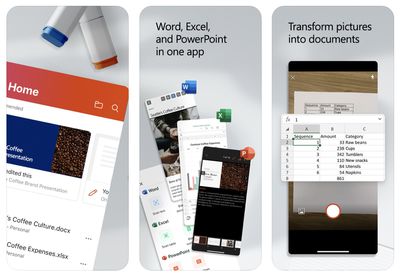
microsoft office app 2020
The main benefit of the unified Office app is that it requires only a single download with a much smaller file size, but it does have a few unique features, including camera integration for easily converting photos of documents and tables into Word and Excel files. The app also has a new Actions pane that supports a number of common tasks like signing PDFs and scanning QR codes.

Microsoft explains some of the benefits of the new Office app in a blog post:

The Office app delivers several key benefits including:

- Combining Word, Excel, and PowerPoint in a way that simplifies the experience with fewer apps to download or switch between. It requires far less phone storage than installing individual apps while maintaining virtually all the capabilities of the existing mobile apps people already know and use.

- Integrating our Lens technology to unlock the power of the camera with capabilities like converting images into editable Word and Excel documents, scanning PDFs, and capturing whiteboards with automatic digital enhancements to make the content easier to read.

- Adding new functionality for common tasks people often encounter when working on a phone—things like making quick notes, signing PDFs, scanning QR codes, and transferring files between devices.

The new Microsoft Office app is available on the App Store for the iPhone and on the Google Play Store for Android. Microsoft says the app will be optimized to support the iPad soon. The app is free to use, even without signing in, but an Office 365 subscription starting at $6.99 per month is required to unlock premium features.


Microsoft's standalone Word, Excel, and PowerPoint apps remain available and were recently updated with a simplified three-tab layout.

(Thanks, Michaël!)
Popular Stories

Aston Martin CarPlay Ultra Screen

Apple's CarPlay Ultra to Expand to These Vehicle Brands Later This Year

Sunday February 1, 2026 10:08 am PST by
Last year, Apple launched CarPlay Ultra, the long-awaited next-generation version of its CarPlay software system for vehicles. Nearly nine months later, CarPlay Ultra is still limited to Aston Martin's latest luxury vehicles, but that should change fairly soon. In May 2025, Apple said many other vehicle brands planned to offer CarPlay Ultra, including Hyundai, Kia, and Genesis. In his Powe...
Apple Logo Black

Apple's Next Launch is 'Imminent'

Sunday February 1, 2026 12:31 pm PST by
The calendar has turned to February, and a new report indicates that Apple's next product launch is "imminent," in the form of new MacBook Pro models. "All signs point to an imminent launch of next-generation MacBook Pros that retain the current form factor but deliver faster chips," Bloomberg's Mark Gurman said on Sunday. "I'm told the new models — code-named J714 and J716 — are slated...
iOS 26

iOS 26.3 and iOS 26.4 Will Add These New Features to Your iPhone

Tuesday February 3, 2026 7:47 am PST by
We are still waiting for the iOS 26.3 Release Candidate to come out, so the first iOS 26.4 beta is likely still at least a week or two away. Following beta testing, iOS 26.4 will likely be released to the general public in March or April. Below, we have recapped known or rumored iOS 26.3 and iOS 26.4 features so far. iOS 26.3 iPhone to Android Transfer Tool iOS 26.3 makes it easier...
Apple MacBook Pro M4 hero

New MacBook Pros Reportedly Launching Alongside macOS 26.3

Sunday February 1, 2026 5:42 am PST by
Apple is planning to launch new MacBook Pro models with M5 Pro and M5 Max chips alongside macOS 26.3, according to Bloomberg's Mark Gurman. "Apple's faster MacBook Pros are planned for the macOS 26.3 release cycle," wrote Gurman, in his Power On newsletter today. "I'm told the new models — code-named J714 and J716 — are slated for the macOS 26.3 software cycle, which runs from...
iOS 26 Home Feature

Apple Gives Final Warning to Home App Users

Tuesday February 3, 2026 8:55 am PST by
In 2022, Apple introduced a new Apple Home architecture that is "more reliable and efficient," and the deadline to upgrade and avoid issues is fast approaching. In an email this week, Apple gave customers a final reminder to upgrade their Home app by February 10, 2026. Apple says users who do not upgrade may experience issues with accessories and automations, or lose access to their smart...

Top Rated Comments

alphaswift Avatar
78 months ago
So if both versions remain available, which one is better to use for doc creation? Which is better if you're read-only?
Score: 8 Votes (Like | Disagree)
melgross Avatar
78 months ago
So Apple has to split iTunes into several apps because people complain it’s too complex, and Microsoft combines several apps into one to make it less complex?
Score: 8 Votes (Like | Disagree)
TwoBytes Avatar
78 months ago

What's interesting to me is that Office used to be available through a single app, and Microsoft broke it into individual apps a few years ago. You don't often see a company - especially one this size - make a change like that only to later change back. I wonder what they saw in their internal data to prompt this? It can't all be about app size, can it?
You can see the reviews from 5 years ago in the app reviews!
Score: 6 Votes (Like | Disagree)
Achiever Avatar
78 months ago
What's interesting to me is that Office used to be available through a single app, and Microsoft broke it into individual apps a few years ago. You don't often see a company - especially one this size - make a change like that only to later change back. I wonder what they saw in their internal data to prompt this? It can't all be about app size, can it?
Score: 5 Votes (Like | Disagree)
1144557 Avatar
78 months ago

So I guess you can delete the individual apps if you have this Office app then?

So if both versions remain available, which one is better to use for doc creation? Which is better if you're read-only?
Thats the million-dollar question here. Are there any differences
Score: 5 Votes (Like | Disagree)
DoctorTech Avatar
78 months ago
I never create MS Office documents on my iPhone but I sometimes need to open and view them when I am away from my laptop or tablet so this might be a good solution for users like me.
Score: 4 Votes (Like | Disagree)















