

Apple today released the first iOS and iPadOS 13.4 betas for developers, bringing quite a few useful new features, design tweaks, and changes that are worth knowing about.
Below, we've rounded up all of the changes that we've found in iOS and iPadOS 13.4 so far.
New Mail Toolbar
The Mail app has an updated toolbar design that moves the reply icon away from the delete icon. Apple in iOS 13 moved these two buttons together, resulting in some people accidentally deleting emails instead of replying to them.
The trash icon also happened to be placed right where the reply icon had been in iOS 12, causing muscle memory issues.

The new design, which is available when viewing an email, places the reply button on the far right, the delete button on the far left, and Folder and Flag icons in between them.
iCloud Folder Sharing
When iOS 13 was first introduced, iCloud Folder Sharing was announced as one of the new features. It was apparently difficult to implement, though, as it was removed during the beta testing period.
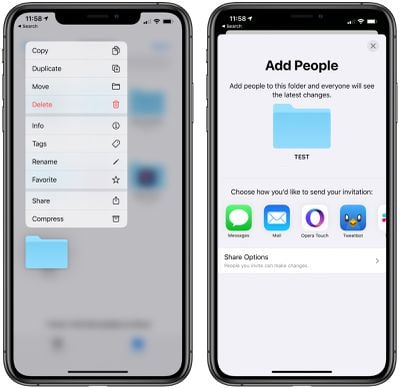
In iOS 13.4, iCloud Folder Sharing is finally available, allowing folders within the Files app to be shared with other people.
New Memoji Stickers
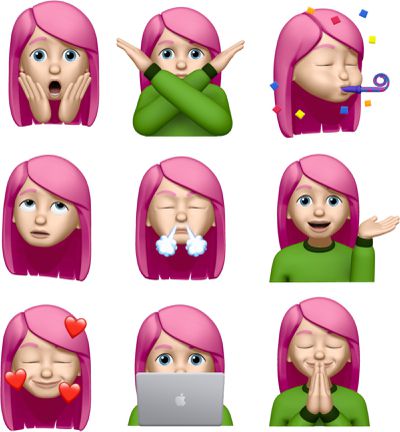
Apple in iOS 13 introduced Memoji stickers, which are emoji-style stickers that feature your Memoji and Animoji characters. In iOS 13.4, there are nine new sticker poses to choose from, including shocked face, face with hearts, eyes rolling, and more.
Universal macOS/iOS/tvOS Purchases
Apple has introduced new functionality that will allow developers to bundle iOS apps, tvOS apps, and macOS apps together for a single purchase price.
This will allow developers who make iOS and macOS apps to sell them in a single bundle, which is not a feature that's been available.
The change will be convenient for both developers and customers, as iOS and macOS users will be able to make one purchase for a cross-platform app. Developers will also be able to create discounted Mac and iOS bundles for the first time.
CarPlay
There are new call controls and third-party navigation controls in CarPlay, according to iMore's Rene Ritchie.
CarKey API
There appears to be a new API in iOS 13.4 called CarKey that is designed to allow the iPhone and the Apple Watch to unlock, lock, and start a compatible car, according to 9to5Mac.
Users will be able to use CarKey in vehicles that have NFC capabilities, with the iPhone or Apple Watch unlocking the car when held nearby. Authentication via Face ID will not be required, and the initial pairing process will be done through the Wallet app.
CarKey can be shared with other people, like family members, with drivers able to invite them through the Wallet app to have access to the key on their Apple devices. Based on signs in the code, Apple is working with some car manufacturers to implement the feature in the iOS 13.4 update.
Location Services
According to Apple's release notes for the iOS 13.4 and iPadOS 13.4 updates, when an app requests the Always location services authorization for the first time after being authorized for While Using the App, the user's iPhone or iPad will immediately show the authorization prompt.
It's not yet quite clear what this change means, but some apps that want always on access to a user's location have been upset with the location services changes that Apple introduced in iOS 13 limiting that access.
Some apps, like Tile, want always on access to provide full tracking functionality.
Keyboard Shortcuts on iPad
For the iPad, there are new keyboard shortcuts in the Photos app for navigating between tabs, search, and create albums. In full screen mode, there are also keyboard shortcuts for deleting photos, duplicating photos, and entering Edit mode.
Shazam Shortcuts Action
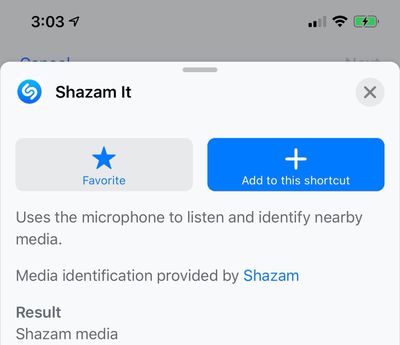
There's a new Shortcuts option to "Shazam It" when creating a shortcut in the Shortcuts app.
iPadOS Hardware Key Remapping
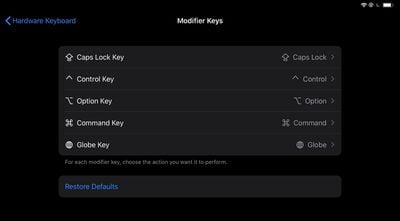
As noted by developer Steve Troughton-Smith, there appears to be a new option for remapping hardware keys on a keyboard that's connected to an iPad.
Other Features
See a feature we missed? Let us know in the comments and we'll add it to the list.























