

Popular to-do app Things reached version 3.11 today on iPad and iPhone, bringing a big update to its Quick Find feature and some other notable improvements.
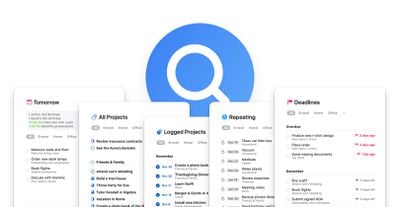
The Quick Find bar is used to quickly switch between lists, find to-dos, and search for tags. That functionality has been expanded and now includes the ability to generate lists for specific types of data.
For example, typing "Deadlines" generates a list of all upcoming (or passed) deadlines. Likewise, typing the keyword "Repeating" brings up all repeating to-dos in one convenient place.
Meanwhile, "Tomorrow" brings up a list for planning your next day, "All Projects" provides an overview of all your goals, and "Logged Projects" offers an overview of past achievements.
While not technically a list, typing "Settings" or "Preferences" into the Quick Find bar offers another way to get to the app's settings screen. Also, to make Quick Find easier to access in longer lists, you can now just tap a list's title to bring it up, instead of having to scroll all the way to the top. Tapping it will also now show recently-viewed lists for convenient access.
Additionally in this update, you can now see the date when an item was created or completed, using a new Get Info option. On Mac, you can now hold down the Command key when clicking a link to open it in the background. And on larger iPad Pro models, the sidebar width has been increased to accommodate longer project titles.
Things 3.11 for iPad is priced at $19.99 [Direct Link] while the iPhone version (which includes Apple watch support) is priced at $9.99. [Direct Link] A 15-day trial of Things for Mac is available on the Cultured Code website.





















Top Rated Comments
For me, the best thing about Things is every few years, they charge real fees for meaningful upgrades. No subscriptions. It’s not an upgrade fee for basically two new features and bug fixes that should have been done anyway—-Adobe and Intuit I’m looking at you. And it’s not too cheap where you worry the company is selling your data or may go out of business with your critical information.
Things and the business model behind it is how software should be.
My speculative guess is this will be part of a paid upgrade. (Which I don’t mind because we’ve had years of great updates and the software is so good I want them to stay in business and make lots of money to stay motivated.)
But who knows...
Been using Things for a decade (since the alpha), and they'e such a ridiculously frustrating developer. They could absolutely sweep the floor with every other To Do app if they just added a few key features but they arrogantly insist on ignoring their users' begging and pleading.
That said, Things 3 is still my preferred personal list app by default because of the Someday functionality (thank god they didn't rename that list in v3).
Meanwhile, Wunderlist is still my preferred productivity app to get work done (3-pane view, starred items, 3-pane view, list sharing, 3-pane view, file attachment, 3-pane view, comments, 3-pane view, multi-platform support, 3-pane view, web app, 3-pane view, less wasted space, 3-pane view).
If only we could have the best of both!
Absolutely worth every penny.
Frequent improvements, too.