Edison Software, makers of Edison Mail for iOS and Android, today debuted Edison Mail for desktop Macs. The developers say the app aims to eliminate common frustrations with desktop mail, all within a minimalist UI that's designed to save time managing emails.
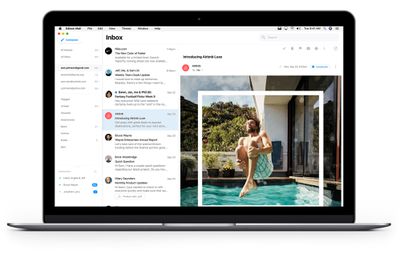
edison mail mac app two pane view
Edison Mail for Mac includes all of the features that make the mobile apps popular, including One-Click Unsubscribe for junk messages, Block Sender, Custom Snooze, Undo Send, and automatic Read Receipt Blocking to prevent advertisers from tracking your email actions.

Email "power user" features are also built-in, including Dark Mode to reduce potential eye strain, Swipe Gestures to manage mail faster, and a Unified Inbox that makes Edison compatible with nearly all email providers to manage unlimited email accounts all in one place. Edison Mail for Mac supports use with Gmail, Yahoo! Mail, Outlook, iCloud, and many other mail providers.
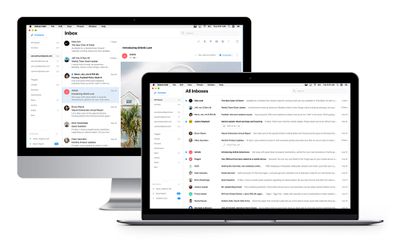
edison mail single and two pane view
Edison Mail for Mac also introduces new features that are designed to maximize mailbox efficiency for desktop users. New Keyboard Shortcuts are available in three settings — default Edison Mail shortcuts, shortcuts users are already familiar with from other mail providers, and the ability to create custom shortcuts.

Elsewhere, Threading allows users to view all of their emails on the same subject together (even for non-Gmail accounts that don’t support Threading), while new Email Templates aim to simplify the task of sending repeated emails with the same content.

Additionally, the ability to Search Settings allows users to find a setting item they're looking for ("‌Dark Mode‌" or "Font," for example) and other items, instead of having to navigate through all options.
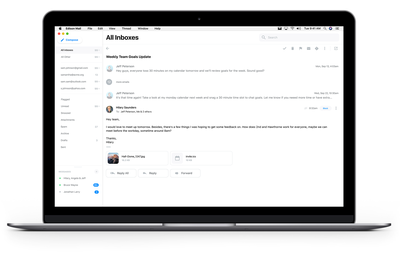
edison mail thread view
According to the developers, the Mac app has been built for existing users of its mobile apps who requested a desktop version. As such, the new Mac app is available by invitation to current Edison Mail users on iOS and Android, rolling out throughout December and beyond. Everyone else can sign up to be invited to use the app at http://mail.edison.tech/mac.

Today, Edison Mail also released a new version of its app for iOS and Android featuring Assistant – a new feature to preview your upcoming meetings, travel, bills, missed calendar invitations, and forgotten subscriptions all in one place.
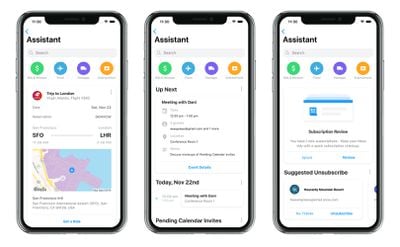
edison mail assistant ios
Assistant lives in the upper right corner of the Edison Mail inbox screen, where users can tap to see what they've got on their schedules in the coming days. Calendar integration includes the day ahead, events that users may have forgotten to RSVP for, bill payment reminders, and travel reminders and information.

Lastly, regular readers may recall that Edison was one of the mail apps found to have been letting their employees read customer emails to optimize smart features. For the record, Edison Software says it has since stopped the practice and deleted any data related to it.

For anyone who still has privacy concerns, both the mobile and desktop apps include options for users to opt-out of data sharing and fully delete any data from both the Edison app and the company's servers.

Edison Mail is available to download for free for iPhone and iPad on the App Store. [Direct Link]


Tags: Edison, Email

Top Rated Comments

ksmith80209 Avatar
79 months ago
Wow - nice post. Welcome to the forum. I don’t see that he was complaining, but asking about how they make their money. A reasonable question.
Score: 6 Votes (Like | Disagree)
Pepe4life Avatar
79 months ago

As far as I remember, they actually sell their AI to big brands etc. (example, coca cola for their internal storaging system, server side stuff etc.) So they actually created this email app to showcase how powerfull their AI is to these clients... Makes good sense to me. But now a days everything is sketchi, so whats the point, if you like the app and it makes your life easier just use it, as simple as that. Why do you Americans have to bi*ch abou everything thinking you are the smartest bunch.
Who hurt you?
Score: 5 Votes (Like | Disagree)
Esquire1 Avatar
79 months ago

Exactly...

The last section closes the door for me
That‘s a wrap for me. No thanks.

I’m glad we’ve gotten to the point where we look at every app with suspicion. I’m sick of apps with no real business model who think snooping in our email is somehow acceptable. Get bent.

There are zero good mail apps that respect your privacy. Apple Mail is the best thing we’ve got and man, that’s sad.
Score: 5 Votes (Like | Disagree)
nutmac Avatar
79 months ago
I have to ask. What is their business model?
Score: 4 Votes (Like | Disagree)
iGeneo Avatar
79 months ago

I have to ask. What is their business model?
Exactly...

The last section closes the door for me

Lastly, regular readers may recall that Edison was one of the mail apps found to have been letting their employees read customer emails to optimize smart features ('https://www.macrumors.com/2018/07/02/third-party-email-apps-reading-user-emails/'). For the record, Edison Software says it has since stopped the practice and deleted any data related to it.

For anyone who still has privacy concerns, both the mobile and desktop apps include options for users to opt-out of data sharing and fully delete any data from both the Edison app and the company's servers.
Score: 3 Votes (Like | Disagree)
tibor96 Avatar
79 months ago

I have to ask. What is their business model?
As far as I remember, they actually sell their AI to big brands etc. (example, coca cola for their internal storaging system, server side stuff etc.) So they actually created this email app to showcase how powerfull their AI is to these clients... Makes good sense to me. But now a days everything is sketchi, so whats the point, if you like the app and it makes your life easier just use it, as simple as that. Why do you Americans have to bi*ch abou everything thinking you are the smartest bunch.
Score: 2 Votes (Like | Disagree)

Popular Stories

iOS 26

iOS 26.4 and iOS 27 Features Revealed in New Leak

Friday December 12, 2025 10:56 am PST by
Macworld's Filipe Espósito today revealed a handful of features that Apple is allegedly planning for iOS 26.4, iOS 27, and even iOS 28. The report said the features are referenced within the code for a leaked internal build of iOS 26 that is not meant to be seen by the public. However, it appears that Espósito and/or his sources managed to gain access to it, providing us with a sneak peek...
iOS 26

iOS 26.2 Coming Soon With These 8 New Features on Your iPhone

Thursday December 11, 2025 8:49 am PST by
Apple seeded the second iOS 26.2 Release Candidate to developers earlier this week, meaning the update will be released to the general public very soon. Apple confirmed iOS 26.2 would be released in December, but it did not provide a specific date. We expect the update to be released by early next week. iOS 26.2 includes a handful of new features and changes on the iPhone, such as a new...
iOS 26

Apple Releases iOS 26.2 With Alarms for Reminders, Lock Screen Changes, Enhanced Safety Alerts and More

Friday December 12, 2025 10:10 am PST by
Apple today released iOS 26.2, the second major update to the iOS 26 operating system that came out in September, iOS 26.2 comes a little over a month after iOS 26.1 launched. ‌iOS 26‌.2 is compatible with the ‌iPhone‌ 11 series and later, as well as the second-generation ‌iPhone‌ SE. The new software can be downloaded on eligible iPhones over-the-air by going to Settings >...
AirPods Pro Firmware Feature

Apple Releases New Firmware for AirPods Pro 2 and AirPods Pro 3

Thursday December 11, 2025 11:28 am PST by
Apple today released new firmware designed for the AirPods Pro 3 and the prior-generation AirPods Pro 2. The AirPods Pro 3 firmware is 8B30, up from 8B25, while the AirPods Pro 2 firmware is 8B28, up from 8B21. There's no word on what's include in the updated firmware, but the AirPods Pro 2 and AirPods Pro 3 are getting expanded support for Live Translation in the European Union in iOS...
macOS Tahoe 26 Thumb

Apple Releases macOS Tahoe 26.2 With Edge Light

Friday December 12, 2025 10:08 am PST by
Apple today released macOS Tahoe 26.2, the second major update to the macOS Tahoe operating system that came out in September. macOS Tahoe 26.2 comes five weeks after Apple released macOS Tahoe 26.1. Mac users can download the macOS Tahoe update by using the Software Update section of System Settings. macOS Tahoe 26.2 includes Edge Light, a feature that illuminates your face with soft...
AirTag 2 Mock Feature

Apple AirTag 2: Four New Features Found in iOS 26 Code

Thursday December 11, 2025 10:31 am PST by
The AirTag 2 will include a handful of new features that will improve tracking capabilities, according to a new report from Macworld. The site says that it was able to access an internal build of iOS 26, which includes references to multiple unreleased products. Here's what's supposedly coming: An improved pairing process, though no details were provided. AirTag pairing is already...
ipados 26 1 slide over

Apple Releases iPadOS 26.2 With Multitasking Improvements

Friday December 12, 2025 10:09 am PST by
Apple today released iPadOS 26.2, the second major update to the iPadOS 26 operating system released in September. iPadOS 26.2 comes a month after iPadOS 26.1. The new software can be downloaded on eligible iPads over-the-air by going to Settings > General > Software Update. iPadOS 26.2 continues with the multitasking improvements that were added with iPadOS 26.1. You can now drag and...
bug security vulnerability issue fix larry

Update Now: iOS 26.2 Fixes 20+ Security Vulnerabilities

Friday December 12, 2025 11:11 am PST by
Apple today released iOS 26.2, iPadOS 26.2, and macOS 26.2, all of which introduce new features, bug fixes, and security improvements. Apple says that the updates address over 20 vulnerabilities, including two bugs that are known to have been actively exploited. There are a pair of WebKit vulnerabilities that could allow maliciously crafted web content to execute code or cause memory...