

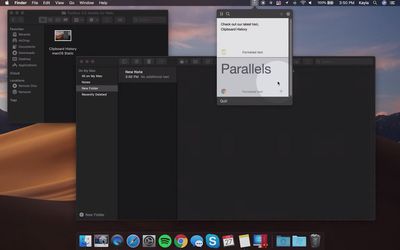
Parallels Toolbox for Mac has been updated to version 3.5 with a handful of new one-click shortcuts, including clipboard history, a sleep timer, an energy saver tool, and the ability to hide some menu bar icons.
parallels toolbox 3 5 mac
From the press release:

New Tools in Parallels Toolbox 3.5 for Mac:

- Clipboard History: Captures what's copied to the Mac clipboard, including plain and formatted text. It also offers full text search, favorites and settings to collect content for up to 30 days. You can also pause the collection or exclude applications, allowing users to further customize the tool.

- Hide Menu Icons: Allows users to hide some icons from the Mac menu bar by creating two sets of menu-bar icons, visible and invisible. Less important icons only become visible when the user clicks the tool's control in the Mac menu bar. Hidden icons automatically hide when the user goes back to working with applications from the control menu.

- Energy Saver: Activates several settings, including hidden ones that reduce system-resources usage and increase battery life, saving up to eight percent in power consumption. It automatically detects your computer's state when it's running on battery and activates options for users to enable or disable.

- Sleep Timer: Allows you to set a timer for the computer to either go to sleep or shut down from the moment you press "Start," helping you save energy. Time options range from 15 minutes to six hours.

New Enhanced Versions of Existing Tools in Parallels Toolbox for Mac:

- Clean Drive: Users can now see files that will be deleted, with the ability to find them in Finder for improved transparency.

- Find Duplicates: Ability to mass-select multiple duplicates for better total-size representation and simplified sorting options.

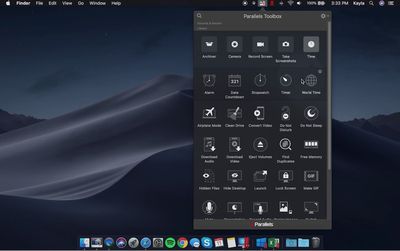
Parallels Toolbox adds a dropdown menu to the macOS menu bar with a collection of tools and shortcuts that simplify common tasks to just a click or two, such as taking screenshots, resizing images, hiding the desktop, recording audio, switching resolutions, creating password-protected archives of files, and more.
parallels toolbox mojave
Parallels Toolbox for Mac is priced at $19.99 per year for new users. The annual subscription includes free updates with new and enhanced tools as they become available over time, such as this version 3.5 update.

Note that while Parallels is best known for its virtualization software that allows for Windows and Linux to run within macOS, its Toolbox software can be used natively on any compatible Mac or Windows PC.


Top Rated Comments

jgbr Avatar
84 months ago
They should focus on the quality of the VM software rather than a tool box I know, I ensure isn’t installed
Score: 4 Votes (Like | Disagree)
UnusedLoginID Avatar
84 months ago
I am in the camp of those of us who find it disingenuous to call it “Parallels Toolbox” when you need “Parallels Tools” to run your VM. I too installed it by mistake thinking it was an update to the tools.
As to Parallels Access which I installed voluntarily, it had limited functionality and extremely slow. And it would never work with my Desktop even after I set it up to never sleep. Basically I could never access my files on the go as Parallels Access could not wake up the computer.
Anyway, all that to say that they should focus on Parallels Desktop and forget the rest. And stop prompting me to install these other tools.
Score: 2 Votes (Like | Disagree)
cfurlin Avatar
84 months ago
Any price that ends with per year is a no sale for me unless it's a membership fee or property taxes.
Score: 1 Votes (Like | Disagree)
larrylaffer Avatar
84 months ago
I use youtube-dl for video downloads (https://github.com/ytdl-org/youtube-dl/). It works with tons of video sites, is constantly updates, has built-in transcoding, and one should always prefer free and open-source. :)
Score: 1 Votes (Like | Disagree)

Popular Stories

iOS 26

iOS 26.4 and iOS 27 Features Revealed in New Leak

Friday December 12, 2025 10:56 am PST by
Macworld's Filipe Espósito today revealed a handful of features that Apple is allegedly planning for iOS 26.4, iOS 27, and even iOS 28. The report said the features are referenced within the code for a leaked internal build of iOS 26 that is not meant to be seen by the public. However, it appears that Espósito and/or his sources managed to gain access to it, providing us with a sneak peek...
apple beta 26 lineup

Apple Leak Confirms Work on Foldable iPhone, AirTag 2, and Dozens More Devices

Monday December 15, 2025 2:05 pm PST by
Last week, details about unreleased Apple devices and future iOS features were shared by Macworld. This week, we learned where the information came from, plus we have more findings from the leak. As it turns out, an Apple prototype device running an early build of iOS 26 was sold, and the person who bought it shared the software. The OS has a version number of 23A5234w, and the first...
Apple Foldable Thumb

Leak Reveals Foldable iPhone Details

Monday December 15, 2025 9:09 am PST by
The first foldable iPhone will feature a series of design and hardware firsts for Apple, according to details shared by the Weibo leaker known as Digital Chat Station. According to a new post, via machine translation, Apple is developing what the leaker describes as a "wide foldable" device, a term used to refer to a horizontally oriented, book-style foldable with a large internal display....
Apple Logo Top Half

Early iOS 26 Software Leak Uncovers Dozens of Upcoming Apple Features

Monday December 15, 2025 3:05 pm PST by
Software from an iPhone prototype running an early build of iOS 26 leaked last week, giving us a glimpse at future Apple devices and iOS features. We recapped device codenames in our prior article, and now we have a list of some of the most notable feature flags that were found in the software code. In some cases, it's obvious what the feature flags are referring to, while some are more...
iOS 26

Apple Releases iOS 26.2 With Alarms for Reminders, Lock Screen Changes, Enhanced Safety Alerts and More

Friday December 12, 2025 10:10 am PST by
Apple today released iOS 26.2, the second major update to the iOS 26 operating system that came out in September, iOS 26.2 comes a little over a month after iOS 26.1 launched. ‌iOS 26‌.2 is compatible with the ‌iPhone‌ 11 series and later, as well as the second-generation ‌iPhone‌ SE. The new software can be downloaded on eligible iPhones over-the-air by going to Settings >...
iOS 26

iOS 26.2 Coming Soon With These 8 New Features on Your iPhone

Thursday December 11, 2025 8:49 am PST by
Apple seeded the second iOS 26.2 Release Candidate to developers earlier this week, meaning the update will be released to the general public very soon. Apple confirmed iOS 26.2 would be released in December, but it did not provide a specific date. We expect the update to be released by early next week. iOS 26.2 includes a handful of new features and changes on the iPhone, such as a new...
macOS Tahoe 26 Thumb

Apple Releases macOS Tahoe 26.2 With Edge Light

Friday December 12, 2025 10:08 am PST by
Apple today released macOS Tahoe 26.2, the second major update to the macOS Tahoe operating system that came out in September. macOS Tahoe 26.2 comes five weeks after Apple released macOS Tahoe 26.1. Mac users can download the macOS Tahoe update by using the Software Update section of System Settings. macOS Tahoe 26.2 includes Edge Light, a feature that illuminates your face with soft...
AirPods Pro Firmware Feature

Apple Releases New Firmware for AirPods Pro 2 and AirPods Pro 3

Thursday December 11, 2025 11:28 am PST by
Apple today released new firmware designed for the AirPods Pro 3 and the prior-generation AirPods Pro 2. The AirPods Pro 3 firmware is 8B30, up from 8B25, while the AirPods Pro 2 firmware is 8B28, up from 8B21. There's no word on what's include in the updated firmware, but the AirPods Pro 2 and AirPods Pro 3 are getting expanded support for Live Translation in the European Union in iOS...
















