Apple's New iPadOS Software Includes Additional Keyboard Shortcuts - MacRumorsOpen MenuShow RoundupsShow Forums menuVisit ForumsOpen Sidebar
Skip to Content

Apple's New iPadOS Software Includes Additional Keyboard Shortcuts

by

Apple today unveiled iPadOS, a new version of iOS that's designed to take advantage of the larger screens in the iPad family. iPadOS will incorporate several features that recognize the tablet's function as a computer replacement, including a new Home screen, an updated Split View to enhance multitasking, improved Apple Pencil support, and additional keyboard shortcuts for use with physical keyboards.
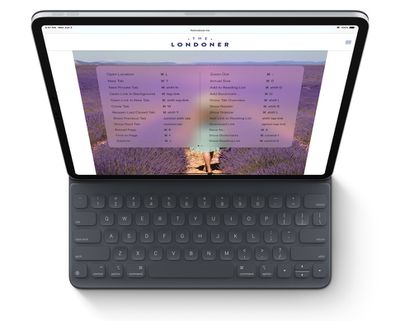
Screenshot
During its WWDC keynote, Apple revealed that Safari for iPadOS will include about 30 additional shortcuts, including the following:

  • Use default font size in Reader (Command + 0)
  • Open link in background (Command + tap)
  • Toggle downloads (Command + Alt/Option)
  • Open link in new window (Command + Alt + tap)
  • Use selection for Find (Command + E)
  • Email this page (Command + I)
  • Open link in new tab (Command + Shift + tap)
  • Decrease Reader text size (Command + -)
  • Zoom in (Command + +)
  • Zoom out (Command + -)
  • Save webpage (Command + S)
  • Change focused element (Alt/Option + tab)
  • Focus Smart Search field (Command + Alt/Option + F)
  • Dismiss web view in app (Command + W)
  • Increase Reader text size (Command + +)
  • Download linked file (Alt + tap)
  • Add link to Reading List (Shift + tap)
  • Close other tabs (Command + Alt/Option + W)
  • Scroll around screen (arrow keys)
  • Paste without formatting (Command + Shift + Alt/Option + V)
  • New Private tab (Command + Shift + N)
  • Actual size (Command + 0)
  • Open search result (Command + Return)
  • Toggle bookmarks (Command + Alt/Option + 1)

The keyboard shortcuts will work with Apple's Smart Keyboard or any third-party Bluetooth connected keyboard, which should make web browsing and managing files even easier on an ‌iPad‌.

In addition, iPadOS automatically presents the desktop version of a website, scaled appropriately for the ‌iPad‌ display, and optimizes it for touch. Safari for iPadOS also comes with a download manager and enhancements to tab management.

Due to be released in the fall, iPadOS will be compatible with the iPad Air 2 and later, all iPad Pro devices, the fifth-generation ‌iPad‌ and later, and the iPad mini 4 and later.

Top Rated Comments

techpr Avatar
90 months ago
Now it needs multi user option and the iPad will be complete.
Score: 11 Votes (Like | Disagree)
itsamacthing Avatar
90 months ago
Hope this is the change that makes my iPad less of an iPad and more of a laptop replacement
Score: 3 Votes (Like | Disagree)
90 months ago
Mouse support is available via Accessibility in settings.
Score: 2 Votes (Like | Disagree)
90 months ago
Mouse, please. I’m a big fan of the stylus, despite it’s stunted functionality compared to 2009’s PC state-of-the-art. However, until the iPad gets a self-cleaning screen and/or allows your arms to relax, it ain’t a laptop replacement.

[edit]: I scrolled a couple more inches down, and saw that mouse support was going to be offered as an “accessibility” option.

Well, count me among the differently-abled when it comes to “smeary-finger-oil-that-even-creates-stylus-friction-on-my-display-but-is-inevitable-due-to-the-zen-ish-buttonless-simplicity-of-the-Apple-Pencil-aversion”!
Score: 1 Votes (Like | Disagree)
SoSickSadNslOw Avatar
90 months ago
I think I’ll be using my iPad Pro more often now. Can’t wait to test this out!
Score: 1 Votes (Like | Disagree)

Popular Stories

Apple Event Logo

Apple Just Released a New Accessory

Monday May 4, 2026 8:13 am PDT by
Apple today released a new Pride Edition Sport Loop for the Apple Watch. The band features a rainbow design with 11 colors of woven nylon yarns. The new Pride Edition Sport Loop is available to order now on Apple.com and in the Apple Store app in 40mm, 42mm, and 46mm sizes, and it will be available at Apple Store locations starting later this week. In the U.S., the band costs $49. There...
iOS 27 on iPhone 17 1

iOS 27 Will Add These New Features to Your iPhone

Saturday May 2, 2026 8:43 am PDT by
Apple is expected to unveil iOS 27 during its WWDC 2026 keynote on June 8, and there are already many rumored features and changes for iPhones. The first developer beta of iOS 27 will likely be available immediately following the keynote, and a public beta typically follows in July. Following beta testing, the software update should be released to all users with a compatible iPhone in...
Apple Announces 2026 Pride Band Watch Face and iPhone Wallpaper Article 2

iOS 26.5 Coming Soon With These New Features

Monday May 4, 2026 8:40 am PDT by
iOS 26.5 is expected to be released next week, following more than a month of beta testing. The update is relatively minor, but there are a couple of new features and changes across the operating system that we have recapped below. iOS 26.5 lays the groundwork for end-to-end encryption for RCS in the Messages app and ads in the Apple Maps app, and it will include a new Pride wallpaper and a...
Related Apple News: Mac | Technology | Reviews | World News | Local News