Apple Pay Now Accepted for iTunes, App Store, Apple Music, and iCloud Purchases in Some Countries - MacRumorsOpen MenuShow RoundupsShow Forums menuVisit ForumsOpen Sidebar
Skip to Content

Apple Pay Now Accepted for iTunes, App Store, Apple Music, and iCloud Purchases in Some Countries

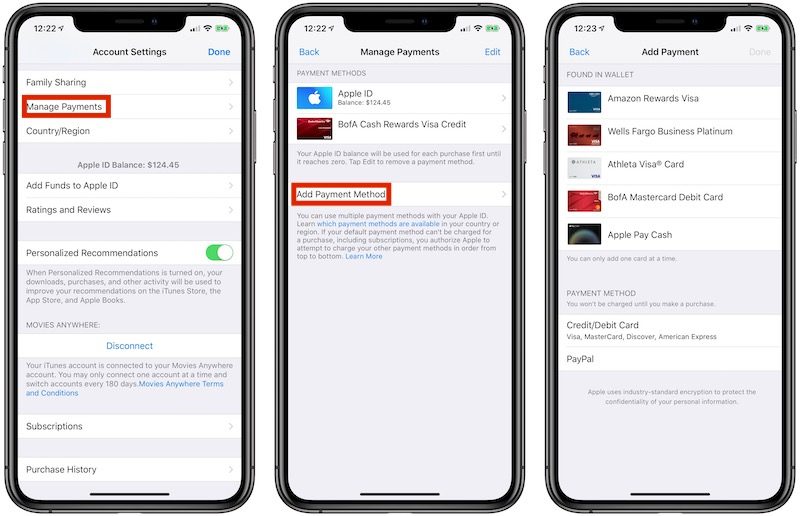
Apple Pay is now an accepted payment method for iTunes, App Store, and Apple Books purchases, as well as Apple Music and iCloud storage subscriptions, as reflected in a recently updated Apple support document.
itunes apple pay
To link any credit or debit cards set up in the Wallet app with your Apple ID account, navigate to Settings > iTunes & ‌App Store‌. Next, select your ‌Apple ID‌ email and then tap View ‌Apple ID‌ > Manage Payments > Add Payment Method. The cards should be listed under a new "Found in Wallet" section.

This functionality is rolling out as a server-side change in the United States, Canada, Australia, Singapore, Hong Kong, Taiwan, Russia, Ukraine, and the United Arab Emirates, so it is not available for all users yet.

In the United States, users can also link an ‌Apple Pay‌ Cash card to an ‌Apple ID‌ account.

There are a handful of benefits to ‌Apple Pay‌ billing for ‌Apple ID‌ account-tied purchases, including the ability to conveniently add multiple credit or debit cards, the improved security of ‌Apple Pay‌, and the ability to better manage ‌Apple Music‌ and ‌iCloud‌ storage subscriptions from the Wallet app.

This functionality arrives ahead of the launch of the Apple Card credit card in the United States this summer.

(Thanks, Dean Lubaki!)

Popular Stories

imac video apple feature

Apple Released Yet Another New Product Today

Friday March 20, 2026 2:39 pm PDT by
Apple has unveiled a whopping nine new products so far this March, including an iPhone 17e, iPad Air models with the M4 chip, MacBook Air models with the M5 chip, MacBook Pro models with M5 Pro and M5 Max chips, the all-new MacBook Neo, an updated Studio Display, a higher-end Studio Display XDR, AirPods Max 2, and now the Nike Powerbeats Pro 2. iPhone 17e features the same overall design as...
ios 26 4 pastel

iOS 26.4: Top 10 New Features Coming to Your iPhone

Friday March 20, 2026 2:44 pm PDT by
iOS 26.4 isn't the major update with new Siri features that we hoped for, but there are some useful quality of life improvements, and a little bit of fun with an AI playlist generator and new emoji characters. Playlist Playground - Apple Music has a Playlist Playground option that lets you generate playlists from text-based descriptions. You can include moods, feelings, activities, or...
HomePod mini and Apple TV Sage

New Apple TV and HomePod Mini Remain 'Ready' to Launch

Sunday March 22, 2026 6:33 am PDT by
Apple has unveiled nine new products this month, but the wait continues for the next-generation Apple TV 4K and HomePod mini models. In his Power On newsletter today, Bloomberg's Mark Gurman said new versions of the Apple TV and HomePod mini have been "ready" since last year, but he reiterated that Apple has held off on releasing them until the more personalized version of Siri and other...

Top Rated Comments

Mike MA Avatar
90 months ago
One might think that this should have been there from the very start?
Score: 13 Votes (Like | Disagree)
Icaras Avatar
90 months ago
My god. About time. This took way too long to implement.
Score: 6 Votes (Like | Disagree)
JustinRP37 Avatar
90 months ago
Always shocked me how Apple Pay was not allowed for many Apple purchases. Even more baffling is the needing your full Apple ID password to download a free app and not just FaceID or TouchID. I can max out my credit cards using FaceID or TouchID in stores, but god forbid I download a free app or $1.99 app without my full password.
Score: 3 Votes (Like | Disagree)
90 months ago
If the Apple ID default card is already in the Wallet as an Apple Pay card, you can “link” it. My default card didn’t show up in the list using the directions in the article, but evidently it needs to be “linked” to be on file as Apple Pay (on the main screen).

The only cards listed using the article’s instructions were Apple Pay cards that I was not using for my Apple ID.
Score: 2 Votes (Like | Disagree)
IGendel Avatar
90 months ago
I'm not seeing this option available. Is it showing up for anyone yet?

Apple Pay is now an accepted payment method for iTunes, App Store, and Apple Books purchases, as well as Apple Music and iCloud storage subscriptions, as reflected in a recently updated Apple support document ('https://support.apple.com/lv-lv/HT202631').


To link any credit or debit cards set up in the Wallet app with your Apple ID account, navigate to Settings > iTunes & App Store. Next, select your Apple ID email and then tap View Apple ID > Manage Payments > Add Payment Method. The cards should be listed under a new "Found in Wallet" section.

This functionality is rolling out as a server-side change in the United States, Canada, Australia, Singapore, Hong Kong, Taiwan, Russia, Ukraine, and the United Arab Emirates, so it is not available for all users yet.

In the United States, users can also link an Apple Pay Cash card to an Apple ID account.

There are a handful of benefits to Apple Pay billing for Apple ID account-tied purchases, including the ability to conveniently add multiple credit or debit cards, the improved security of Apple Pay, and the ability to better manage Apple Music and iCloud storage subscriptions from the Wallet app.

This functionality arrives ahead of the launch of the Apple Card credit card in the United States this summer.

(Thanks, Dean Lubaki ('https://twitter.com/DeanLubaki/status/1128022871140372480')!)

Article Link: Apple Pay Now Accepted for iTunes, App Store, Apple Music, and iCloud Purchases in Some Countries ('https://www.macrumors.com/2019/05/14/apple-pay-billing-itunes-app-store-icloud/')
Score: 2 Votes (Like | Disagree)
lartola Avatar
88 months ago
Actually in Hong Kong most of the merchants which have wireless terminals that accept PayWave / PayPass etc. support Apple Pay even if they do not express say it. Only some smaller merchants with weird terminals may have problems.
And here in Mexico it's exactly the other way around. Small and medium size merchants, as well as gas stations, restaurants and fast food joints, usually have standalone portable/wireless terminals that support contactless payment, and therefore can accept Apple Pay just fine. The problem are most of the retailers using integrated point of sale systems (i.e, those systems where the products to be purchased are scanned using barcodes and the credit card pin-pad is connected to a computer that controls it). With very few exceptions, these retailers still don't have contactless payment enabled even though the pin-pads they currently use, such as the Ingenico ipp 320 or Verifone vx 820, do have a built in contactless reader. They usually have the contactless readers disabled and only use the pin-pads for inserting chip cards, and more recently to accept Samsung Pay using MST.
[doublepost=1562216362][/doublepost]
Does anyone know if this would qualify for both 2% Apple Pay cashback and 3% Apple product/services cashback on Apple card?
It qualifies for the 3% cash back, since you're buying apple products. The 2% cash back is only for purchases made using Apple Pay anywhere other than Apple itself.
Score: 1 Votes (Like | Disagree)
Related Apple News: Reviews | Motoring | Technology | Iphone | News