A year and a half ago, Flexibits branched out from its popular calendar app Fantastical to debut Cardhop, an intuitive contacts management app for macOS. Cardhop took Apple's Contacts to the next level, offering a smart input field that intelligently parses the text you're typing and figures out what you want to do. Customizable quick actions let you easily perform tasks related to your contacts, such as placing a phone call, sending an email, or contacting on Skype.


Flexibits is now bringing the power of Cardhop to iOS, today launching a universal iPhone and iPad app that offers many of the same features found in the macOS version. The intelligent natural language input is here, automatically detecting whether you're trying to search, add, or edit a contact based on what you've typed.
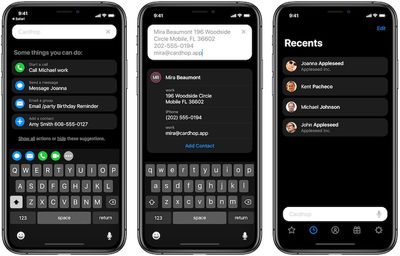
cardhop add
While Cardhop's contact cards will look very familiar to those who are used to Apple's native Contacts app, Cardhop's enhanced abilities make it much easier to manage and use the information stored on those cards.
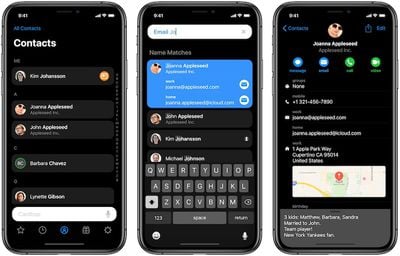
cardhop dark contacts
Cardhop for iOS makes it easy to edit your contacts, as all you have to do is tap and hold on the piece of information you're looking to update. As on macOS, there are customizable action keys that give you one-tap access to whatever functions you're most interested in, and those action keys live right above your keyboard at all times.

Cardhop for iOS offers a choice of dark and light themes, as well as a combination theme that shows your lists and results in a dark color and individual contact cards in a light color. Siri Shortcuts are also supported in Cardhop, letting you automate various actions with your contacts and integrate those actions across apps.
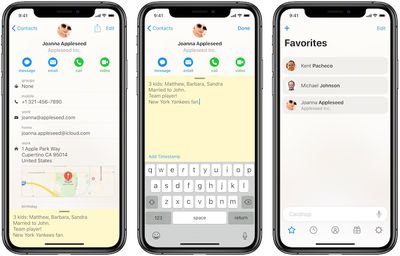
cardhop light contacts
Notes is another area Flexibits has chosen to emphasize with Cardhop. While Apple's Contacts app lets you take notes about people stored in your database, Cardhop makes the feature more prominent with a slide-up interface and distinctive background (yellow or gray depending on theme), encouraging you to save information about the people you meet for more meaningful future interactions.

Cardhop also supports personal business cards, letting you customize a card with the information you want to share and displaying it like a business card on your phone. With a QR code embedded on the card, it's easy to share just by letting others scan the code using the camera app on their phones.
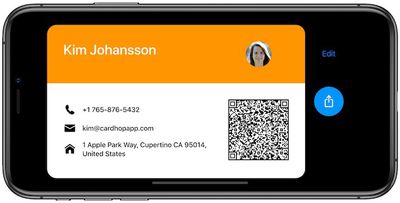
cardhop business card
The natural language input field in Cardhop supports English, French, Italian, German, Spanish, and Japanese, and if the app incorrectly parses your input, you can hit a flag icon to help the app learn what it should have done.

Finally, Cardhop for iOS supports directory lookups for Google Contacts, G Suite, and Exchange to let you quickly pull down contact information from your accounts on those services. A free update to Cardhop for macOS launching today also brings directory lookups to the desktop.

Flexibits is launching Cardhop for iOS as a paid universal app with no additional in-app purchases required. A limited-time launch sale will see Cardhop priced at $3.99, and once that expires the regular price will be $4.99.


Top Rated Comments

Chrjy Avatar
88 months ago
no mention if it's icloud synced. If not, it's "worthless ".
On their website it states:
The same contacts that you already use will instantly be available in Cardhop. iCloud, Google, Exchange, and LinkedIn are all supported.

Although not entirely sure what happens if you add a new contact via Cardhop....is it automatically added to iOS contacts?
EDIT: I just installed the trial Mac version and can confirm if you add a contact via Cardhop it is added to normal contacts and syncs with iCloud.
Score: 4 Votes (Like | Disagree)
martyjmclean Avatar
88 months ago
This is an instant buy for me! It's embarrassing that Contacts etc. hasn't improved since iOS 7.
Score: 3 Votes (Like | Disagree)
richie510 Avatar
88 months ago
Just crossed my fingers and downloaded the app. The only feature I have ever wanted from iOS contacts is moving a contact from one account to another. This gets that done.

Hopefully it will allow me to choose which account I add a new contact to, but I cannot figure out how to add a new contact yet... I'm sure it's easy, but just havnt found that yet.

My only initial complaint is how prominently birthdays are shown. Why is every app/platform and every American so obsessed with birthdays now?
Score: 2 Votes (Like | Disagree)
QuarterSwede Avatar
88 months ago
Can you create groups with this? That’s something you still can’t do without a Mac or iCloud in Contacts.
Score: 1 Votes (Like | Disagree)
LastStarfighter Avatar
88 months ago
Fantastic software. Just bought it. This is the future of business cards. These cards we give each other get used once to enter the information into our contacts apps or phones and then either sit in a drawer gathering dust or get thrown in the bin. Either way it's not something we should be continuing to do in our limited resources world.

Being able to share your contact details via the QR code based business card within the app saves the planet and saves us retyping what's on a business card or relying on expensive OCR software to try to interpret the various business cards we encounter in our careers. This in my view is the major strength of this app. I don't really need better contacts management but I'll take it as it's all part of the app I just bought.
Score: 1 Votes (Like | Disagree)
LastStarfighter Avatar
88 months ago
Welcome to the FaceID club. You're right, it's so much better than TouchID and completely intuitive to flick up to unlock your device.

I agree, battery life is massively important for many. I do find that charging my X though is much faster than it used to be with older devices.
Being able to unlock your phone when it's cold and I'm wearing touchscreen gloves is the killer application for FaceID. Before this I'd have to either type in the PIN or take a glove off! Sitting on a freezing cold train platform in Cologne waiting for the train back to the airport, or out hiking in the cold up a mountain or hill, makes me appreciate that kind of thing.

I've invested in all the new charging technologies to speed charging up since being able to with the XR, wireless, USB-PD bedisde and car chargers. Very nice to have fast charging. I just can't find a way to get wireless charging integrated into my car (current model Jeep Grand Cherokee) that's slick enough to where I'm happy with it. I don't like vent mount phone holders, even if they do auto open and close mechanically, and the only flat surface I can find that's big enough to fit a flat charger to hold the XR in place is the dashboard which just seems weird so I still just cable charge in the car. At least until I can find that one perfect wireless option for it.

Honestly though in a normal day, with charging when I'm in the car, the XR's battery doesn't get low enough to where USB-PD charging really has full effect. Usually down to the 80s at the lowest point of the day and it charges back to 100% on my drive home.
Score: 1 Votes (Like | Disagree)

Popular Stories

iOS 26

iOS 26.4 and iOS 27 Features Revealed in New Leak

Friday December 12, 2025 10:56 am PST by
Macworld's Filipe Espósito today revealed a handful of features that Apple is allegedly planning for iOS 26.4, iOS 27, and even iOS 28. The report said the features are referenced within the code for a leaked internal build of iOS 26 that is not meant to be seen by the public. However, it appears that Espósito and/or his sources managed to gain access to it, providing us with a sneak peek...
Apple Logo Top Half

Early iOS 26 Software Leak Uncovers Dozens of Upcoming Apple Features

Monday December 15, 2025 3:05 pm PST by
Software from an iPhone prototype running an early build of iOS 26 leaked last week, giving us a glimpse at future Apple devices and iOS features. We recapped device codenames in our prior article, and now we have a list of some of the most notable feature flags that were found in the software code. In some cases, it's obvious what the feature flags are referring to, while some are more...
apple beta 26 lineup

Apple Leak Confirms Work on Foldable iPhone, AirTag 2, and Dozens More Devices

Monday December 15, 2025 2:05 pm PST by
Last week, details about unreleased Apple devices and future iOS features were shared by Macworld. This week, we learned where the information came from, plus we have more findings from the leak. As it turns out, an Apple prototype device running an early build of iOS 26 was sold, and the person who bought it shared the software. The OS has a version number of 23A5234w, and the first...
Apple Foldable Thumb

Leak Reveals Foldable iPhone Details

Monday December 15, 2025 9:09 am PST by
The first foldable iPhone will feature a series of design and hardware firsts for Apple, according to details shared by the Weibo leaker known as Digital Chat Station. According to a new post, via machine translation, Apple is developing what the leaker describes as a "wide foldable" device, a term used to refer to a horizontally oriented, book-style foldable with a large internal display....
iOS 26

iOS 26.3 Beta 1 Features: What's New So Far

Monday December 15, 2025 4:23 pm PST by
Apple is testing iOS 26.3, the next version of iOS 26 that will launch around January. Since iOS 26.3's testing is happening over the holidays, it is a smaller update with fewer features than we've seen in prior betas. We've rounded up what's new so far, and we'll add to our list with subsequent betas if we come across any other features. Transfer to Android Apple is making it simpler...
iOS 26

Apple Releases iOS 26.2 With Alarms for Reminders, Lock Screen Changes, Enhanced Safety Alerts and More

Friday December 12, 2025 10:10 am PST by
Apple today released iOS 26.2, the second major update to the iOS 26 operating system that came out in September, iOS 26.2 comes a little over a month after iOS 26.1 launched. ‌iOS 26‌.2 is compatible with the ‌iPhone‌ 11 series and later, as well as the second-generation ‌iPhone‌ SE. The new software can be downloaded on eligible iPhones over-the-air by going to Settings >...
iOS 26

iOS 26.2 Coming Soon With These 8 New Features on Your iPhone

Thursday December 11, 2025 8:49 am PST by
Apple seeded the second iOS 26.2 Release Candidate to developers earlier this week, meaning the update will be released to the general public very soon. Apple confirmed iOS 26.2 would be released in December, but it did not provide a specific date. We expect the update to be released by early next week. iOS 26.2 includes a handful of new features and changes on the iPhone, such as a new...
airpods max 2024 colors

AirPods Max 2 Likely to Offer These 10 New Features

Monday December 15, 2025 7:41 am PST by
Apple released the AirPods Max on December 15, 2020, meaning the over-ear headphones launched five years ago today. While the AirPods Max were updated with a USB-C port and new color options last year, followed by support for lossless audio and ultra-low latency audio this year, the headphones lack some of the features that have been introduced for newer generations of the regular AirPods and the ...