

With Apple having discontinued its AirPort lineup last year and mesh Wi-Fi becoming more and more popular due to its robust coverage and performance, the company's users are increasingly looking to third-party networking options. Belkin-owned Linksys has been one of the leaders in the mesh Wi-Fi market with its Velop lineup, and it's the only brand of Wi-Fi system Apple now carries in its stores and online.
While the Velop systems have been popular for their performance and unobtrusive design, some users have been looking for something a bit more traditional that offers wired ports, and that's why Linksys today is announcing the MR8300 Tri-Band Mesh Wi-Fi router. It's a standalone Wi-Fi router that offers many of the features power users are accustomed to, including three radios (one 2.4 GHz 802.11n and two 5 GHz 802.11ac), four adjustable antennas with beamforming to deliver maximum signal coverage, and 4 gigabit LAN ports for wired connectivity. There's also a USB 3.0 port for connecting peripherals such as shared network storage.
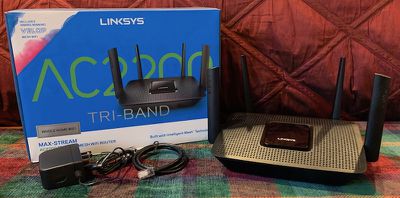
If that sounds pretty much like a traditional router, it is, but the MR8300 also includes built-in mesh technology that integrates with the Velop systems, so you can use it as a hub to build your mesh network around. The integration helps you evolve your network over time if your needs change such as moving from a small apartment where a single router is sufficient to a larger home where you can benefit from a mesh setup.
I've had the MR8300 in my house for a couple of weeks, using it both in place of and integrated with my existing tri-band Velop nodes, and it's offered solid coverage and performance for my home.
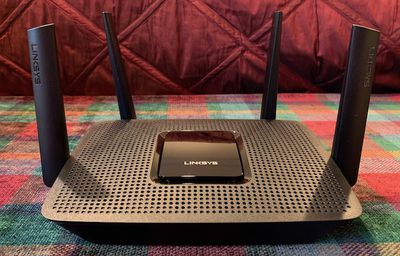
Unlike the Velop nodes or Apple's AirPort products, the MR8300 doesn't have a sleek design, instead prioritizing performance with its large adjustable antennas. It's not unusual for Wi-Fi router design, but if you're coming from something like the AirPort lineup it can be a little bit of a visual shock that might give you pause when considering just how visible you want your Wi-Fi router to be.
The MR8300 isn't the most powerful Wi-Fi router you can buy, with Linksys itself offering some higher-end options like the EA9500 with eight antennas, eight Gigabit Ethernet ports, and faster transfer speeds, for example, but the MR8300 offers a nice balance of performance, price, and mesh expandability.
For nearly a year, I've been using a three-node tri-band Velop system in my 1850 square foot, two-story home, with the primary node located in first-floor family room at one end of the house. My office is located at the exact opposite end of the house and up a floor, and while I get decent Wi-Fi speeds in my office, it feels like I do need to be careful with the placement of my Velop nodes to ensure a good signal, as the node in the center of my home has occasionally complained about a weak connection to the primary node.
The MR8300 isn't able to fully cover my entire house on its own from its peripheral location, managing an average of only 27 Mbps down and 11 Mbps up from my 100/100 Google Fiber service when connecting from my office at the opposite end of the house, but that's not surprising considering my previous experience with Wi-Fi routers in my house. If you have a smaller home or are able to locate the router in a more central location, coverage should be just fine. Moving close to the router yielded speeds of around 95 Mbps up and down.

While my router's location in my house isn't ideal for full Wi-Fi coverage on its own, it is in my family room with an Xbox and an Apple TV, so the ability to use stable wired connections for those devices is a plus.
So if your setup is like mine and you find your router can't give you adequate coverage on its own, that's where the MR8300's Velop technology comes in. You can easily add one or more Linksys Velop nodes to the MR8300, letting your network grow with you while giving you the benefits of both fast gigabit wired connections and mesh Wi-Fi technology.
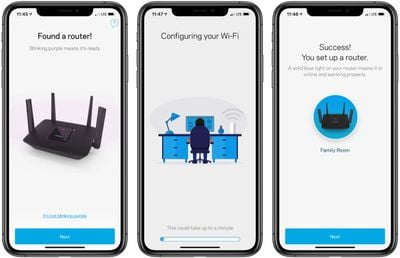
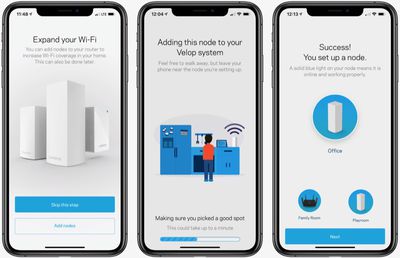
The Linksys iOS app makes it easy to set up and manage the company's routers, and it takes only a few minutes to get the MR8300 up and running, with plenty of customization options available in the app. And if you want to add Velop nodes to the network, the app makes it easy to do so. It takes a few minutes for each node to start up and configure itself, but the process is extremely simple. And once everything is up and running, the app lets you check on the status of each node and see at a glance which nodes and Wi-Fi bands your devices are connected to.
Once I had my Velop nodes added to the MR8300, I was able to achieve speeds in excess of 92 Mbps up and down throughout my home.
The Linksys MR8300 is scheduled to be priced at $199.99, although Linksys is currently listing it at $179.99 in the company's online store. The MR8300 is launching today and will also be available through Best Buy and Amazon.
That's the same price as a single tri-band Velop node, but it offers a bit more in the way of features such as the wired ports. The MR8300 is also nearly identical to the EA8300 router from Linksys priced at $139.99, so you're essentially paying $60 for the new Velop compatibility.
Velop Tri-Band users may also be interested in new Linksys Shield subscription services launching this year to help protect your network on an ongoing basis. First up next month is a Parental Control Subscription priced at $4.99 per month or $49.99 per year that offers filtering for adult, violent, or other types of content at the router level to help keep kids safe online. A separate Network Security Subscription priced at $1.99 per month or $19.99 per year will be launching later in 2019 to help protect against threats from malicious sites by checking your traffic against a database of known threats.
Note: MacRumors is an affiliate partner with Linksys, Best Buy, and Amazon. When you click a link and make a purchase, we may receive a small payment, which helps us keep the site running.






















Top Rated Comments
Yep, I should have phrased that differently...thanks.