

Eternal Storms Software today released Yoink 2.0 for iOS and Yoink 3.5 for Mac, two major upgrades to the popular drag and drop-improving "shelf" app.

For those unfamiliar, Yoink acts like a convenient shelf for users to drag in files and other content, do something else (switch apps, tabs, and so on) and then easily access those items again by dragging them out of Yoink.
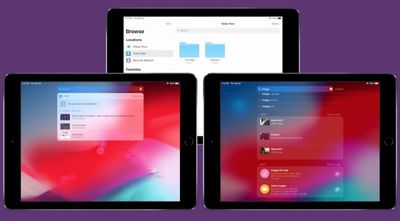
yoink 2
Version 2.0 of Yoink for iOS brings iCloud sync support, so items stored in Yoink are available across iOS devices logged into the same Apple account. Each device has its own "shelf" in iCloud, so all items are grouped for easy discoverability.

The different shelves are accessible through both the Yoink app and also in its extensions, users can access all items via the Today Widget, the keyboard, the file provider, and Spotlight search.

Yoink 2.0 for iOS also brings support for Handoff across iPhones, iPads and Macs, so items selected on one device can be handed off to another and those files are transferred right away.

Elsewhere, Yoink now also includes support for Siri Shortcuts. Using Siri, users can store clipboard contents or download the link to the clipboard in Yoink, without having to switch to or activate Yoink itself.

Items can also be copied from Yoink using Siri (the most recently added image, PDF, text or link, for example), while Yoink can be opened using the virtual assistant to show a specified, synced device's items.

In addition, Yoink for iOS has expanded support for keyboard commands, an optional Dark Mode interface, and optional smaller icons for showing more items stored in the Yoink "shelf" at once.

Meanwhile over on Yoink for Mac, the new version 3.5 update adds Handoff support between Macs and iOS devices, a clipboard history Today Widget that keeps track of your clipboard's contents, and full compatibility with macOS Mojave (including Dark Mode) as well as a Finder Quick Action.

Yoink for iPad and iPhone is available on the App Store for the introductory price of $3.99. After the introductory week has passed, the price will change to $5.99.

Yoink for Mac is available on the Mac App Store for the introductory price of $4.99. After the introductory week has passed, the price will change to $7.99. A free, 15-day trial is also available on the website – the app requires at least OS X Lion 10.7.3, although macOS High Sierra 10.13 or later is recommended.


Tag: Yoink

Top Rated Comments

Jessica Lares Avatar
96 months ago
I fail to recognize the difference between this app vs the Files app? It appears Files already does what this app does. Could someone enlighten me?
It's meant for you to save something temporarily, use it, and then have it automatically go away.
Score: 2 Votes (Like | Disagree)
ignatius345 Avatar
96 months ago
I fail to recognize the difference between this app vs the Files app? It appears Files already does what this app does. Could someone enlighten me?
Not sure about the iOS version, but the Mac version is basically a little temporary "shelf" that appears on the edge of your screen and lets you put any file or draggable object there. The shelf stays put while you switch apps -- and persists between multiple desktops, full-screen apps, etc -- and then you can drag things back out of it to wherever you're dragging them to. Once things are dragged out, the shelf disappears. I find it indispensible for multiple desktops.

Actually, this video explains it better than I can: https://eternalstorms.at/yoink/mac/
Score: 2 Votes (Like | Disagree)
urbancity Avatar
96 months ago
I fail to recognize the difference between this app vs the Files app? It appears Files already does what this app does. Could someone enlighten me?
Score: 1 Votes (Like | Disagree)
Abstract Avatar
96 months ago
It’s sort of like the feature that was in Pathfinder 10-12 years ago, except accessible throughout OSX? That’s pretty cool.
Score: 1 Votes (Like | Disagree)

Popular Stories

Aston Martin CarPlay Ultra Screen

Apple's CarPlay Ultra to Expand to These Vehicle Brands Later This Year

Sunday February 1, 2026 10:08 am PST by
Last year, Apple launched CarPlay Ultra, the long-awaited next-generation version of its CarPlay software system for vehicles. Nearly nine months later, CarPlay Ultra is still limited to Aston Martin's latest luxury vehicles, but that should change fairly soon. In May 2025, Apple said many other vehicle brands planned to offer CarPlay Ultra, including Hyundai, Kia, and Genesis. In his Powe...
Apple Logo Black

Apple's Next Launch is 'Imminent'

Sunday February 1, 2026 12:31 pm PST by
The calendar has turned to February, and a new report indicates that Apple's next product launch is "imminent," in the form of new MacBook Pro models. "All signs point to an imminent launch of next-generation MacBook Pros that retain the current form factor but deliver faster chips," Bloomberg's Mark Gurman said on Sunday. "I'm told the new models — code-named J714 and J716 — are slated...
iOS 26

iOS 26.3 and iOS 26.4 Will Add These New Features to Your iPhone

Tuesday February 3, 2026 7:47 am PST by
We are still waiting for the iOS 26.3 Release Candidate to come out, so the first iOS 26.4 beta is likely still at least a week or two away. Following beta testing, iOS 26.4 will likely be released to the general public in March or April. Below, we have recapped known or rumored iOS 26.3 and iOS 26.4 features so far. iOS 26.3 iPhone to Android Transfer Tool iOS 26.3 makes it easier...
Apple MacBook Pro M4 hero

New MacBook Pros Reportedly Launching Alongside macOS 26.3

Sunday February 1, 2026 5:42 am PST by
Apple is planning to launch new MacBook Pro models with M5 Pro and M5 Max chips alongside macOS 26.3, according to Bloomberg's Mark Gurman. "Apple's faster MacBook Pros are planned for the macOS 26.3 release cycle," wrote Gurman, in his Power On newsletter today. "I'm told the new models — code-named J714 and J716 — are slated for the macOS 26.3 software cycle, which runs from...
iOS 26 Home Feature

Apple Gives Final Warning to Home App Users

Tuesday February 3, 2026 8:55 am PST by
In 2022, Apple introduced a new Apple Home architecture that is "more reliable and efficient," and the deadline to upgrade and avoid issues is fast approaching. In an email this week, Apple gave customers a final reminder to upgrade their Home app by February 10, 2026. Apple says users who do not upgrade may experience issues with accessories and automations, or lose access to their smart...














