

Hulu today is rolling out a new update for Hulu.com, bringing it in line with the design and user interface that users should be familiar with if they use Hulu on smartphones and TVs, like iOS and tvOS. The company is launching the new update to coincide with fall television premieres, which typically kick off around this time, in mid to late September.
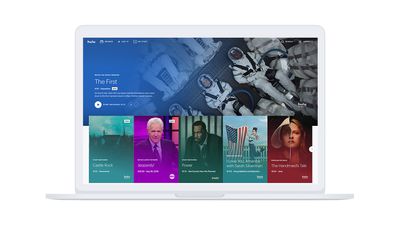
The company says that subscribers can expect all of the usual options they need on Hulu.com, including Playback, Show Details, Add to My Stuff, Recording, and Stop Suggesting all featured in the Home section. When watching a video, navigational controls will allow you to skip ahead to the next episode by clicking an "Up Next" button.
The main change is that Hulu.com no longer has a "Watchlist" and now supports the service's new "My Stuff" feature, which is where you can add shows to watch later. When in My Stuff, it's easier to track all of the shows you're watching, and Hulu will notify you when new episodes of a show are added. On Hulu.com's new splash screen, the company notes that you can sync all of your existing My Stuff shows to the new Hulu.com using a sync option in account settings.
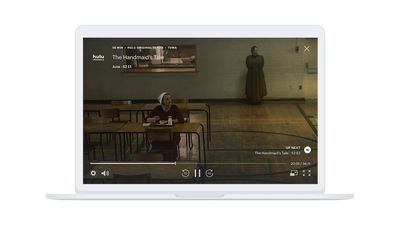
For sports fans using Hulu with Live TV, you can watch multiple games on multiple windows on Hulu.com, and a basic picture-in-picture feature is also supported for other programs. This way, you can keep watching a show while browsing other parts of Hulu on the web, and the small player can be moved anywhere on the screen while multitasking.
Hulu explains that some Hulu with Live TV subscribers have had these updates on the web for a while, and the company has taken feedback from these users for the public launch:
Some of you may be familiar with the new look and feel of Hulu.com. We launched an early version of the new experience just over a year ago to provide our Hulu with Live TV viewers access to all the big games and live TV coverage from their browsers. Since then, we’ve continued to evolve and refine the new Web experience to incorporate user feedback and new, compelling features, updates and configurations that make the most out of the wide range of motion you have with your mouse and how quickly you’re able to point and click.
Hulu first began rolling out its new experience and updated UI in May 2017, launching first on Apple TV, iOS, Xbox One, Android, and Chromecast. The new Hulu design on these apps -- now on Hulu.com -- includes large pieces of artwork for each show, a curated home screen of show suggestions, and more.





















