

Apple this morning released iOS 12, and following the update, hundreds of apps are introducing support for the new features, including Siri Shortcuts. Siri Shortcuts let you create multi-step automations using first and third-party apps that can be activated through Siri voice command.
Below, we've rounded up some of the more notable apps that have been introducing support for Siri Shortcuts. Siri Shortcuts can be created in the Shortcuts app in iOS 12, but are available for use in iOS 12, in watchOS 5 and on the Siri watch face, on HomePod, and with CarPlay.
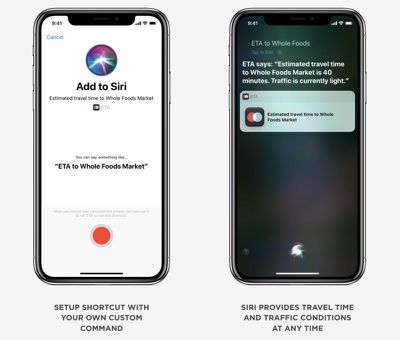
ETA - ETA is a navigation app that offers up directions, traffic conditions, and travel time. With the new update, ETA introduces shortcuts for adding a location, calculating and displaying travel time, and getting turn-by-turn directions.
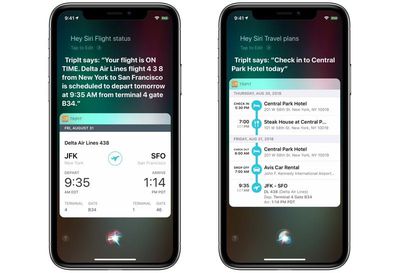
TripIt - TripIt, a travel organization app, is introducing Siri Shortcuts that let users access flight information and upcoming travel plans that are stored within the app.
Bear - Note taking app Bear includes Siri Shortcuts designed to let you create new notes on iOS and use Siri to search through your notes without opening the Bear app. There are also new navigation options, enhanced header linking, new iMessage stickers, and more transparency surrounding syncing. Bear for macOS has also been updated with features like Dark Mode support.
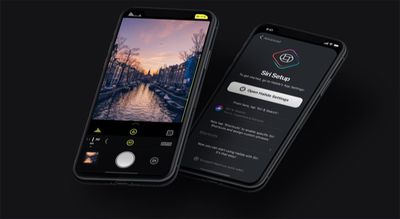
Halide - Photography app Halide is introducing Siri Shortcuts support that's designed to let you trigger a shot using a Siri voice command. With the Shortcuts integration, Halide can also show up as a contextual suggestion if you take photos at specific times or places. Halide's latest update also includes support for iPhone XS Max, wide color, and a new feature called "Technical Readout" that creates a report with system-level details about the iPhone's camera. There are performance improvements.
Sky Guide - Sky Guide has introduced Siri Shortcuts for identifying objects in the sky with commands like "Hey Siri, what star is that?" with the iPhone pointed at a specific star or planet. Sky Guide's shortcut will let Siri tap into Sky Guide's info to provide the answer, with no need to open up the Sky Guide app.
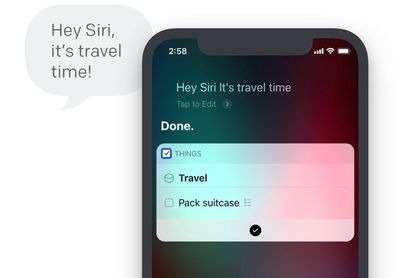
Things 3 - To-do app Things is gaining full support for Siri Shortcuts, which will also enable Siri suggestions for Things tasks. There's are Shortcuts integrations for adding new items to a Things to-do list, opening up a list you refer to often, and creating repeat lists for tasks you do more than once, such as packing for a trip. Password AutoFill, Landscape Mode, and Dynamic Snooze Notifications are also included. Things will now appear on the Apple Watch on the Siri watch face thanks to Shortcuts integration.
Pandora - Pandora includes support for Siri Shortcuts, with a new option that lets you ask Siri to play a favorite station. Siri is also able to keep track of your favorite Pandora stations and present them as suggestions on the Lock screen.
PCalc - Popular calculator app PCalc introduces support for Siri Shortcuts with options like rounding to a certain number of decimal places when making a calculation or converting currencies or measurements. All of PCalc's app features can be turned into shortcuts that are designed to run in the background or open up PCalc to perform an action. PCalc users should read MacStories' complete overview of the PCalc shortcut update for details.
WaterMinder - With WaterMinder's new Siri Shortcuts, you can create shortcuts for logging a drink, showing the last logged drink, showing your remaining hydration goal for the day, or showing your current daily hydration level.
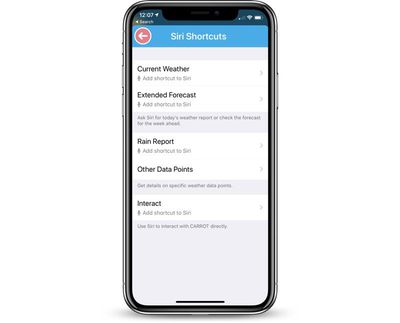
Carrot Weather - With Siri Shortcuts support, you can get weather reports and forecasts without needing to open the Carrot Weather app. There are options for current weather, weather forecast, rain reports, and more. Today's Carrot Weather update also supports Apple's new iPhones and complications on Apple Watch Series 4, and it shows as a data source on the Siri watch face.
Day One - Day One's iOS 12 update brings Siri Shortcuts that can do things like create a new entry, camera, or audio recording specific to an individual journal, so you can create new content for each of your journals via voice command. The update also introduces a new filter for checklist entries and it includes support for typing Markdown links.
Focus 5 - Pomodoro-based time management app Focus 5 includes Siri shortcuts for doing things like adding new tasks or accessing the app through Siri predictions. The app also includes a new task lit feature for better organizing tasks and it offers a Dark Mode.
Monster Job Search - The app for job search site Monster now supports Siri Shortcuts for your favorite search queries, preventing you from needing to repeatedly type in the same search terms.
For those who are just getting started with Shortcuts, Apple has shared a detailed Shortcuts User Guide, which is a great way to get acquainted with all of the things that the Shortcuts feature is able to do.
The user guide is organized into sections that include Shortcuts basics, creating and using Shortcuts, managing Shortcuts, using advanced Shortcuts, and frequently asked questions.
Know of other apps that have introduced support for Siri Shortcuts and other iOS 12 features? Let us know in the comments. We'd also love to hear the most useful Siri Shortcuts features you've found so far in iOS 12.























