

Pixelmator today updated its pro image editing software, Pixelmator Pro, to version 1.1.4 to add new effects, a new Auto Selective Color adjustment tool that's powered by Core ML, and more.
The Auto Selective Color feature allows selective color adjustments to be applied automatically to images to improve specific colors using machine learning.
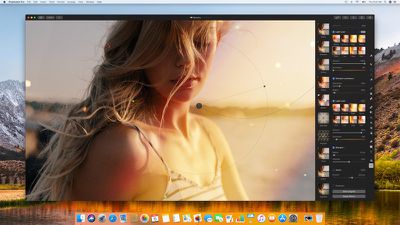
A new Light Leak effect adds a sunny, vintage feel to photos, while a Bokeh effect can add artistic camera blur. There's a new Spin Blur to create circular motion effects, and a Noise effect lets you add digital noise to photos.
Other new effects include Threshold, Mask to Alpha, Clouds, and other Tile and Distort effects pulled from the original Pixelmator app.
A long list of improvements have been made to existing tools. Auto White Balance and Auto Lightness, for example, better preserve skin tones and are 30 percent faster. The Color Adjustments and Effects submenus offer up Copy, Paste, Reset and Flatten Adjustment options, and there's a new keyboard shortcut (O) for Show Original when using various tools.
A full list of improvements and bug fixes are available in the Pixelmator Pro release notes.
In celebration of back to school, Pixelmator is discounting Pixelmator Pro to $29.99, a $30 discount off of the original $59.99 price tag. Pixelmator Pro can be downloaded from the Mac App Store. [Direct Link]





















Top Rated Comments
Then I'll probably make the jump to Affinity Photo, although Pixelmator standard does everything I need right now.
Pixelmator
Pixelmator Pro
Affinity Photo
Photoshop
Pixelmator is a beginners app. Pixelmator Pro is Pixelmator with a few more functions. It’s not a pro level app at all, but it is very accessible, especially if you’re familiar with Apple’s Photos. Both apps can do do a lot - neither is bad, but they lack advanced options.
Affinity Photo is where you start getting options to do pro level work. Photoshop’s algorithms are superior in many areas compared to Affinity, but for many, many people, Affinity is more than enough.
1) Put a pivot point on a specific part. I do a lot of animation (e.g. cartoon elbow/knee pivots useful) and was bummed when they pulled this feature out of Pixelmator a few years ago and never put it back. Why????
2) If you have a bunch of layers in a group (e.g. a truck with wheels, cab, crate, etc.) and you want to edit some of these layers together (e.g. Exposure or Color to wheels and cab only), you should be able to select ONLY those layers you want to edit...and do so. But nope, can't do it. Have to do apply edits to each layer one at a time. Time waster.
Other than that I think it is a good program. I just hope they don't take anything out of the base version to "dumb it down" so people have to buy the "pro" version to get back the "stolen" features. Have seen this done by other companies and it sucks.