

Apple Seeds Tenth Beta of macOS Mojave to Developers [Update: Public Beta Available]

Apple today seeded the tenth beta of an upcoming macOS Mojave update to developers for testing purposes, one week after releasing the ninth beta and more than two months after introducing the software at the Worldwide Developers Conference.

macOS Mojave introduces a new method of installing software updates, so after the initial beta has been installed using the appropriate profile from the Developer Center, additional betas can be downloaded through opening up System Preferences and choosing the "Software Update" option.


Apple's macOS Mojave update introduces a systemwide Dark Mode, with Mojave users able to choose between a light theme or the new dark theme, which changes the color of the dock, menu bar, apps, and other elements. Dark Mode is accompanied by Dynamic Desktops, aka wallpapers that subtly change throughout the day. Additional wallpapers were introduced in the fourth and fifth betas.

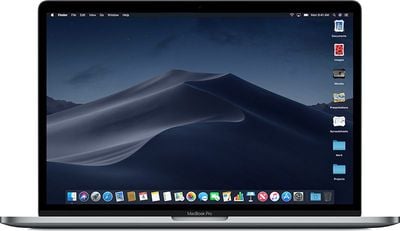
Stacks, a new desktop organization system, keeps all of your desktop files neat and organized, while Finder has been enhanced with a Gallery View, a Sidebar, a revamped Quick Look option and Quick Actions, so you can do more in the Finder window than ever before.

Screenshots can now be edited using Markup tools and a new management options that also allow for easy screen recording, while Continuity camera, a new feature, allows you to import photos and document scans directly from an iPhone or iPad to the Mac.
macosmojavestacks
The Apple News, Stocks, Home, and Voice Memos apps have been ported from iOS to macOS as part of a multiyear project Apple is working on to make it easier to bring iOS apps to Macs, and Apple has introduced several new privacy protections to keep your data safer than ever.

Apple is also making it harder for websites to track you with a range of new Safari tools, and it's also easier to make and store secure, hard-to-guess passwords for each and every website.

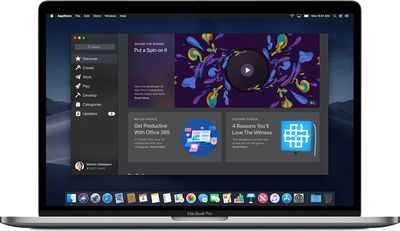
Apple has added an entirely revamped Mac App Store to macOS Mojave that makes it easier to discover apps with a featured section and specific categories for games, creative apps, productivity apps, apps for developers, and more.
macosmojavemacappstore
macOS Mojave was initially supposed to include a Group FaceTime feature that includes support for chatting with up to 32 people at one time, but it was removed in macOS Mojave beta 7 and the feature won't be available until later in the year.

macOS Mojave is available to developers and public beta testers to work out bugs and other issues ahead of an upcoming fall public release.

Update: Apple has also seeded a new beta of macOS Mojave to public beta testers.

Related Forum: macOS Mojave

Popular Stories

iOS 26

iOS 26.3 and iOS 26.4 Will Add These New Features to Your iPhone

Tuesday February 3, 2026 7:47 am PST by
We are still waiting for the iOS 26.3 Release Candidate to come out, so the first iOS 26.4 beta is likely still at least a week or two away. Following beta testing, iOS 26.4 will likely be released to the general public in March or April. Below, we have recapped known or rumored iOS 26.3 and iOS 26.4 features so far. iOS 26.3 iPhone to Android Transfer Tool iOS 26.3 makes it easier...
Apple Logo Black

Apple's Next Launch is 'Imminent'

Sunday February 1, 2026 12:31 pm PST by
The calendar has turned to February, and a new report indicates that Apple's next product launch is "imminent," in the form of new MacBook Pro models. "All signs point to an imminent launch of next-generation MacBook Pros that retain the current form factor but deliver faster chips," Bloomberg's Mark Gurman said on Sunday. "I'm told the new models — code-named J714 and J716 — are slated...
iOS 26 Home Feature

Apple Gives Final Warning to Home App Users

Tuesday February 3, 2026 8:55 am PST by
In 2022, Apple introduced a new Apple Home architecture that is "more reliable and efficient," and the deadline to upgrade and avoid issues is fast approaching. In an email this week, Apple gave customers a final reminder to upgrade their Home app by February 10, 2026. Apple says users who do not upgrade may experience issues with accessories and automations, or lose access to their smart...
Aston Martin CarPlay Ultra Screen

Apple's CarPlay Ultra to Expand to These Vehicle Brands Later This Year

Sunday February 1, 2026 10:08 am PST by
Last year, Apple launched CarPlay Ultra, the long-awaited next-generation version of its CarPlay software system for vehicles. Nearly nine months later, CarPlay Ultra is still limited to Aston Martin's latest luxury vehicles, but that should change fairly soon. In May 2025, Apple said many other vehicle brands planned to offer CarPlay Ultra, including Hyundai, Kia, and Genesis. In his Powe...
Apple Foldable Thumb

First Foldable iPhone Design Details Revealed

Monday February 2, 2026 7:19 am PST by
Apple's first foldable iPhone will feature relocated volume buttons, an all-black camera plateau, a smaller Dynamic Island, and more, according to design leaks from a known Weibo leaker. The user known as "Instant Digital" today claimed to share several key details about the design of the foldable iPhone: The volume buttons will be located on the top edge of the device, aligned to the...

Top Rated Comments

ersan191 Avatar
97 months ago
Shame it won't run on my seven year old laptop or desktop. Obsolescence is coming too quickly.
Can’t tell if serious
Score: 9 Votes (Like | Disagree)
FocusAndEarnIt Avatar
97 months ago
For all those whining about MacRumors posting this every time there's an update, being on the Public Beta myself, I appreciate the notification because without it I wouldn't know there was an update until sometimes 24 hours after it was released.
Score: 7 Votes (Like | Disagree)
ipedro Avatar
97 months ago
I've been using Mojave and for me, its flagship feature isn't Dark Mode, but how polished everything is.

I was able to compare a clean install of High Sierra with a clean install of Mojave and Mojave is definitely noticeably faster on the same iMac. I would usually attribute that to a new install being fresh but both of these were installed on a wiped drive and on the same iMac so it's definitely the OS that performs better. And it's still in beta!

I like most of Dark Mode but I can't live with the dark Finder windows. App icons were designed for a light backdrop don't work really well on a dark screen.
Score: 6 Votes (Like | Disagree)
amaze1499 Avatar
97 months ago
Unfortunately most of the apps I have to use for work like PowerPoint crash upon startup in Mojave.
Check logs. Reproduce issue with new user. Office apps run fine everywhere else.
Score: 5 Votes (Like | Disagree)
mountainview Avatar
97 months ago
Does Mojave support AFS for Fusion Drives ?
Yes it does support APFS for Fusion drives. Running it on my iMac 5K. macOS Mojave makes a very polished impression already, everything super smooth so far.
Score: 3 Votes (Like | Disagree)
Kaibelf Avatar
97 months ago
How's the stability of this thing? Thinking of downloading from High Sierra but don't know if I want to risk it yet.
I won't lie... for usual daily driver use, it's solid. You can tell it's nearly ready to release and should be final in a couple weeks. If you have a very specific set of workflows and get weird about the way certain things moved in the past and don't like any change at all, well, any update isn't for you. However, I follow these boards and betas very closely and virtually none of the problems I hear about are something I would normally find unless I made it a point to look for it.
Score: 3 Votes (Like | Disagree)

















