

Apple Seeds Ninth Beta of iOS 12 to Developers [Update: Public Beta Available] - MacRumorsOpen MenuShow RoundupsShow Forums menuVisit ForumsOpen Sidebar
Skip to Content

Apple Seeds Ninth Beta of iOS 12 to Developers [Update: Public Beta Available]

Apple today seeded the ninth beta of an upcoming iOS 12 update to developers for testing purposes, five days after seeding the eighth beta and more than two months after introducing the new software at the Worldwide Developers Conference.

Registered developers can download the new iOS 12 beta from Apple's Developer Center or over-the-air after installing the proper certificate.


iOS 12 introduces several major new features, with Apple revamping the operating system from top to bottom to make iPhones and iPads, especially the older models, faster and more responsive.

On the iPhone X, there are new Animoji characters along with "Memoji," which are customizable, personalized, humanoid Animoji that can be used both in Messages and in FaceTime, and there are new camera effects in both of those apps.

Apple originally planned to introduce Group FaceTime support in iOS 12, but the feature was removed in iOS 12 beta 7 and will not be reintroduced until later this fall in a future update to iOS 12.

Siri is smarter in iOS 12 with a new Shortcuts feature that lets you create multi-step customized automations using first and third-party apps that can be activated with Siri voice commands. Shortcuts can be created through the Shortcuts app, available as a beta from Apple's Developer Center.

Apple built comprehensive time management and monitoring tools into iOS 12 with Screen Time, allowing you to keep track of how much time you're spending in apps on your iPhone and iPad. App limits can help you cut back on iOS device usage, and robust parental controls are included for families.
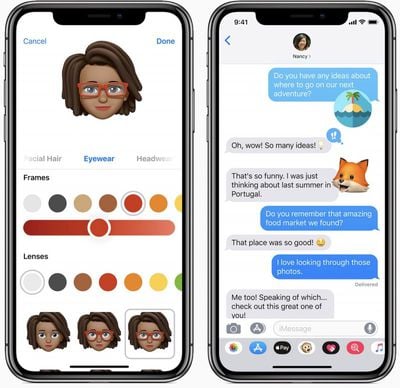
iOS 12 Memoji
Updated Do Not Disturb options make activating Do Not Disturb more intuitive and simple, and a new Do Not Disturb at Bedtime feature cuts down on nighttime distractions and sleep interruptions.
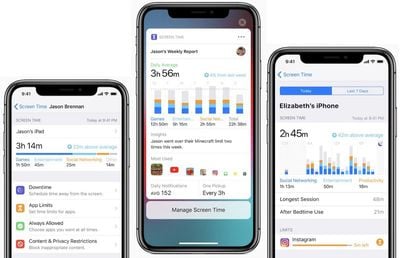
ios 12 screen time
Grouped Notifications make incoming notifications easier to view and manage, while a new Instant Tuning feature lets you tweak your notification settings right on the Lock screen on a notification-by-notification basis.


Apple News has a new Browse feature, the Stocks app has been redesigned and brought to the iPad, iBooks has been overhauled with a new look and a new name -- Apple Books -- and Voice Memos has been revamped with iCloud support and an iPad app.

ARKit 2.0 introduces new capabilities like shared experiences that let two people see the same AR environment on separate devices, and persistence, which allows AR experiences to be saved across multiple sessions. There's also a new Apple-built Measure app for measuring objects using AR capabilities.

iOS 12 includes a revamped and rebuilt Maps app that uses a new Apple-designed Maps engine that will display foliage, pools, buildings, pedestrian pathways, and other map elements more accurately. The new Maps also includes significant improvements to traffic, real-time road conditions, construction, and more, plus it will enable Apple to push out changes and fixes more quickly.
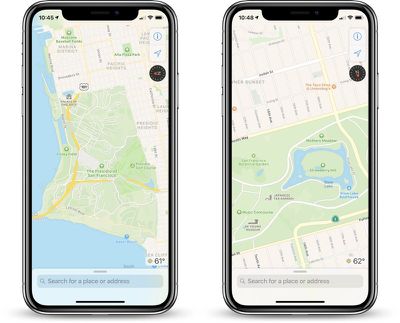
ios12newmapssf
The updated Maps app is available in the Northern California area during beta testing. After iOS 12 launches, Apple will continue rolling out the new maps to additional U.S. locations across late 2018 and 2019.

Tons of other small tweaks and features have been added to iOS 12, so make sure to check out our dedicated roundup for additional detail on what's new in iOS 12.

New betas of upcoming operating system updates always introduce tweaked features and new functionality, and we'll be outlining what's new in the seventh beta below. We also rounded up all of the changes that were introduced in the previous betas: beta 2 and beta 3, beta 4, beta 5, beta 6, and beta 7.

We're on beta 9 rather than beta 8 because Apple last week was forced to release an extra iOS beta to address issues in the seventh beta that were causing slow app launch times.

iOS 12 is available for developers and public beta testers, with a public launch planned for September alongside new iPhones.

What's new in iOS 12 beta 9: According to Apple's release notes, traffic data might not be displayed properly in iOS 12 beta 9. Apple suggests affected customers Tap the ‘i’ button to reveal Maps Settings and toggle the Traffic switch on.

Start and stop times for Downtime might unexpectedly change if they were configured prior to installing the ninth beta, so Downtime start and stop times will need to be reset after updating.

Update: Apple has also made a new beta of iOS 12 available to its public beta testers.

Related Forum: iOS 12

Popular Stories

imac video apple feature

Apple Released Yet Another New Product Today

Friday March 20, 2026 2:39 pm PDT by
Apple has unveiled a whopping nine new products so far this March, including an iPhone 17e, iPad Air models with the M4 chip, MacBook Air models with the M5 chip, MacBook Pro models with M5 Pro and M5 Max chips, the all-new MacBook Neo, an updated Studio Display, a higher-end Studio Display XDR, AirPods Max 2, and now the Nike Powerbeats Pro 2. iPhone 17e features the same overall design as...
ios 26 4 pastel

iOS 26.4: Top 10 New Features Coming to Your iPhone

Friday March 20, 2026 2:44 pm PDT by
iOS 26.4 isn't the major update with new Siri features that we hoped for, but there are some useful quality of life improvements, and a little bit of fun with an AI playlist generator and new emoji characters. Playlist Playground - Apple Music has a Playlist Playground option that lets you generate playlists from text-based descriptions. You can include moods, feelings, activities, or...
iPhone 18 Pro Deep Red Feature

iPhone 18 Pro Launching Later This Year With These 12 New Features

Wednesday March 18, 2026 7:39 am PDT by
While the iPhone 18 Pro and iPhone 18 Pro Max are not expected to launch for another six months or so, there are already plenty of rumors about the devices. It was initially reported that the iPhone 18 Pro models would have fully under-screen Face ID, with only a front camera visible in the top-left corner of the screen. However, the latest rumors indicate that only one Face ID component...

Top Rated Comments

john123 Avatar
99 months ago
do you think its stable enough as a daily driver?
Every single release someone asks this. And every single time, the answer is the same.

Everyone has different ideas and definitions of what "stable enough" means. It's a beta. It will have issues. The final version will (likely) have fewer issues.

If stability is your primary concern, you shouldn't be installing betas. Period. End of story. The sole exception might be if you find your current experience to be so frustratingly unstable that you're willing to potentially trade one set of issues for another—and in the case of iOS 11, that's definitely possible.

For a greater pool to draw feedback? public does not mean stable.
Amen. It's amazing to me how many people don't understand what "beta" really means, so I guess it shouldn't be any more surprising that they're equally clueless about what "public beta" means. Sigh.
[doublepost=1534788108][/doublepost]
Every comment I’ve seen on here says it’s been stable for several betas for now, since this may be the final beta before the GM soon
Bet you dollars to doughnuts it isn't.
Score: 9 Votes (Like | Disagree)
99 months ago
I think it’s funny how so many beta testers on these pages talk about how stable it is. Are you guys using the same beta? Are you not having the settings screen freeze up on you, random app crashes, odd glitches and other issues? Because I sure am. And that’s expected, since it’s a beta.

But for all you testers, what are you even doing that you don’t notice these issues? If you’re not THOROUGHLY putting the software through its paces, you have no right to comment on its stability.
As a Public Beta tester, I feel like my obligation is not to test everything possible, but more so to use the phone as I usually would, and provide feedback on anything issues I face while using the phone normally. Just my opinion :)
Score: 8 Votes (Like | Disagree)
99 months ago
I honestly find it AMAZING how non-developers will install the beta and then complain there are issues. Shocking !!!

A few weeks ago I had just installed one version of the iOS 12 beta that broke the GPS. Which led me to being lost and without a GPS in the middle of a very shady neighborhood at night. But it's my own damn fault for deploying iOS betas on my primary device, not Apple's.
Score: 7 Votes (Like | Disagree)
Bornee35 Avatar
99 months ago
It is stable enough for daily use. That's why they have introduced a 'Public Beta' - confident that the public can use it for daily use.

What else would the public be testing it for?

You developers are stuck in your own little world sometimes
For a greater pool to draw feedback? public does not mean stable.
Score: 7 Votes (Like | Disagree)
99 months ago
I don’t understand many mobile OSes UX/UI. Take iOS for example, why is the web browser address bar at the top like a desktop OS browser, it should be placed at the bottom closer to your thumb/finger(s). The zoom in/out and compass direction on Apple Maps, why is this not placed at the bottom of the screen. Why does it feel that these mobile OS makers are forcing me to exercise my thumb/finger(s) and then produce “solution” such as reachability. Even to view Control Centre on iPhone X at the top right makes a users to needless reach to the top of the screen, while a swipe down to active reachability. How about a swipe down at the bottom of the screen brings up Control Centre. If Ives is designing this UX/UI then he has lost the concept of form and function for design.

I don’t use a phone to exercise my thumb/finger(s), fix this stupidity mobile OS developers. I see Google in Android Pie has relocated the search bar to the bottom, at least their get it. Now make this universal. Basically using desktop OS methods of navigation on a mobile OS. Might as well add mouse support since you are still sticking to the desktop OS design language.
Why would you want static elements at the bottom, where it's easiest to swipe and interact with the page? I scroll using the area near the bottom, and they have many of the quick options towards the bottom. Opening maps, I use the bottom half of the screen to move the map around, double tapping where needed. If you had buttons there, it would remove some valuable interaction space for a part of the UI that is used much less frequently.
Score: 7 Votes (Like | Disagree)
OldSchoolMacGuy Avatar
99 months ago
Installed and functioning fine.
Score: 6 Votes (Like | Disagree)
Related Apple News: Ipad | South Africa | Mac | News | Mac
















