

Apple Releases Third Beta of New watchOS 5 Operating System to Developers

Apple today seeded the third beta of an upcoming watchOS 5 update to developers, two weeks after releasing the second beta and a month after introducing the software at the Worldwide Developers Conference. watchOS 5 is the newest version of the software that runs on the Apple Watch.

To install the beta, you'll need the proper configuration profile, which can be obtained through the Apple Developer Center. Once the profile is in place, the watchOS 5 beta can be downloaded using the dedicated Apple Watch app on the iPhone by going to General --> Software Update.
watchos5roundup
To update, the Apple Watch must have 50 percent battery, it must be placed on an Apple Watch charger, and it must be in range of the iPhone. It would be wise to install the beta on a secondary device instead of a primary device given that this is an early version of the watchOS 5 software that still has bugs to be worked out.

watchOS 5 is a major update to watchOS, introducing Activity Competitions so you can compete on workouts with friends, Walkie-Talkie with push-to-talk functionality for quickly communicating with the people you talk to most, and auto workout detection to make it easier than ever to start and stop workouts.

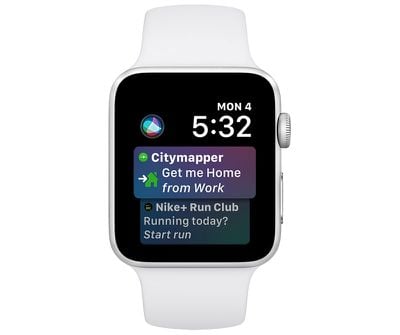
Other new features include an improved Siri watch face with support for third-party apps, a dedicated Apple Podcasts app, new Workout types that include Yoga and Hiking, new features for runners, WebKit support for viewing some web content on Apple Watch, and enhanced notifications, which will make notifications on the Apple Watch interactive.

Early software betas often introduce new functionality, so we'll update this post if anything new is found in the third beta of watchOS 5. The second beta brought full support for the Walkie-Talkie feature, which was unavailable in the first beta.

watchOS 5 is only available to developers and will not be provided to public beta testers (because there's no way to downgrade Apple Watch software), so non-developers will need to wait until the software is officially released in the fall to try it out.

The watchOS 5 update runs on all Series 1, Series 2, and Series 3 Apple Watch models, but it is not available for the first-generation "Series 0" Apple Watch models.

What's new in watchOS 5 beta 3: As of today's beta, the "Raise to Speak" feature that lets you talk to Siri is now working. To use it, make sure Raise to Speak is enabled in the Settings app by going to General --> Siri and toggling it on. From there, you can speak into your wrist to activate Siri without needing to say "Hey Siri." The trick to get it to work seems to be holding it very close to your mouth, but it doesn't always successfully activate.
Related Roundup: Apple Watch 11
Buyer's Guide: Apple Watch (Neutral)

Popular Stories

iOS 26

iOS 26.3 and iOS 26.4 Will Add These New Features to Your iPhone

Tuesday February 3, 2026 7:47 am PST by
We are still waiting for the iOS 26.3 Release Candidate to come out, so the first iOS 26.4 beta is likely still at least a week or two away. Following beta testing, iOS 26.4 will likely be released to the general public in March or April. Below, we have recapped known or rumored iOS 26.3 and iOS 26.4 features so far. iOS 26.3 iPhone to Android Transfer Tool iOS 26.3 makes it easier...
Apple Logo Black

Apple's Next Launch is 'Imminent'

Sunday February 1, 2026 12:31 pm PST by
The calendar has turned to February, and a new report indicates that Apple's next product launch is "imminent," in the form of new MacBook Pro models. "All signs point to an imminent launch of next-generation MacBook Pros that retain the current form factor but deliver faster chips," Bloomberg's Mark Gurman said on Sunday. "I'm told the new models — code-named J714 and J716 — are slated...
iOS 26 Home Feature

Apple Gives Final Warning to Home App Users

Tuesday February 3, 2026 8:55 am PST by
In 2022, Apple introduced a new Apple Home architecture that is "more reliable and efficient," and the deadline to upgrade and avoid issues is fast approaching. In an email this week, Apple gave customers a final reminder to upgrade their Home app by February 10, 2026. Apple says users who do not upgrade may experience issues with accessories and automations, or lose access to their smart...
Aston Martin CarPlay Ultra Screen

Apple's CarPlay Ultra to Expand to These Vehicle Brands Later This Year

Sunday February 1, 2026 10:08 am PST by
Last year, Apple launched CarPlay Ultra, the long-awaited next-generation version of its CarPlay software system for vehicles. Nearly nine months later, CarPlay Ultra is still limited to Aston Martin's latest luxury vehicles, but that should change fairly soon. In May 2025, Apple said many other vehicle brands planned to offer CarPlay Ultra, including Hyundai, Kia, and Genesis. In his Powe...
Apple Foldable Thumb

First Foldable iPhone Design Details Revealed

Monday February 2, 2026 7:19 am PST by
Apple's first foldable iPhone will feature relocated volume buttons, an all-black camera plateau, a smaller Dynamic Island, and more, according to design leaks from a known Weibo leaker. The user known as "Instant Digital" today claimed to share several key details about the design of the foldable iPhone: The volume buttons will be located on the top edge of the device, aligned to the...

Top Rated Comments

newtestleper Avatar
99 months ago
I imagine it's because there aren't many developers who care much about this operating system. I've personally been busy developing all sorts of neat watch faces for Samsung and Fitbit watches, and Pebble before that, because Apple STILL will not let you develop a ****ing WATCH FACE!

Gee, Tim, should I buy this $400 super-computer to wear on my wrist just so I can watch Mickey Mouse spin his arm around and occasionally check my heart rate? Or should I buy this reasonably priced SMART WATCH which I can program to display useful information that I actually want to see AT A GLANCE?
That escalated quickly.

I have to say, I tried three different smart watches (Samsung Gear Sport, Garmin Vivoactive 3 and a Ticwatch) in the month I walked away from the Apple Watch. For the most part, the quality of the third-party watch faces were awful. Back to the Apple Watch I came.
Score: 6 Votes (Like | Disagree)
DavidTheExpert Avatar
99 months ago
Longest ever delay without a comment on one of these things?
I imagine it's because there aren't many developers who care much about this operating system. I've personally been busy developing all sorts of neat watch faces for Samsung and Fitbit watches, and Pebble before that, because Apple STILL will not let you develop a ****ing WATCH FACE!

Gee, Tim, should I buy this $400 super-computer to wear on my wrist just so I can watch Mickey Mouse spin his arm around and occasionally check my heart rate? Or should I buy this reasonably priced SMART WATCH which I can program to display useful information that I actually want to see AT A GLANCE?
Score: 6 Votes (Like | Disagree)
Futhark Avatar
99 months ago
I’ve rebooted my phone and same issue so rebooted the watch and now have it back to the install option but I’m not feeling confident. I’m concerned how poor the AppleWatch Betas are tbh
Score: 2 Votes (Like | Disagree)
tivoboy Avatar
99 months ago
I had all the betas last year for both iOS and WatchOS - boy this thread just reminded me of all the headaches... If WatchOS 5 had some new watch faces I would have made the jump (damn I'm tired of the current ones) but it doesn't so I'll just wait.
It’s funny I just had the same deja vu thought thninking that maybe somehow the forums server has linked the posts from last year to this new thread.

And it’s a holiday as well. Very odd timing for a new drop. I personally know that place is shut down for basically the rest of the week.
Score: 1 Votes (Like | Disagree)
Iogre Avatar
99 months ago
Do we know if the GPS issue was fixed? This issue has been slowly killing me.
Score: 1 Votes (Like | Disagree)
soben Avatar
99 months ago
Any way around the "you are not connected to the internet" message? I've tried rebooting phone + watch, positioning the phone on a Curry line, etc, but to no avail.
as removing beta profile + reboot won't fix this issue, only unpair will bring it back to connect to Internet. but if you install beta profile it will immediately bring back the issue. so I tried this way in 42mm s1 and finally succeeded in upgrading to beta 3: when pair the watch, using recovery to first image of 5 beta 1 and then install beta profile and then uninstall profile, then install beta profile again--this time it can connect to Internet and update will show up.
Score: 1 Votes (Like | Disagree)














