watchOS 5 Beta 2 Includes Functional Walkie-Talkie App - MacRumorsOpen MenuShow RoundupsShow Forums menuVisit ForumsOpen Sidebar
Skip to Content

watchOS 5 Beta 2 Includes Functional Walkie-Talkie App

In the first watchOS 5 beta, the Walkie-Talkie app, which is one of the key new features in the update, was unavailable and said only "Coming Soon," but in the second watchOS 5 beta, the Walkie-Talkie feature is available.

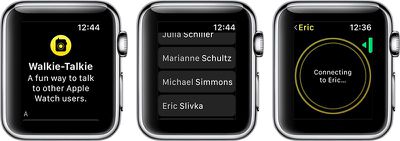
When you launch the Walkie-Talkie app after installing the second beta update, you'll be able to scroll through your contacts and choose a person to connect to. The person on the receiving end of your Walkie-Talkie message will hear their Apple Watch beep and then they'll see a screen that will allow them to approve a connection.
walkietalkieconnection
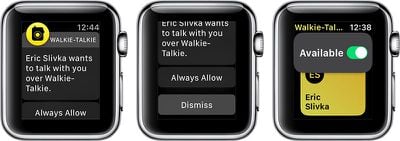
At the current time, it appears that you can only choose "always allow" when opting to enable a connection with a person.

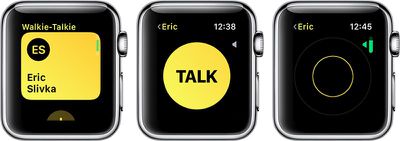
Once a two-way connection is established, you simply press and hold down on the talk button to communicate, as does the person on the other end. Conversations, which we've been testing, are crisp and clear with excellent audio quality.
walkietalkieinuse
If your Apple Watch is on silent mode, Walkie-Talkie ignores it, so you're still going to hear Walkie-Talkie beeps and incoming conversations. The same is true for Do Not Disturb Mode and Theater Mode, but there is a Walkie-Talkie volume toggle accessible by turning the Digital Crown. With a push-to-talk connection turned on, you and the person you're connected to can chat at any time, with no additional approval options available.

You can have multiple Walkie-Talkie conversations going at once, with each conversation listed in the app.
walkietalkieallow
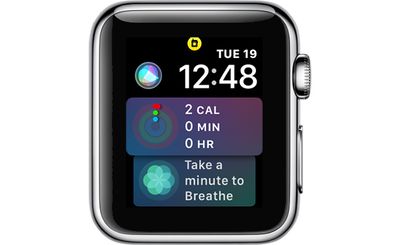
While a Walkie-Talkie conversation is enabled with another person, both of you will see a yellow Walkie-Talkie icon at the top of the Apple Watch.
walkietalkieicon
If you want to mute a Walkie-Talkie conversation so you can no longer be contacted, you can scroll up on the Walkie-Talkie app interface and toggle off the "Available" icon. When unavailable, if someone tries to speak to you, they'll see a message that you are unavailable, and you'll receive a notification.
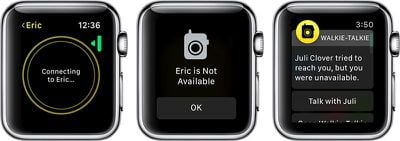
walkietalkieunavailable
If you want to resume your conversations with people, you can turn the toggle back to "Available" and everything will work as normal. Both people in the conversation need to have themselves set to "Available" in the Walkie-Talkie app for it to be fully functional.

Walkie-Talkie and the other watchOS 5 features will be limited to developers until watchOS 5 is released in the fall, as Apple does not provide betas of watchOS to the public.

Related Roundup: Apple Watch 11
Buyer's Guide: Apple Watch (Caution)

Popular Stories

modular ultra training load

watchOS 27 to Offer New Watch Faces, Including 'Modular Ultra' Variant

Monday May 4, 2026 5:58 am PDT by
For watchOS 27, Apple is testing new Apple Watch faces, and one of them is a simpler version of an existing Apple Watch Ultra watch face that could be coming to standard Series models. Writing in his latest Power On newsletter, Bloomberg's Mark Gurman reports that Apple is testing multiple new faces for watchOS 27, code-named "Orchid." One of them is said to be a "simplified take" on the...
Apple Announces 2026 Pride Band Watch Face and iPhone Wallpaper Feature

Apple Announces 2026 Pride Band, Watch Face, and iPhone Wallpaper

Monday May 4, 2026 6:05 am PDT by
Apple today introduced its 2026 Pride Collection, including a new Apple Watch band, watch face, and a matching wallpaper for the iPhone and iPad. Apple said its Pride Collection celebrates LGBTQ+ communities around the world during Pride Month in June and beyond. In addition, the company noted that it is proud to financially support organizations that serve LGBTQ+ communities. The new Pri...
Apple Watch Ultra 2 Black Titanium

watchOS 26.5 Fixes Two Apple Watch Bugs

Tuesday May 5, 2026 7:56 am PDT by
watchOS 26.5 fixes two Apple Watch bugs, according to Apple's release notes for the update, which is expected to be released next week. Apple fixed bugs in the Messages and Workout apps:• Fixes an issue where Messages on Apple Watch may use SMS instead of iMessage when paired with a dual SIM iPhone • Fixes an issue where Workout app audio alerts could fail to play if the phone was not...

Top Rated Comments

Arcus Avatar
104 months ago
Just what we need, another way for "public speakerphone" idiots to annoy everyone around them .
Score: 22 Votes (Like | Disagree)
neoian Avatar
104 months ago

If your Apple Watch is on silent mode, Walkie-Talkie ignores it
Kind of defeats the point of silent mode IMO
Score: 20 Votes (Like | Disagree)
oneMadRssn Avatar
104 months ago
What most people that never used Nextel didn't appreciate was it was extremely low voice latency with the walkie talkie feature. Like, nearly CB radio low latency. This is one of the reason construction guys liked it so much. When operating a crane or loading big heavy things, the delay you get with a cell phone voice call can be too much. When you say stop, you want the other guy to hear it immediately (or as close to immediate as possible). Other than using a CB radio, Nextel was the next best thing.
Score: 14 Votes (Like | Disagree)
RogerWilco Avatar
104 months ago
Why not just phone the person....:confused:
Where is your child-like wonder? We're all just kids inside and this app brings out the best in us. Just think, at the next business meeting you can joke with a pal across the room. Everyone will be in awe at your mastery of this new frontier in social media! Jony, Tim, Phil, you are all on a roll, just keep those winners coming!!
Score: 7 Votes (Like | Disagree)
iTuna Avatar
104 months ago
Enjoy waiting three minutes for the app to load.
Score: 6 Votes (Like | Disagree)
justperry Avatar
104 months ago
Why not just phone the person....:confused:
Score: 6 Votes (Like | Disagree)
Related Apple News: Ipad Pro | Sport | Apple Tv Deals | Microsoft | Rumors