How watchOS 5 Brings Rich Web Content to Messages and Mail on Apple Watch - MacRumorsOpen MenuShow RoundupsShow Forums menuVisit ForumsOpen Sidebar
Skip to Content

How watchOS 5 Brings Rich Web Content to Messages and Mail on Apple Watch

Apple's latest version of watchOS promises to bring rich HTML content to the wrists of Apple Watch users, thanks to new Webkit optimizations that improve apps like Mail and Messages.

Apple expanded on the new WebKit features at a WWDC session, in which it explained to developers how they can optimize web content for viewing on Apple Watch screens.
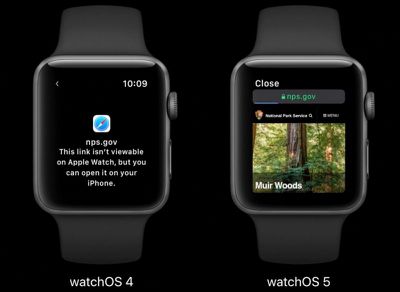
watchos 5 rich html content
Currently in the watchOS Mail app, rich HTML messages are rendered in a text-only format and users are prompted to view the content on another device for the full experience.

Likewise, tapping a URL link received in Mail or Messages directs Apple Watch users to their iPhone to view the web page.

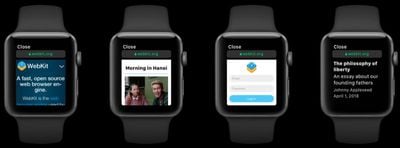
However, in watchOS 5, full HTML emails are capable of being displayed on Apple Watch in cases where text-only formatting can't express the content of the message, and users can also view web page links, as well as interact with them, albeit in a limited way.

For example, turning the Digital Crown on Apple Watch scrolls the HTML content vertically, or users can drag with their finger to move up and down the page, while double-tapping zooms the content in and out, similar to iPhone.

In a Force Touch addition, a firm press on the Apple Watch screen reveals back and forward buttons to navigate through your viewing history (swiping left and right does the same thing).
watchOS 5 rich web content
Apple says it achieved the WebKit optimizations by shrinking the 320-pixel display used by the iPhone SE to fit the 156-pixel width of the Apple Watch display, and then computing the initial scale of the page so that the content width fits within the smaller screen. Basically, this allows text and images to appear smaller while preserving the overall layout of the page.

Apple notes that the optimizations are aimed at quickly consuming content, so some features like video playback and web fonts aren't currently available. However, users will be able to interact with forms within HTML content, and there's also an Safari-like Reader mode, which automatically activates on text-heavy web pages (the Reader Mode option is also accessible via Force Touch, so users can choose to read pages on their watch with extraneous content stripped out).

watchOS 5, due for release in the fall, promises several other improvements and features, including Walkie-Talkie for touch-to-talk communications with friends, automatic workout detection, and updates to the Siri watch face.

Related Roundup: Apple Watch 11
Buyer's Guide: Apple Watch (Neutral)

Popular Stories

imac video apple feature

Apple Released Yet Another New Product Today

Friday March 20, 2026 2:39 pm PDT by
Apple has unveiled a whopping nine new products so far this March, including an iPhone 17e, iPad Air models with the M4 chip, MacBook Air models with the M5 chip, MacBook Pro models with M5 Pro and M5 Max chips, the all-new MacBook Neo, an updated Studio Display, a higher-end Studio Display XDR, AirPods Max 2, and now the Nike Powerbeats Pro 2. iPhone 17e features the same overall design as...
ios 26 4 pastel

iOS 26.4: Top 10 New Features Coming to Your iPhone

Friday March 20, 2026 2:44 pm PDT by
iOS 26.4 isn't the major update with new Siri features that we hoped for, but there are some useful quality of life improvements, and a little bit of fun with an AI playlist generator and new emoji characters. Playlist Playground - Apple Music has a Playlist Playground option that lets you generate playlists from text-based descriptions. You can include moods, feelings, activities, or...
iPhone 18 Pro Deep Red Feature

iPhone 18 Pro Launching Later This Year With These 12 New Features

Wednesday March 18, 2026 7:39 am PDT by
While the iPhone 18 Pro and iPhone 18 Pro Max are not expected to launch for another six months or so, there are already plenty of rumors about the devices. It was initially reported that the iPhone 18 Pro models would have fully under-screen Face ID, with only a front camera visible in the top-left corner of the screen. However, the latest rumors indicate that only one Face ID component...

Top Rated Comments

ArtOfWarfare Avatar
102 months ago
I get the sense that Apple still doesn’t know what they’re doing with the Apple Watch and they’re just throwing ideas at it and seeing what sticks.
Score: 6 Votes (Like | Disagree)
102 months ago
I get the sense that Apple still doesn’t know what they’re doing with the Apple Watch and they’re just throwing ideas at it and seeing what sticks.
They must be doing something right, with its popularity. However, Can you elaborate on this? I mean it’s rather vague what you’re saying. In terms of where watchOS once was and where it is now, how is it “They don’t what they’re doing”? I also think anytime Apple introduces something new, it must have some type of acceptance in order for it to be useful to somebody. I’m not sure how others don’t expect software to expand if they don’t try new things.
[doublepost=1528369066][/doublepost]
Am I the only one that thinks the screen is way too damn small to read an article on a holiday destination as demonstrated?
I just think it’d look really dumb and feel really dumb if you were squinting at this tiny little screen scrolling thru an article.
Just pull out your phone it’d be so much quicker!!.
We know the iPhone would serve a different purpose for a larger display, but Apple Watch is nice because you don’t have to have your iPhone with you all the time to glance at the display to see something and then revert to the iPhone if you want to. OtherWise, it sounds like the Apple Watch isn’t really for you based on your concerns over a small screen, given its alternative functionality.
Score: 5 Votes (Like | Disagree)
Blackstick Avatar
102 months ago
I have this justifiable feeling my Series 1 is going to be dog slow when this rolls around in September.
Score: 5 Votes (Like | Disagree)
macduke Avatar
102 months ago
Can I, as a web developer, set a 156px media query breakpoint to target the Apple Watch specifically or is this an automatically scaling only thing with no way to override it? I can't even test the beta on my Series 0 and won't upgrade until the Series 4 this autumn.

I kind of want to be cheeky and put up a fixed position overlay that says in white on black background: NO.

But in all seriousness though, I feel like some of my designs are robust enough that I could scale the text size up and make it a little more usable with a simple media query. I've often been frustrated when my wife sends me a link to something on my Watch and I can't just tap it to see what it's about really quick. It would be neat if when opening a link you could force touch and bring up a button to send a reminder to your iPhone lock screen that, when tapped, will open up the webpage on the device whenever you get around to it.
Score: 2 Votes (Like | Disagree)
102 months ago
I’m pretty excited to see this myself. I think most of my emails contain HTML and while o don’t want a full desktop experience, right now those emails are impossible to check on the Watch. If this can at least make the more simple ones readable I think it’ll be a great update.
Score: 2 Votes (Like | Disagree)
justiny Avatar
102 months ago
I get the sense that Apple still doesn’t know what they’re doing with the Apple Watch and they’re just throwing ideas at it and seeing what sticks.
I disagree. Apple has dramatically improved the Watch far beyond what we saw with the first generation.

That being said, displaying HTML and web content on a tiny display is not a critical feature. The Watch excels in several different ways, and I’d rather not see Apple stretch certain features beyond its capabilities.

If this destroys the battery life or throttles the performance, the juice isn’t worth the squeeze.
Score: 2 Votes (Like | Disagree)
Related Apple News: Travel | Iphone | Mac | Mac | South Africa