

Adobe Scan Gains Automatic Document Detection, iOS 11 Files Support - MacRumorsOpen MenuShow RoundupsShow Forums menuVisit ForumsOpen Sidebar
Skip to Content

Adobe Scan Gains Automatic Document Detection, iOS 11 Files Support

by

Adobe Scan, Adobe's document scanning app, was today updated with new features that are designed to make it easier to locate and access scans of receipts, documents, and more.
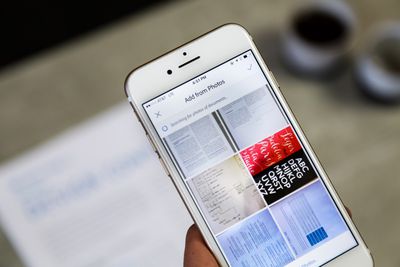
adobescanios
With Adobe Sensei machine learning integration, Adobe Scan is now able to scan the photos in your camera roll to locate all images that appear to be documents, so they can be automatically imported into the Adobe Scan app for storage purposes.


The new feature is designed to make it easier to keep track of all of your receipt and document photos, aggregating them in one place so it's no longer necessary to search through all of your photos to find the relevant images.

There's no longer a need to sift through hundreds or even thousands of images to find what you're looking for. In fact, Adobe Scan is the only free app that automatically searches for documents, receipts, business cards, and more, so that you can find what you need fast.

Along with Adobe Sensei integration, Adobe Scan is being updated with support for the iOS 11 Files app. All Adobe Scan files can be accessed through Files, making document management easier.

There are also new search tools to make it easier to find files by name or date, and Adobe has added improved image cleaning specifically designed to better handle shadows and folds for clearer scans.

Adobe Scan can be downloaded from the App Store for free. [Direct Link]

Tag: Adobe

Top Rated Comments

111 months ago
I’m a big fan of Scanner Pro. Anyone have experience with both and can do a comparison?
Score: 3 Votes (Like | Disagree)
Awesome discussion Avatar
111 months ago
Scanner Pro is definitly the way to go. Adobe Scan does nothing but take a picture and cut it and a little bit ocr. the major downside is: adobe requrires you to sign in and every document will be uploaded to their cloud. you cant turn this off.
Score: 2 Votes (Like | Disagree)
98 others Avatar
111 months ago
I’m a big fan of Scanner Pro. Anyone have experience with both and can do a comparison?
Same. Would a love a comparison if anyone has used both.
Score: 2 Votes (Like | Disagree)

Popular Stories

Apple Event Logo

Apple Just Released a New Accessory

Monday May 4, 2026 8:13 am PDT by
Apple today released a new Pride Edition Sport Loop for the Apple Watch. The band features a rainbow design with 11 colors of woven nylon yarns. The new Pride Edition Sport Loop is available to order now on Apple.com and in the Apple Store app in 40mm, 42mm, and 46mm sizes, and it will be available at Apple Store locations starting later this week. In the U.S., the band costs $49. There...
iOS 27 on iPhone 17 1

iOS 27 Will Add These New Features to Your iPhone

Saturday May 2, 2026 8:43 am PDT by
Apple is expected to unveil iOS 27 during its WWDC 2026 keynote on June 8, and there are already many rumored features and changes for iPhones. The first developer beta of iOS 27 will likely be available immediately following the keynote, and a public beta typically follows in July. Following beta testing, the software update should be released to all users with a compatible iPhone in...
Apple Announces 2026 Pride Band Watch Face and iPhone Wallpaper Article 2

iOS 26.5 Coming Soon With These New Features

Monday May 4, 2026 8:40 am PDT by
iOS 26.5 is expected to be released next week, following more than a month of beta testing. The update is relatively minor, but there are a couple of new features and changes across the operating system that we have recapped below. iOS 26.5 lays the groundwork for end-to-end encryption for RCS in the Messages app and ads in the Apple Maps app, and it will include a new Pride wallpaper and a...
Related Apple News: Local News | News | Opinion | Technology | Iphone

















