Apple Releases Second Public Beta of iOS 11.2 for Public Beta Testers - MacRumorsOpen MenuShow RoundupsShow Forums menuVisit ForumsOpen Sidebar
Skip to Content

Apple Releases Second Public Beta of iOS 11.2 for Public Beta Testers

Apple today released the second public beta of iOS 11.2 to its public beta testing group, one week after releasing the first public beta and a little over a week after the release of iOS 11.1, the first major update to the iOS 11 operating system.

Beta testers who are members of Apple's beta testing program will receive the iOS 11.2 beta update over-the-air after installing the proper certificate on an iOS device.
ios11
Those who want to join the beta testing program can sign up on Apple's beta testing website, which gives users access to iOS, macOS, and tvOS betas. iOS betas are not always stable and should not be installed on a primary device.

Apple is allowing public beta testers to test Apple Pay cash starting with today's iOS 11.2 beta. iOS 11.2 beta 2 also fixes an autocorrect bug plaguing many people. The bug autocorrects the letter "i" to "A[?]." Apple has recommended a temporary workaround in the form of a Text Replacement, but the problem will be fixed for good once iOS 11.2 is released.

iOS 11.2 fixes an animation bug in the Calculator app that caused some numbers and symbols to be ignored when entered in rapid succession. The update removes the animations from the calculator app so calculations can be done quickly with no need to pause between entering numbers to obtain the correct result.

In addition to the Calculator bug, iOS 11.2 introduces a new Now Playing option for controlling content on the Apple TV in Control Center, redesigned camera emoji, and a new loading animation for Live Photos effects.


Related Forum: iOS 11

Popular Stories

iOS 27 on iPhone 17 1

iOS 27 Will Add These New Features to Your iPhone

Saturday May 2, 2026 8:43 am PDT by
Apple is expected to unveil iOS 27 during its WWDC 2026 keynote on June 8, and there are already many rumored features and changes for iPhones. The first developer beta of iOS 27 will likely be available immediately following the keynote, and a public beta typically follows in July. Following beta testing, the software update should be released to all users with a compatible iPhone in...
Apple MacBook Pro M4 hero

Why You Might Want to Wait to Buy a MacBook Pro

Friday May 1, 2026 3:43 pm PDT by
Apple refreshed the 14-inch and 16-inch MacBook Pro with M5 Pro and M5 Max models in March 2026, but depending on your needs and interests, you might want to skip this generation because there's something better in the works. The M5 Pro and M5 Max MacBook Pro models have faster chips, but the same design that Apple has used since 2021. An updated design with new display technology and faster ...
Apple Event Logo

Apple Just Released a New Accessory

Monday May 4, 2026 8:13 am PDT by
Apple today released a new Pride Edition Sport Loop for the Apple Watch. The band features a rainbow design with 11 colors of woven nylon yarns. The new Pride Edition Sport Loop is available to order now on Apple.com and in the Apple Store app in 40mm, 42mm, and 46mm sizes, and it will be available at Apple Store locations starting later this week. In the U.S., the band costs $49. There...

Top Rated Comments

newjerseydamo Avatar
111 months ago
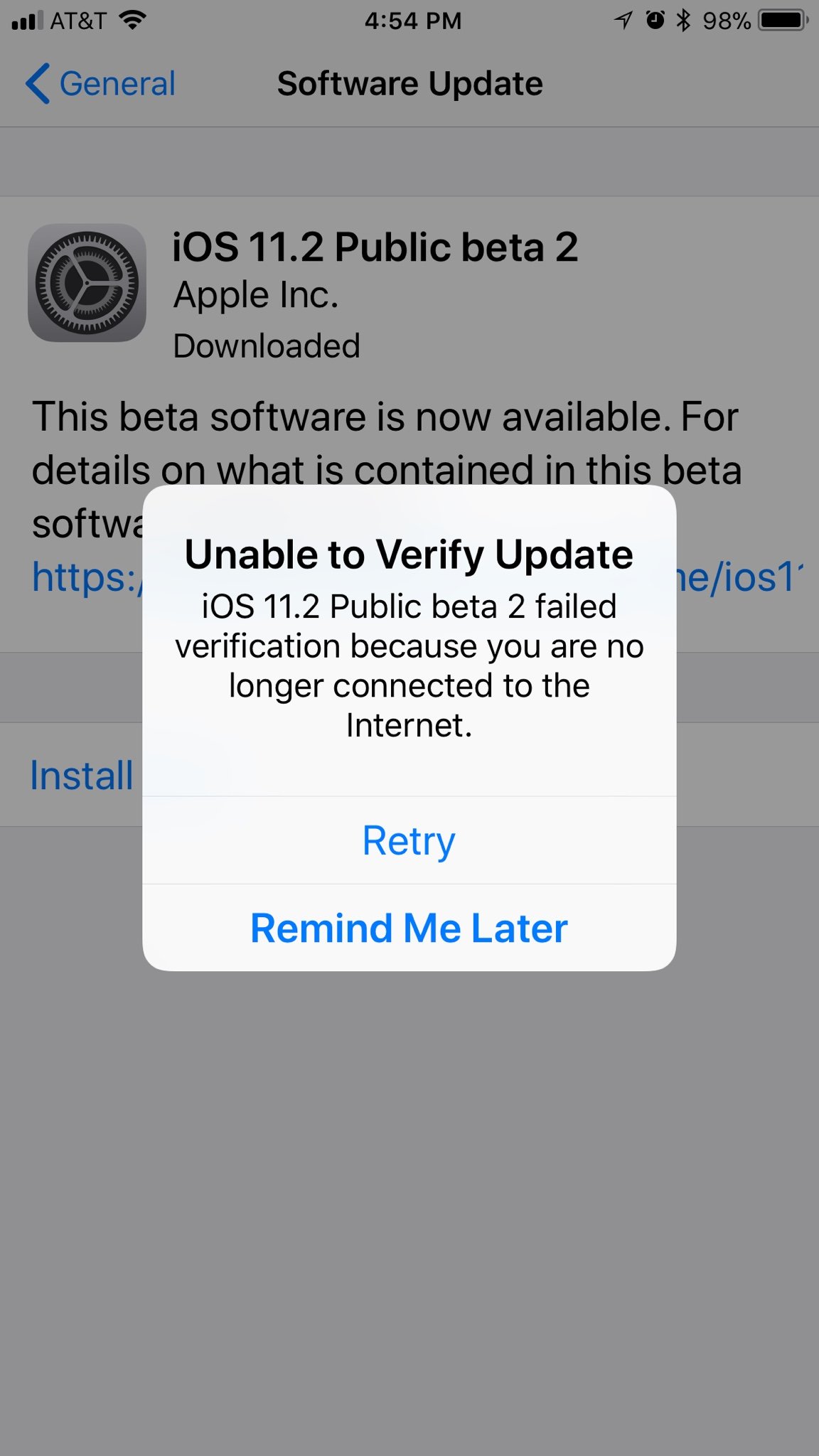
Getting an unable to verify message.
Thinks I'm not connected to the internet.

IPhone 7+.
Score: 13 Votes (Like | Disagree)
Nick Bedsole Avatar
111 months ago
Apple today released the second public beta of iOS 11.2 to its public beta testing group, one week after releasing the first public beta ('https://www.macrumors.com/2017/11/01/apple-first-ios-11-2-public-beta/') and a little over a week after the release of iOS 11.1 ('https://www.macrumors.com/2017/10/31/apple-releases-ios-11-1-with-new-emoji/'), the first major update to the iOS 11 operating system.

Beta testers who are members of Apple's beta testing program will receive the iOS 11.2 beta update over-the-air after installing the proper certificate on an iOS device.


Those who want to join the beta testing program can sign up on Apple's beta testing website, which gives users access to iOS, macOS, and tvOS betas. iOS betas are not always stable and should not be installed on a primary device.

Apple is allowing public beta testers to test Apple Pay cash starting with today's iOS 11.2 beta. iOS 11.2 beta 2 also fixes an autocorrect bug ('https://www.macrumors.com/2017/11/07/fix-autocorrect-bug-developer-beta/') plaguing many people. The bug autocorrects the letter "i" to "A[?]." Apple has recommended a temporary workaround ('https://www.macrumors.com/2017/11/06/apple-workaround-for-autocorrect-bug-ios/') in the form of a Text Replacement, but the problem will be fixed for good once iOS 11.2 is released.

iOS 11.2 fixes an animation bug in the Calculator app that caused some numbers and symbols to be ignored when entered in rapid succession. The update removes the animations from the calculator app so calculations can be done quickly with no need to pause between entering numbers to obtain the correct result.

In addition to the Calculator bug, iOS 11.2 introduces a new Now Playing option for controlling content on the Apple TV in Control Center, redesigned camera emoji, and a new loading animation for Live Photos effects.

Article Link: Apple Releases Second Public Beta of iOS 11.2 for Public Beta Testers ('https://www.macrumors.com/2017/11/07/apple-releases-ios-11-2-public-beta/')
I can't update. I tap the "Download and Install" button, and it just goes back to blue, and nothing happens. Thoughts?
I’ve downloaded the update but it tells me that it cannot be verified due to my WiFi not working correctly. I tested it with safari and it worked. I then disconnected my phone from the internet, forgot the network and put the password back in. It still isn’t working.
Score: 7 Votes (Like | Disagree)
newjerseydamo Avatar
111 months ago
Restarting my phone, deleting and downloading the update again, and even resetting my network settings have not fixed the problem of the update not verifying.
It's not my end that's the issue.
Score: 3 Votes (Like | Disagree)
MozMan68 Avatar
111 months ago
Would be nice to install it if I could get past this...


I could have sworn those three little bars up there meant I was connected...[emoji849]
Score: 2 Votes (Like | Disagree)
111 months ago
How do you delete the download? I OTA’d it on my 8 and Air 2, can’t verify either. UK based.
Found it.

https://support.apple.com/en-us/HT201435

But I don't think that it matters. I think that who managed to get verified just lucked out to get into the Apple servers that must be dysfunctional for some reason
Score: 2 Votes (Like | Disagree)
newjerseydamo Avatar
111 months ago
That's usually fixed by a hard reset. My phone won't even download the update.
Tried that too.
Still won't verify. Something wrong on Apple's end.
Score: 2 Votes (Like | Disagree)
Related Apple News: Culture | South Africa | Ipad | Iphone | Politics