PSA: Your Older 32-Bit Apps Won't Launch After Installing iOS 11 - MacRumorsOpen MenuShow RoundupsShow Forums menuVisit ForumsOpen Sidebar
Skip to Content

PSA: Your Older 32-Bit Apps Won't Launch After Installing iOS 11

When millions of iPads and iPhones are updated to iOS 11 on September 19, older 32-bit apps that have not been updated with iOS 11 support will no longer launch.

If you attempt to open one of these 32-bit apps, iOS 11 will refuse to open it and will offer up a message that says the app needs to be updated to work with the new operating system.

You're also not going to find 32-bit apps available when searching in the new App Store, nor can previously downloaded 32-bit apps be installed through the Purchased tab.
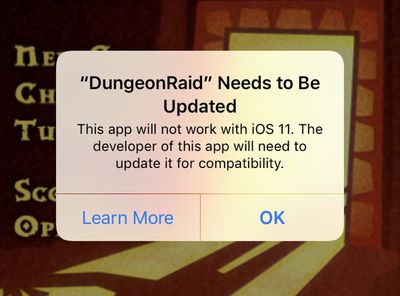
32bitappios11
Apple has not widely publicized the imminent lack of support for 32-bit apps, so when older apps stop working tomorrow, it could come as a shock to the users who are still have them installed and use them regularly.

Apple has, however, attempted to warn customers. Starting with the launch of iOS 10.1 in October of 2016, when launching a 32-bit app, Apple informed customers that older apps "may slow down your iPhone." As of iOS 10.3, a more explicit message has been provided: "This app will not work with future versions of iOS."

Customers who have paid attention to these warnings may not be as surprised, but not everyone may have seen or read the warnings.

Apple began transitioning to 64-bit apps when the iPhone 5s launched in September of 2013. All apps and app updates have been required to use 64-bit architecture since June of 2015, so all apps that are 32-bit have not been updated for at least two years.

Many app developers have gone back and added 64-bit support to older apps, but there are still bound to be many apps that lack support.

Current iOS 10 users can check to see if there are any 32-bit apps on their iOS devices in the Settings app. Go to General --> About --> Applications to see the "App Compatibility" section that lists any outdated apps.

iOS 11 is only compatible with devices that feature a 64-bit chip, meaning it works with everything that has an A7 or newer chip. Specifically, iOS 11 is compatible with iPhone 5s, SE, 6 Plus, 6, 6s Plus, 6s, 7 Plus, and 7, along with the new fifth-generation iPad, the iPad Air, the iPad Air 2, all iPad Pro models, the iPad mini 2 and later, and the 6th generation iPod touch.

Customers on older devices like the iPhone 5 and 5c that can't install iOS 11 will not be affected.

Related Forum: iOS 11

Popular Stories

iOS App Store General Feature Desaturated

Apple Removes Freecash App From App Store After Months of Data Harvesting

Tuesday April 14, 2026 3:54 pm PDT by
Apple removed scam app Freecash from the App Store this week after the app spent months harvesting data from iPhone users, reports TechCrunch. Freecash reached the number two spot on the U.S. App Store charts in January after being heavily marketed on TikTok. It promised users up to $35 per hour for watching TikTok content, but it was collecting swaths of user data. Back in January, Wired...
grok logo purple gradient

Apple Threatened to Pull Grok From App Store Over Sexualized Images

Wednesday April 15, 2026 7:10 am PDT by
Apple privately warned Elon Musk's xAI company in January that it would remove the Grok app from the App Store unless the company put a stop to the chatbot's nude and sexualized deepfakes, according to a letter Apple sent to U.S. senators and obtained by NBC News ($). Earlier this year, Grok's AI capabilities came under scrutiny after X users shared nonconsensual sexualized images of women...
iOS App Store General Feature Dock

Apple Quietly Tweaked the iOS App Store App – Here's What's Changed

Friday April 17, 2026 2:32 am PDT by
No, you aren't going crazy – Apple has quietly made a backend change to the App Store app in iOS that switches the location of the Updates tab and renames it to make it more prominent. In the App Store app, you can see the change by tapping your profile picture in the top-right corner. The "Apps & Purchase History" tab used to be at the top the list, but it has switched places with...

Top Rated Comments

Robot Overlord Avatar
113 months ago
No this is apple turning off apps. They don't need to do this, let users make their own minds up - it's our devices, our choice.
Yup, so you can make the choice not to update your device.
Score: 61 Votes (Like | Disagree)
113 months ago
Let the complaints roll in.... People are going to start bitching about how Apple should still be supporting 32bit Applications... Just FYI, Apple has given developers plenty of notice about this change and the need for App updates....
Score: 40 Votes (Like | Disagree)
im_to_hyper Avatar
113 months ago
Sounds more like an issue developers need to get sorted out ASAP.
Score: 35 Votes (Like | Disagree)
azentropy Avatar
113 months ago
Sounds more like an issue developers need to get sorted out ASAP.
Current developers are already on top of current apps. The issue is for older and abandoned apps. Lots of older games I really still enjoy no longer will work and don't have much chance of every being updated.
Score: 23 Votes (Like | Disagree)
TMRJIJ Avatar
113 months ago
No this is apple turning off apps. They don't need to do this, let users make their own minds up - it's our devices, our choice.
Their OS, their choice.
Don’t update to iOS 11 if you really need those apps.
Score: 19 Votes (Like | Disagree)
AFEPPL Avatar
113 months ago
No this is apple turning off apps. They don't need to do this, let users make their own minds up - it's our devices, our choice.
Score: 18 Votes (Like | Disagree)
Related Apple News: South Africa | Opinion | Iphone | Travel | Culture