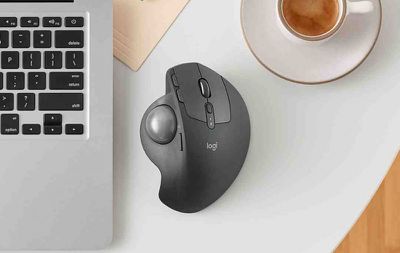
Logitech resurrected the trackball device today with its announcement of the MX ERGO, which the company is calling its "first new innovative trackball in nearly a decade".

Pitched to consumers looking for alternatives to mice and touchpads, the Bluetooth-based MX ERGO features an adjustable metal hinge with angle options at either zero or 20 degrees for personalizing the comfort level, which improves wrist posture and pronation, according to Logitech.
mx ergo instagram

"We are so excited by this new trackball. It is back, better than ever and the idea for this trackball innovation was inspired by our users, who invented creative ways to achieve their desired level of comfort, sometimes adding additional wedges under their trackball for elevated angles," said Anatoliy Polyanker, global portfolio and brand director at Logitech. "The MX ERGO is our first adjustable trackball that delivers on the need for elevated comfort in a beautiful design."

The sculpted shape is designed to offer full palm and finger support, with a soft rubber on top for a comfortable grip over many hours of work. An LED light indicates when "precision mode" is activated using the dedicated button on the side of the MX ERGO. This special mode is said to allow the user to instantly change cursor speed and accuracy.

The device also supports multi-device connectivity through Logitech's Easy-Switch and Logitech Flow software, which allows users to seamlessly switch between two computers with one mouse, as well as copy and paste content, images and documents between them.


The rechargeable battery lasts up to four months on a full charge, depending on usage, and Logitech reckons the MX ERGO can give a complete day of work with just one minute of charge if the device is low on power.

The Logitech MX ERGO is priced at $99.99 and should be available to buy on the Logitech website and select retail stores throughout the U.S. in September.


Top Rated Comments

arubinst Avatar
110 months ago
I had one of those about 20 years ago.

It was really fantastic. It was so much better compared to a mouse! So comfortable to use and precision was great.

I had to remove the ball once every couple of weeks to clean it up, and to clean up the sensors, but it then went back to being buttery smooth and extremely precise.

If it weren't for the multitouch gestures that I have grown accustomed to using a trackpad, I would buy one of these without hesitation.
Score: 5 Votes (Like | Disagree)
pdaholic Avatar
110 months ago
This makes me wanna play a game of Missle Command. Or centipede.
Score: 4 Votes (Like | Disagree)
MikhailT Avatar
110 months ago
This is awesome news. Trackballs oblivates my RSI/CTS issues and Logitech m570 was the first one I bought. I’ve switched to CST’s L-Trac 2545w trackball and it’s the best one so far with an actual smooth wheel that no trackball had.
Score: 4 Votes (Like | Disagree)
Pilgrim1099 Avatar
110 months ago
I know plenty of creatives that swear by trackballs. I don't get it, either, but choice is a great thing. ‍♂️
For a good reason, creatives like trackballs due to precision when creating paths on Adobe Illustrator ( or any other vector app ), page layout, image editing, etc. You can't do that with a Magic Trackpad from Apple which feels weird. With a trackball mouse, you have analog control using your fingers and can program any custom buttons on it ( if any ) to your whim for shortcuts. And trackball mice keeps your hand rested while using your thumb as you use the other finger for 'right click' functions, or scrolling.

I had the original Magic Mouse when it came with my iMac and it broke down eventually. I stopped using it after getting hand cramps trying to do page layout and design-related projects. I switched to a full trackball mice and it was a godsend. My cramps and RSI went away since then.

I will never, ever touch an Apple produced mice or trackpad again unless they get their act together and go back to proper ergonomic design. They may look nice in appearance but how they function isn't really practical. It may be a lot of fun to use multi-touch on the trackpad for iMac but in the end, using, say, Photoshop with it doesn't seem effective at all. You have to use an ergonomic mice/trackball and/or a Wacom tablet for precision work.
Score: 3 Votes (Like | Disagree)
Keebler Avatar
110 months ago
I had one of those about 20 years ago.

It was really fantastic. It was so much better compared to a mouse! So comfortable to use and precision was great.

I had to remove the ball once every couple of weeks to clean it up, and to clean up the sensors, but it then went back to being buttery smooth and extremely precise.

If it weren't for the multitouch gestures that I have grown accustomed to using a trackpad, I would buy one of these without hesitation.
Yup!

I still use an M570 after switching to trackballs due to the start of wrist issues. None since.
The only complaint is that the bluetooth connectivity is wonky. I have stuttering issues or a real connection loss for a few seconds. I'm on Yosemite so maybe that's the problem. I do notice more after my Mac goes to sleep.

I keep wanting to switch to my trackpad which I rarely use, but i don't like how my wrist sits with it. I should give it a shot.

Cheers,
Brian
Score: 3 Votes (Like | Disagree)
mochatins Avatar
110 months ago
I LOVE my Logitech M570 and when the scroll wheel button dies (again) I will upgrade to this.

For those who don't know, here's what's awesome about this beloved device, which I hope the new controller lives up to:
[LIST=1]
* Superior ergonomics. Vastly better than mice or trackpads. It's the only thing that keeps my right-hand RSI at bay. Once you learn to use a thumb trackball, you will not go back to anything else.
* Amazing connectivity. At least in the M570, it uses a custom Logitech dongle that is far better than Bluetooth. Connects instantly, stays connected. (Incidentally the same dongle also connects to my Logitech solar-powered Mac keyboard, with its number keypad. Never needs charging, always a full battery even in part shade.)
* Amazing battery life. One AA is good for many months' use.
* Flexibility: I map the forward & back buttons to Mission Control & Dashboard, with BetterTouchTool. For good measure I keep an older Apple trackpad for my left hand to use for gestures.

Logitech's keyboards & controllers are the best on the market, bar none. Looking forward to this!
Score: 3 Votes (Like | Disagree)

Popular Stories

Aston Martin CarPlay Ultra Screen

Apple's CarPlay Ultra to Expand to These Vehicle Brands Later This Year

Sunday February 1, 2026 10:08 am PST by
Last year, Apple launched CarPlay Ultra, the long-awaited next-generation version of its CarPlay software system for vehicles. Nearly nine months later, CarPlay Ultra is still limited to Aston Martin's latest luxury vehicles, but that should change fairly soon. In May 2025, Apple said many other vehicle brands planned to offer CarPlay Ultra, including Hyundai, Kia, and Genesis. In his Powe...
Apple Logo Black

Apple's Next Launch is 'Imminent'

Sunday February 1, 2026 12:31 pm PST by
The calendar has turned to February, and a new report indicates that Apple's next product launch is "imminent," in the form of new MacBook Pro models. "All signs point to an imminent launch of next-generation MacBook Pros that retain the current form factor but deliver faster chips," Bloomberg's Mark Gurman said on Sunday. "I'm told the new models — code-named J714 and J716 — are slated...
Apple MacBook Pro M4 hero

New MacBook Pros Reportedly Launching Alongside macOS 26.3

Sunday February 1, 2026 5:42 am PST by
Apple is planning to launch new MacBook Pro models with M5 Pro and M5 Max chips alongside macOS 26.3, according to Bloomberg's Mark Gurman. "Apple's faster MacBook Pros are planned for the macOS 26.3 release cycle," wrote Gurman, in his Power On newsletter today. "I'm told the new models — code-named J714 and J716 — are slated for the macOS 26.3 software cycle, which runs from...
iOS 26

iOS 26.3 and iOS 26.4 Will Add These New Features to Your iPhone

Tuesday February 3, 2026 7:47 am PST by
We are still waiting for the iOS 26.3 Release Candidate to come out, so the first iOS 26.4 beta is likely still at least a week or two away. Following beta testing, iOS 26.4 will likely be released to the general public in March or April. Below, we have recapped known or rumored iOS 26.3 and iOS 26.4 features so far. iOS 26.3 iPhone to Android Transfer Tool iOS 26.3 makes it easier...
14 inch MacBook Pro Keyboard

Apple Changes How You Order a Mac

Saturday January 31, 2026 10:51 am PST by
Apple recently updated its online store with a new ordering process for Macs, including the MacBook Air, MacBook Pro, iMac, Mac mini, Mac Studio, and Mac Pro. There used to be a handful of standard configurations available for each Mac, but now you must configure a Mac entirely from scratch on a feature-by-feature basis. In other words, ordering a new Mac now works much like ordering an...