

 Mozilla yesterday announced the release of Firefox 54 web browser with new multi-process architecture that promises to make browsing with multiple tabs open faster and more stable, especially on computers with 8GB of memory or less.
With the latest release, Firefox uses up to four processes to run web page content across all open tabs. This means that a heavy, complex web page in one tab has a much lower impact on the responsiveness and speed of other tabs, according to Mozilla:
The old Firefox used a single process to run all the tabs in a browser. Modern browsers split the load into several independent processes. We named our project to split Firefox into multiple processes 'Electrolysis' (or E10s) after the chemical process that divides water into its core elements. E10s is the largest change to Firefox code in our history. Besides running faster and crashing less, E10S makes websites feel more smooth. Even busy pages, like Facebook newsfeeds, spool out smoothly and cleanly.
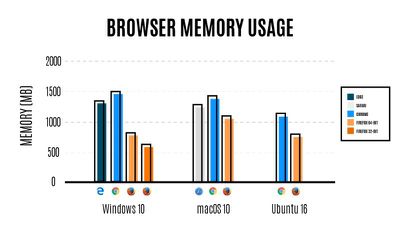
In Mozilla's own tests comparing memory usage for various browsers, it claimed that Firefox used significantly less RAM in macOS than both Safari and Chrome. The group has published an article on Medium explaining how the new E10s architecture works.
In one section titled "Why Chrome gets too hot when Firefox does not", Mozilla writes that Chrome's method of creating separate processes for each open tab can end up with each one consuming hundreds of megabytes of RAM, whereas Firefox reuses processes and content engines to limit memory usage.
By default, Firefox now creates up to 4 separate processes for web page content. So, your first 4 tabs each use those 4 processes, and additional tabs run using threads within those processes. Multiple tabs within a process share the browser engine that already exists in memory, instead of each creating their own.
Mozilla claims that Firefox's considerate memory usage means users with 8GB of memory or less can browse the web without the browser hogging resources, allowing them to do other things on their computer. Meanwhile, users with more than 8GB of RAM can bump up the number of content processes that Firefox uses to make it even faster.
To change the number of content processes Firefox uses, enter about:config in your address bar, and adjust the number for the dom.ipc.processCount setting (we'll be exposing a visible preference for this in an upcoming release).
Users can test out the claims by downloading Firefox 54 for free from the Mozilla website.






















Top Rated Comments
For those interested here is a plug-in compatibility checker for Firefox. If the Firefox installation detects that one of your plugins isn't multi-process compatible it won't enable multi-processing for Firefox on your Mac.
https://addons.mozilla.org/en-US/firefox/addon/add-on-compatibility-reporter/
Adblock and Ghostery were okay for me - but the User Agent Switcher was not, part of Firefox (so I can run more than one instance of Firefox on my OS X desktop with different settings - i.e. different users).
Checking "about:config" in the address bar (say Yes), then go to "dom.ipc.processCount" in the address bar to see how many multiprocess threads you're allocated. Should be 4 if everything is good.
Because of my OSX User Agent Switcher conflict I only have 1 for my processCount. The Windows version of task switcher is compatible, BTW. Mozilla needs to update the OS X version (and probably Linux - they often share alot of code) of the User Agent Switcher to be compatible as well.
Safari uses a little bit more of memory, but when you scroll, it's already rendered while on Firefox you have to wait...
Safari is better, also much better performance in JavaScript.
If that's the case, then Firefox's memory usage on it is a non-issue, since it's not "a Mac" and therefore won't run the "Mac" version of Firefox.
Also, those are iMacs, not Macs. That's how it works, right?
I guess the Mac Pro is also not "a Mac", even though its name suggest it's a Pro version of a Mac.
Please inform Apple, as their website's "Mac" header ('https://www.apple.com/mac/') is apparently wrong.
When I buy "a Mac" in your world, which model do I get?
Even seemingly static websites have become more complex than most local apps we're running. However, while Activity Indicator clearly shows wasteful apps, wasteful websites are hidden behind fat browser processes, so nobody in the industry optimizes their web site for RAM usage.
Browser tabs are literally taking hundreds of megabytes. (I'm looking at you Slack!)
At the same time, websites keep insisting on opening links in new tabs, so unless you constantly clean up behind yourself, you'll quickly find yourself with dozens of open tabs.
Go ahead and checkout how much your browser is really using. Chances are, you'll be surprised. (Use "View > All Processes, Hierarchically" to see all additional processes)