

Quicken for Mac 2017 Gains Auto Backup and Other Features in New Update - MacRumorsOpen MenuShow RoundupsShow Forums menuVisit ForumsOpen Sidebar
Skip to Content

Quicken for Mac 2017 Gains Auto Backup and Other Features in New Update

by

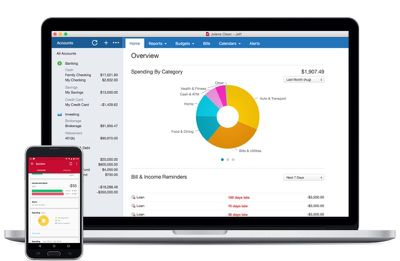
Finance and budgeting software Quicken for Mac was updated to version 4.4 this week, adding a handful of useful new features ranging from auto backup to improvements to summary reports.

With Auto-Backup, Quicken will back up five files at a time to a user-set location whenever someone logs out of the app, preventing data from being accidentally lost. A new Transaction Sidebar indicator has been added, which highlights all accounts that have new transactions when connected accounts are refreshed.
quickenformac2017
Comparison and summary reports can be exported or copied to a spreadsheet for printing or data analysis, and there's a new Total column in the summary report. New report comparison customization options make it easier to compare the current period with previous periods on a quarterly or monthly basis.

First released in October, Quicken 2017 features a new interface, a range of custom report options, and Quicken Bill Pay for paying for bills directly within the app.

Quicken for Mac 2017 can be downloaded from the Quicken website or from the Mac App Store for $74.99. [Direct Link]


Tag: Quicken

Top Rated Comments

veggiespam Avatar
121 months ago
Cool. Quicken added that "five-file-backup" thing like my copy of Quicken '97 currently does. Awesome.
Score: 6 Votes (Like | Disagree)
blue22 Avatar
121 months ago
No thanks Quicken, I'll stick with Banktivity (formerly "iBank"), they've been doing great by me for years.

Sure, it's may not be "perfect" in every way (and what personal finance app truly is?) but unlike with Quicken for the Mac, I can at least trust Banktivity to not ditch the platform for a decade, then come back with some weak-sauce port of their PC version and claim like "all is good for Mac users" while charging a premium for a half-featured product. Sooooo, I'll pass...
Score: 3 Votes (Like | Disagree)
rtrueman Avatar
121 months ago
I stayed on Quicken for Windows for years, running Parallels. I decided to become a beta tester for Quicken 2016 for Mac and really started liking the new product (strictly volunteering my time - there's no compensation for beta testing, although I did "win" a copy of 2016). I can tell you, the (formerly) Intuit Mac team was VERY committed to the product and I started using 2016 Mac as my only version of Quicken. I've no regrets making the switch. Quicken 2017 for Mac is even better and I gladly paid for the upgrade. It may not be for everyone, but they do have a decent return policy that I've used after purchasing a previous version years back.
Score: 3 Votes (Like | Disagree)
3587 Avatar
121 months ago
This or iBank? I'm a pretty big fan of iBank after Quicken deserted us back in the day.
Score: 3 Votes (Like | Disagree)
thisisnotmyname Avatar
121 months ago
Paid posting?
Score: 3 Votes (Like | Disagree)
121 months ago
It's not as bad as you might think. I was able to export as a QIF out of Banktivity, then import that into Quicken. The export and import took minutes to complete.

I then chose to clean up the categories (and switch them over to Quicken's default categories), but that's optional. That's the only part that took quite a while, but that's also because the person that I was helping was lousy at categorizing stuff (and iBank/Banktivity didn't help in the least... it screwed up payee names and assigned stupid categories all over the place.)
I couldn't agree more. I tried Banktivity for 1.5 years. It just never worked right. I spent more time fighting it than using it, and their customer service was... well, lets just say they just were not a viable option. I switched to Quicken 17 a few months back -- it took all of 10 minutes to x-fer all info -- and it has been one of the best decisions. It is SOOOO much better to the point that I'm embarrassed I didn't do this sooner. I too, decided to clean up all the weird categories Banktivity generated (as previous poster noted, this is optional... for the "clean data" freaks out there like me). Took some time, but now all my reports and data from Quicken is clean, concise, and accurate. I can account for every penny that moves anywhere.
Score: 2 Votes (Like | Disagree)

Popular Stories

imac video apple feature

Apple Released Yet Another New Product Today

Friday March 20, 2026 2:39 pm PDT by
Apple has unveiled a whopping nine new products so far this March, including an iPhone 17e, iPad Air models with the M4 chip, MacBook Air models with the M5 chip, MacBook Pro models with M5 Pro and M5 Max chips, the all-new MacBook Neo, an updated Studio Display, a higher-end Studio Display XDR, AirPods Max 2, and now the Nike Powerbeats Pro 2. iPhone 17e features the same overall design as...
iPhone 18 Pro Deep Red Feature

iPhone 18 Pro Launching Later This Year With These 12 New Features

Wednesday March 18, 2026 7:39 am PDT by
While the iPhone 18 Pro and iPhone 18 Pro Max are not expected to launch for another six months or so, there are already plenty of rumors about the devices. It was initially reported that the iPhone 18 Pro models would have fully under-screen Face ID, with only a front camera visible in the top-left corner of the screen. However, the latest rumors indicate that only one Face ID component...
ios 26 4 pastel

iOS 26.4: Top 10 New Features Coming to Your iPhone

Friday March 20, 2026 2:44 pm PDT by
iOS 26.4 isn't the major update with new Siri features that we hoped for, but there are some useful quality of life improvements, and a little bit of fun with an AI playlist generator and new emoji characters. Playlist Playground - Apple Music has a Playlist Playground option that lets you generate playlists from text-based descriptions. You can include moods, feelings, activities, or...
Related Apple News: South Africa | Apple Watch Live Activities Fix | Studio Display Vs Studio Display Xdr Buyers Guide | Lawsuit | Iphone Fold
















