German developers The Soulmen today released a new version of popular writing app Ulysses, bringing Touch Bar support, Tabs in macOS Sierra, and a host of other new features and performance improvements.

From Wednesday, users launching version 2.7 of the award-winning app on Touch Bar equipped MacBook Pros will see new contextual functions for Ulysses in the OLED strip, bringing the ability to assign markup tags directly while they write.
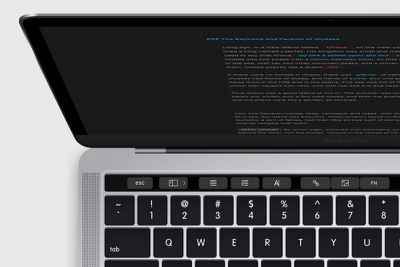
macbook_touchbar ulysses
Ulysses 2.7 now also includes tabbed windows in macOS Sierra, making it possible to switch between multiple open texts within the same window.

Elsewhere, Ulysses now offers full support for the TextBundle format outside its iCloud library. TextBundle combines Markdown text and all referenced images into a single file for convenience, and Ulysses now allows writers to use images when working from Dropbox or other storage providers.

The latest update also makes it easier to switch from Evernote to Ulysses, by allowing users to import ENEX Evernote export files containing multiple notes, upon which individual sheets are created for each note.

In addition, a new Reading Time writing goal has been added to the existing options (number of characters, words, or pages), while a number of more general improvements, bug fixes, and stability enhancements have also been implemented in the latest version of the app.

Ulysses 2.7 is available for MacOS and iOS on the Mac App Store and App Store respectively, and is a free update for existing users. The Mac app costs $44.99, while the universal iOS app costs $24.99.


Top Rated Comments

Sheza Avatar
118 months ago
Fantastic app - and no, I didn't get it for free, I purchased both the Mac and iOS versions myself.

Despite being aimed at writers, I primarily use Ulysses to write lecture notes for my Law degree. It's a beautiful and simple interface for holding all of my lecture notes which can then be keyword-searched easily. If I'm in a seminar / tutorial / whatever people call them, and someone mentions a case, I can pop the name into the keyword search and instantly be taken back to the exact spot in the lecture where the case was introduced.

It also provides a complete library of my three years of lecture notes, all backed up to the cloud, and easily exported to PDF and so on.

Not to mention I can access my lecture notes on all my devices thanks to iCloud sync and brilliant Mac-iOS interplay.
Score: 4 Votes (Like | Disagree)
AppleInLVX Avatar
118 months ago
These guys are seriously among the cream of the crop for app development. I've been using Ulysses for two years now, and it's all I need. Beautiful, bullet-proof, cross-platform functionality. There's simply nothing better. Worth every last penny. I've used it for two novels, all my journal writing, and more and more just for miscellaneous thoughts and notes. The dev are super-responsive, too. This one's a no-brainer if you're looking for something that'll handle writing.
Score: 3 Votes (Like | Disagree)
norsemen Avatar
118 months ago
Fantastic app - and no, I didn't get it for free, I purchased both the Mac and iOS versions myself.

Despite being aimed at writers, I primarily use Ulysses to write lecture notes for my Law degree. It's a beautiful and simple interface for holding all of my lecture notes which can then be keyword-searched easily. If I'm in a seminar / tutorial / whatever people call them, and someone mentions a case, I can pop the name into the keyword search and instantly be taken back to the exact spot in the lecture where the case was introduced.

It also provides a complete library of my three years of lecture notes, all backed up to the cloud, and easily exported to PDF and so on.

Not to mention I can access my lecture notes on all my devices thanks to iCloud sync and brilliant Mac-iOS interplay.
I second that. Worth every $. Uses this every day for meeting notes. Exports to word or publish to wordpress. This does it all.
Score: 3 Votes (Like | Disagree)
goomba478 Avatar
118 months ago
I LOVE their apps. I found out about them 2 years ago and use Ulysses for iPad and Mac almost exclusively for writing now. They constantly are improving things and the developers are super awesome people too. I wish them all the best.
Score: 2 Votes (Like | Disagree)
Lisat78 Avatar
118 months ago
I'm another fan. I started using Ulysses purely and simply because Scrivener was not then available on iOS. Now it is, but I find that Ulysses is still my writing (and reading) app of choice. I can echo what's said about about developer responsiveness; I have emailed them so many times, often about things relating to readability rather than writing and they've given me pretty much everything I've asked for. Brilliant, brilliant app, on both iOS and Mac OS. So much so that I'd now think a million times before going android or windows because I can't bear to lose the simplicity, elegance, and all round functionality of Ulyssses.
Score: 2 Votes (Like | Disagree)
Brammy Avatar
118 months ago
Wonderful app and update.
Score: 1 Votes (Like | Disagree)

Popular Stories

iOS 26

iOS 26.4 and iOS 27 Features Revealed in New Leak

Friday December 12, 2025 10:56 am PST by
Macworld's Filipe Espósito today revealed a handful of features that Apple is allegedly planning for iOS 26.4, iOS 27, and even iOS 28. The report said the features are referenced within the code for a leaked internal build of iOS 26 that is not meant to be seen by the public. However, it appears that Espósito and/or his sources managed to gain access to it, providing us with a sneak peek...
apple beta 26 lineup

Apple Leak Confirms Work on Foldable iPhone, AirTag 2, and Dozens More Devices

Monday December 15, 2025 2:05 pm PST by
Last week, details about unreleased Apple devices and future iOS features were shared by Macworld. This week, we learned where the information came from, plus we have more findings from the leak. As it turns out, an Apple prototype device running an early build of iOS 26 was sold, and the person who bought it shared the software. The OS has a version number of 23A5234w, and the first...
Apple Logo Top Half

Early iOS 26 Software Leak Uncovers Dozens of Upcoming Apple Features

Monday December 15, 2025 3:05 pm PST by
Software from an iPhone prototype running an early build of iOS 26 leaked last week, giving us a glimpse at future Apple devices and iOS features. We recapped device codenames in our prior article, and now we have a list of some of the most notable feature flags that were found in the software code. In some cases, it's obvious what the feature flags are referring to, while some are more...
Apple Foldable Thumb

Leak Reveals Foldable iPhone Details

Monday December 15, 2025 9:09 am PST by
The first foldable iPhone will feature a series of design and hardware firsts for Apple, according to details shared by the Weibo leaker known as Digital Chat Station. According to a new post, via machine translation, Apple is developing what the leaker describes as a "wide foldable" device, a term used to refer to a horizontally oriented, book-style foldable with a large internal display....
iOS 26

iOS 26.3 Beta 1 Features: What's New So Far

Monday December 15, 2025 4:23 pm PST by
Apple is testing iOS 26.3, the next version of iOS 26 that will launch around January. Since iOS 26.3's testing is happening over the holidays, it is a smaller update with fewer features than we've seen in prior betas. We've rounded up what's new so far, and we'll add to our list with subsequent betas if we come across any other features. Transfer to Android Apple is making it simpler...
iOS 26

Apple Releases iOS 26.2 With Alarms for Reminders, Lock Screen Changes, Enhanced Safety Alerts and More

Friday December 12, 2025 10:10 am PST by
Apple today released iOS 26.2, the second major update to the iOS 26 operating system that came out in September, iOS 26.2 comes a little over a month after iOS 26.1 launched. ‌iOS 26‌.2 is compatible with the ‌iPhone‌ 11 series and later, as well as the second-generation ‌iPhone‌ SE. The new software can be downloaded on eligible iPhones over-the-air by going to Settings >...
iOS 26

iOS 26.2 Coming Soon With These 8 New Features on Your iPhone

Thursday December 11, 2025 8:49 am PST by
Apple seeded the second iOS 26.2 Release Candidate to developers earlier this week, meaning the update will be released to the general public very soon. Apple confirmed iOS 26.2 would be released in December, but it did not provide a specific date. We expect the update to be released by early next week. iOS 26.2 includes a handful of new features and changes on the iPhone, such as a new...
airpods max 2024 colors

AirPods Max 2 Likely to Offer These 10 New Features

Monday December 15, 2025 7:41 am PST by
Apple released the AirPods Max on December 15, 2020, meaning the over-ear headphones launched five years ago today. While the AirPods Max were updated with a USB-C port and new color options last year, followed by support for lossless audio and ultra-low latency audio this year, the headphones lack some of the features that have been introduced for newer generations of the regular AirPods and the ...