

Apple Seeds First Beta of iOS 10.2 to Developers - MacRumorsOpen MenuShow RoundupsShow Forums menuVisit ForumsOpen Sidebar
Skip to Content

Apple Seeds First Beta of iOS 10.2 to Developers

Apple today seeded the first beta of an upcoming iOS 10 update to developers, one week after releasing the iOS 10.1 update and more than a month after launching the iOS 10 operating system. As a major 10.x update, iOS 10.2 will likely bring bug fixes, performance improvements, and perhaps a few new features to iOS 10.

Registered developers can download the new iOS 10.2 beta from the Apple Developer Center or over-the-air with the proper configuration profile installed.
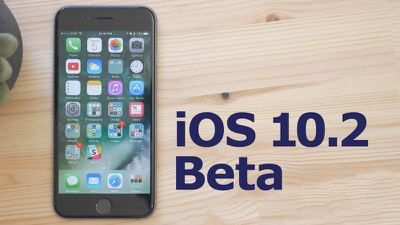
10-2-beta
We don't yet know what features are included in iOS 10.2, but the prior update, iOS 10.1, introduced a new Portrait photography mode for the iPhone 7 Plus' dual-lens camera system. Should new features be discovered in today's update, we'll update this post.

Apple has called iOS 10 its "biggest release ever" for iOS users, with a revamped lock screen, a Siri SDK for developers, an overhauled Messages app, a dedicated "Home" app for HomeKit users, new facial and object recognition capabilities in Photos, and redesigned Maps and Apple Music apps.

What's new in iOS 10.2:

Emoji - Unicode 9 emoji are included in iOS 10.2. Some of the new emoji include clown face, drooling face, selfie, fox face, owl, shark, butterfly, avocado, pancakes, croissant, and more.
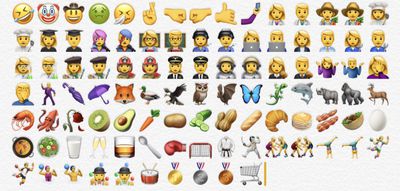
ios102emoji
Wallpapers - There are new wallpapers in iOS 10.2, which use the same graphics that were shown off in iPhone 7 marketing materials.
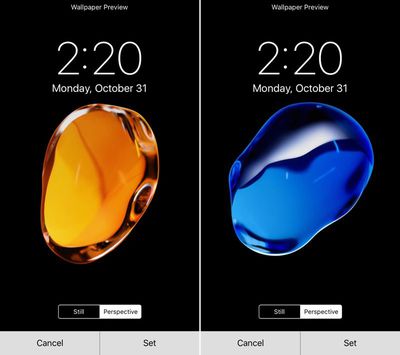
ios102wallpaper
Camera settings - There's a new option for saving your last known camera settings. This will let you preserve the last Camera Mode, Photo Filter, or Live Photo setting. "Preserve Settings" is available in the Settings App under "Photos & Camera."
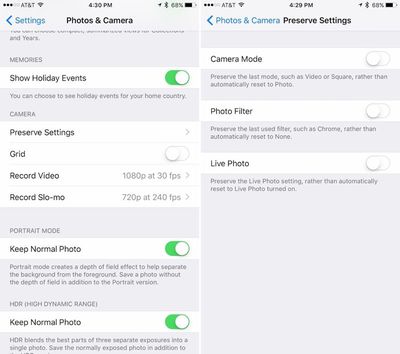
preservesettings
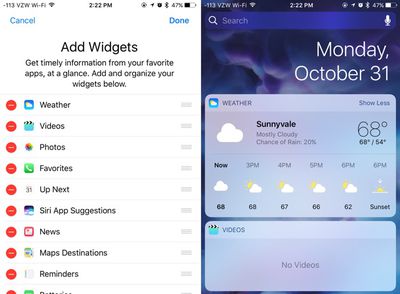
Videos widget - There's a new widget available for the Videos app, accessible on the widgets panel by swiping to the right on the Home screen of an iPhone or iPad. The Videos widget displays movies and TV shows in the Videos app, and a tap will cause content to play automatically.
videowidgetsios102
Emergency contacts - There's a new feature that will automatically notify your emergency contacts when you use the Emergency SOS feature on iPhone or Apple Watch. A popup notification shows up when you open the Health app after installing iOS 10.2.

Apple Music - There's a new option to sort playlists in Apple Music by type, title, and recently added.


Related Forum: iOS 10

Popular Stories

imac video apple feature

Apple Released Yet Another New Product Today

Friday March 20, 2026 2:39 pm PDT by
Apple has unveiled a whopping nine new products so far this March, including an iPhone 17e, iPad Air models with the M4 chip, MacBook Air models with the M5 chip, MacBook Pro models with M5 Pro and M5 Max chips, the all-new MacBook Neo, an updated Studio Display, a higher-end Studio Display XDR, AirPods Max 2, and now the Nike Powerbeats Pro 2. iPhone 17e features the same overall design as...
iPhone 18 Pro Deep Red Feature

iPhone 18 Pro Launching Later This Year With These 12 New Features

Wednesday March 18, 2026 7:39 am PDT by
While the iPhone 18 Pro and iPhone 18 Pro Max are not expected to launch for another six months or so, there are already plenty of rumors about the devices. It was initially reported that the iPhone 18 Pro models would have fully under-screen Face ID, with only a front camera visible in the top-left corner of the screen. However, the latest rumors indicate that only one Face ID component...
ios 26 4 pastel

iOS 26.4: Top 10 New Features Coming to Your iPhone

Friday March 20, 2026 2:44 pm PDT by
iOS 26.4 isn't the major update with new Siri features that we hoped for, but there are some useful quality of life improvements, and a little bit of fun with an AI playlist generator and new emoji characters. Playlist Playground - Apple Music has a Playlist Playground option that lets you generate playlists from text-based descriptions. You can include moods, feelings, activities, or...

Top Rated Comments

Tony_YYZ Avatar
123 months ago
Android device users complain they don't get enough updates. iOS users complain they get too many updates.

oy vey
Score: 19 Votes (Like | Disagree)
123 months ago
I am simply sick of all these updates. It's completely absurd and would be unnecessary if apple knew how write good and dependable code. But it's bug after bug after bug. The only beneficiary of this is this board as it gives all of you loads to moan and groan about. But for us regular users, it's a nightmare. Spending day after day updating all my devices and then discovering that a new bug was introduced that will require another update. If Steve were still alive, this wouldn't be happening. I'm going to buy a pc and the new pixel phone right now. I'm done with apple forever.
Bye! No need to post anymore either, what will you do with all your extra time! :D
Score: 18 Votes (Like | Disagree)
123 months ago
I'm going to buy a pc and the new pixel phone right now. I'm done with apple forever.
Ciao
Score: 15 Votes (Like | Disagree)
TheAppleFairy Avatar
123 months ago
I am simply sick of all these updates. It's completely absurd and would be unnecessary if apple knew how write good and dependable code. But it's bug after bug after bug. The only beneficiary of this is this board as it gives all of you loads to moan and groan about. But for us regular users, it's a nightmare. Spending day after day updating all my devices and then discovering that a new bug was introduced that will require another update. If Steve were still alive, this wouldn't be happening. I'm going to buy a pc and the new pixel phone right now. I'm done with apple forever.
Well delete the beta profile then, If you don't have the beta profile you don't get that many updates and will have nothing to cry about.
Score: 15 Votes (Like | Disagree)
rwilliams Avatar
123 months ago
This far in and nobody has mentioned Dark Mode. You fellas are slipping.
Score: 12 Votes (Like | Disagree)
123 months ago
You've got to be kidding me. The animation is longer. The wallpaper actually zooms in on the 7Plus but it does not on the Air 2. Entirely DIFFERENT animation. The wallpaper does NOT zoom in on the Air 2.

@Jayson A Help me out. lol
Yes, you're right. The animation isn't glitchy, they literally re-worked the animation to be exactly how it's being shown.

Apple did this because they want the animation to start immediately on the first click, rather than waiting for a second click before returning home.

It's like this (for anyone that's interested)

iPhone 6s:
1. User clicks home button once
2. iPhone says to itself "Don't do anything yet! We don't know if the user is going to double click, so we don't know what action to take just yet!
3. After a second or so, the iPhone goes "False alarm! User just wanted to go home! Start the home animation!!"
4. The screen smoothly transforms into the size of its home screen icon.

iPhone 7 does things differently:
1. User clicks home button once
2. iPhone says to itself "Start the animation! We'll deal with a second click as it comes!"
3. The wallpaper however, cannot move yet because the iPhone doesn't know when you'll do the second click.
4. If a second click is detected during the initial animation, the iPhone says "Wait! The user clicked again! Interrupt the current animation and show them the multitasking screen!"

Because of the fact that the iPhone has to be prepared to show the multitasking screen, the way the app animates to the home screen is different. It starts off by shrinking the screen slowly, but keeping the same proportions of the app screen (16:9). Once it gets past the size of the multitasking window size, it starts to distort slightly and blend into it's icon on the home screen. However, since the zoom animation started off slow, it has to make up time by speeding up toward the end of the animation, but someone forgot to tell the wallpaper that, so it lags behind the rest of the animation.

That's why the iPhone 7's animation looks off-putting.

If they could just get the wallpaper to move at the same speed as the zoom animation, it wouldn't look so weird or delayed.

I hope this helped some people out
Score: 9 Votes (Like | Disagree)
Related Apple News: Local News | Sport | World News | Motoring | Opinion
















