Microsoft Explains How Word, PowerPoint, Excel, and Outlook Work With Touch Bar - MacRumorsOpen MenuShow RoundupsShow Forums menuVisit ForumsOpen Sidebar
Skip to Content

Microsoft Explains How Word, PowerPoint, Excel, and Outlook Work With Touch Bar

by

Yesterday during its Hello Again event, Apple confirmed that the Microsoft Office suite of apps will be gaining support for Touch Bar on the new MacBook Pro, and now Microsoft has detailed what that will look like for each app. The company said that with Touch Bar support on Word, PowerPoint, Excel, and Outlook, it's "continually evolving Office to take advantage of the latest and greatest hardware innovations across the industry."

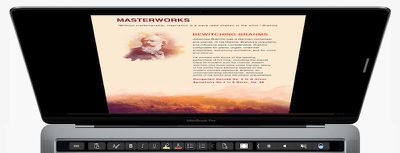
In Word, users will be able to use "Word Focus Mode," which eliminates the clutter of on-screen ribbons and commands "so you can simply focus on your work." All of the relevant UI is then moved down onto Touch Bar, with classic buttons like copy/paste, bold, italics, underline, list, indent, and more found on Apple's new multi-touch panel.
office-word-mac
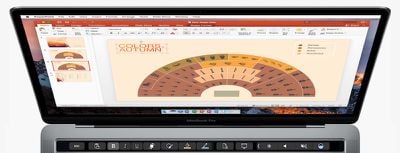
Microsoft said PowerPoint's addition of Touch Bar support lets users "easily manipulate graphic elements." Buttons like "Reorder Objects" make it easy to find the exact object users are looking for and move it to a new location, thanks to an easy-to-read graphical map of a slide's layers. Object manipulation and slides can also be rotated and tracked by sliding a finger across the Touch Bar.
office-powerpoint-mac
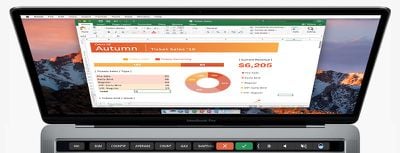
Excel's Touch Bar integration makes it quicker to write functions into rows of the program. By typing an equals sign into a cell, Excel will immediately pull up the most recently used functions and display them on the Touch Bar. As the company explained, "for example, with a tap (for the formula) and another tap (for a named range) in the Touch Bar, you can quickly sum a range in your spreadsheet." Easy spreadsheet organization is also available through the Touch Bar, with borders, cell colors and recommended charts propagating on the panel.
office-excel-mac
The last program detailed was Outlook, and Microsoft said that here the Touch Bar will provide "the most commonly used commands" whenever a user is working in its calendar and email programs. This means when composing an email, an add file prompt appears, along with a list of recent documents that users can one-tap to attach as a full attachment or a link. While in Outlook's calendar, users will be able to see their events for the day, and even jump into a Skype for Business video meeting.
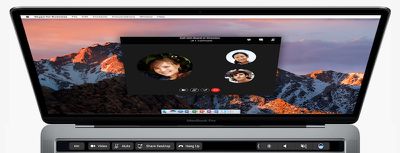
office-outlook-mac
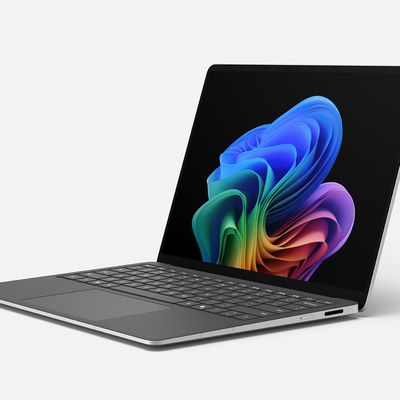
Before Apple's event, Microsoft held its own presentation on Wednesday, where it announced a new Surface Book and all-in-one desktop Surface Studio, as well as a "Creators Update" coming to Windows 10. Microsoft's new computers are up for pre-order now, the Surface Book starting at $2,399 and Surface Studio at $2,999, and are expected to ship in November and December, respectively.
Related Roundup: MacBook Pro
Buyer's Guide: MacBook Pro (Buy Now)
Related Forum: MacBook Pro

Top Rated Comments

miknos Avatar
123 months ago
we have to measure which option is faster:
a) to press button on your touch bar
b) to click hot-made button above your ribbon in excel using mouse
Just having to look down (keyboard) and back to the screen is a step backwards.
Score: 8 Votes (Like | Disagree)
123 months ago
They position the MBP as a business computer, a Pro's computer. Most businesses use...

...the answer is not iWork.:p:D
The industry and consumers are just sticking to what they're 'used to' and Apple's finally playing along (which contradicts a lot of their core values in my opinion). When instead they should be working to make programs like Numbers even more robust and showcase the value behind their product.

Actually, "The answer" is not MS Office. iWork is by far a superior product to Office in a great deal of ways. Microsoft Office for Mac is pure garbage and half-baked. Just my two cents and personal opinion.
Score: 5 Votes (Like | Disagree)
123 months ago
we have to measure which option is faster:
a) to press button on your touch bar
b) to click hot-made button above your ribbon in excel using mouse
c) Press CTRL + C/V/B/I/U etc... without needing to look down from screen or locating and having to move the mouse - unless it is of course a more specific activity.
Score: 5 Votes (Like | Disagree)
123 months ago
Funny how Microsoft is early out of the gate supporting new Mac hardware with Office... And they also have been impressively on top of their app updates for iOS... But at the same time they run Surface commercials that basically say "Macs are crap! Buy a Surface!" ;)
Score: 5 Votes (Like | Disagree)
123 months ago
we have to measure which option is faster:
a) to press button on your touch bar
b) to click hot-made button above your ribbon in excel using mouse
Score: 5 Votes (Like | Disagree)
123 months ago
In Excel the F keys are incredibly useful:
F1: Help
F2: EDIT
F4: Fix cells
F5: Go to.

So, adding a button to start a formula (from what is seen in the picture) is useless.

The MacBook Pro is turning into the less Pro of all Macs.

Enjoy your emoji toolbar.
Score: 4 Votes (Like | Disagree)

Popular Stories

imac video apple feature

Apple Released Yet Another New Product Today

Friday March 20, 2026 2:39 pm PDT by
Apple has unveiled a whopping nine new products so far this March, including an iPhone 17e, iPad Air models with the M4 chip, MacBook Air models with the M5 chip, MacBook Pro models with M5 Pro and M5 Max chips, the all-new MacBook Neo, an updated Studio Display, a higher-end Studio Display XDR, AirPods Max 2, and now the Nike Powerbeats Pro 2. iPhone 17e features the same overall design as...
ios 26 4 pastel

iOS 26.4: Top 10 New Features Coming to Your iPhone

Friday March 20, 2026 2:44 pm PDT by
iOS 26.4 isn't the major update with new Siri features that we hoped for, but there are some useful quality of life improvements, and a little bit of fun with an AI playlist generator and new emoji characters. Playlist Playground - Apple Music has a Playlist Playground option that lets you generate playlists from text-based descriptions. You can include moods, feelings, activities, or...
iPhone 18 Pro Deep Red Feature

iPhone 18 Pro Launching Later This Year With These 12 New Features

Wednesday March 18, 2026 7:39 am PDT by
While the iPhone 18 Pro and iPhone 18 Pro Max are not expected to launch for another six months or so, there are already plenty of rumors about the devices. It was initially reported that the iPhone 18 Pro models would have fully under-screen Face ID, with only a front camera visible in the top-left corner of the screen. However, the latest rumors indicate that only one Face ID component...
Related Apple News: Culture | Business | World News | South Africa | Reviews