

Apple Offers a Temporary Workaround if the Home Button Fails on an iPhone 7

With the introduction of the iPhone 7, Apple did away with the classic click-mechanism home button in favor of a "solid-state" pressure sensitive one that uses haptic feedback to mimic traditional button presses.

The programming that controls the Taptic Engine-powered feedback is deeply integrated into iOS 10, so much so that it appears Apple's latest iPhone is able to automatically offer a temporary workaround when its diagnostic software senses that the technology is playing up.
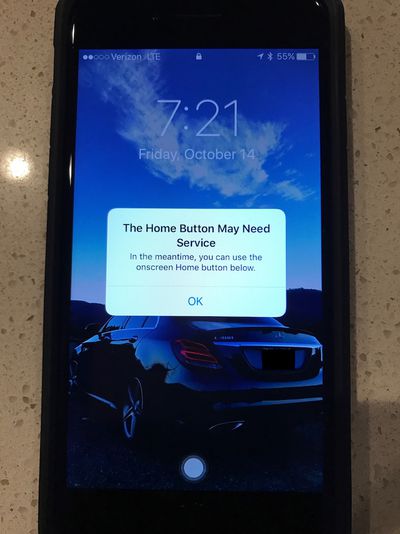
iphone 7 broken home button
MacRumors forum member 'iwayne' shared the above picture of his iPhone 7 display after the device unexpectedly turned itself off while charging and the haptic feedback began malfunctioning after a restart. A dialog prompt warns that the home button is in need of repair, but presents an alternative onscreen home button for temporary use until the phone has been turned in to Apple for servicing.

MacRumors has previously noted that the Taptic Engine can become unresponsive if the OS freezes, which forced Apple to change the reset process for the iPhone 7 series. Apple has also apparently safeguarded against instances when the button's haptic sensor system breaks completely, but whether or not its failure rate is any better than a physical button remains to be seen.

Rumors suggest Apple will ditch the iconic home button entirely for next year's "iPhone 8" in favor of one built directly into an edge-to-edge display, but it's unclear if Apple intends to implement the same button-based recovery methods for instances in which devices freeze or stop responding completely.


Related Forum: iPhone

Popular Stories

iOS 26

iOS 26.4 and iOS 27 Features Revealed in New Leak

Friday December 12, 2025 10:56 am PST by
Macworld's Filipe Espósito today revealed a handful of features that Apple is allegedly planning for iOS 26.4, iOS 27, and even iOS 28. The report said the features are referenced within the code for a leaked internal build of iOS 26 that is not meant to be seen by the public. However, it appears that Espósito and/or his sources managed to gain access to it, providing us with a sneak peek...
iOS 26

iOS 26.2 Coming Soon With These 8 New Features on Your iPhone

Thursday December 11, 2025 8:49 am PST by
Apple seeded the second iOS 26.2 Release Candidate to developers earlier this week, meaning the update will be released to the general public very soon. Apple confirmed iOS 26.2 would be released in December, but it did not provide a specific date. We expect the update to be released by early next week. iOS 26.2 includes a handful of new features and changes on the iPhone, such as a new...
iOS 26

Apple Releases iOS 26.2 With Alarms for Reminders, Lock Screen Changes, Enhanced Safety Alerts and More

Friday December 12, 2025 10:10 am PST by
Apple today released iOS 26.2, the second major update to the iOS 26 operating system that came out in September, iOS 26.2 comes a little over a month after iOS 26.1 launched. ‌iOS 26‌.2 is compatible with the ‌iPhone‌ 11 series and later, as well as the second-generation ‌iPhone‌ SE. The new software can be downloaded on eligible iPhones over-the-air by going to Settings >...
AirPods Pro Firmware Feature

Apple Releases New Firmware for AirPods Pro 2 and AirPods Pro 3

Thursday December 11, 2025 11:28 am PST by
Apple today released new firmware designed for the AirPods Pro 3 and the prior-generation AirPods Pro 2. The AirPods Pro 3 firmware is 8B30, up from 8B25, while the AirPods Pro 2 firmware is 8B28, up from 8B21. There's no word on what's include in the updated firmware, but the AirPods Pro 2 and AirPods Pro 3 are getting expanded support for Live Translation in the European Union in iOS...
macOS Tahoe 26 Thumb

Apple Releases macOS Tahoe 26.2 With Edge Light

Friday December 12, 2025 10:08 am PST by
Apple today released macOS Tahoe 26.2, the second major update to the macOS Tahoe operating system that came out in September. macOS Tahoe 26.2 comes five weeks after Apple released macOS Tahoe 26.1. Mac users can download the macOS Tahoe update by using the Software Update section of System Settings. macOS Tahoe 26.2 includes Edge Light, a feature that illuminates your face with soft...
AirTag 2 Mock Feature

Apple AirTag 2: Four New Features Found in iOS 26 Code

Thursday December 11, 2025 10:31 am PST by
The AirTag 2 will include a handful of new features that will improve tracking capabilities, according to a new report from Macworld. The site says that it was able to access an internal build of iOS 26, which includes references to multiple unreleased products. Here's what's supposedly coming: An improved pairing process, though no details were provided. AirTag pairing is already...
ipados 26 1 slide over

Apple Releases iPadOS 26.2 With Multitasking Improvements

Friday December 12, 2025 10:09 am PST by
Apple today released iPadOS 26.2, the second major update to the iPadOS 26 operating system released in September. iPadOS 26.2 comes a month after iPadOS 26.1. The new software can be downloaded on eligible iPads over-the-air by going to Settings > General > Software Update. iPadOS 26.2 continues with the multitasking improvements that were added with iPadOS 26.1. You can now drag and...
bug security vulnerability issue fix larry

Update Now: iOS 26.2 Fixes 20+ Security Vulnerabilities

Friday December 12, 2025 11:11 am PST by
Apple today released iOS 26.2, iPadOS 26.2, and macOS 26.2, all of which introduce new features, bug fixes, and security improvements. Apple says that the updates address over 20 vulnerabilities, including two bugs that are known to have been actively exploited. There are a pair of WebKit vulnerabilities that could allow maliciously crafted web content to execute code or cause memory...

Top Rated Comments

djcerla Avatar
120 months ago
Software is much more prone to bugs than hardware failure. Physical buttons are best in many instances!
The physical button of the iPhone has constantly been a point of failure, to the point that in Far Eastern countries often it isn't used at all to preserve the resale value (they use Accessibility features instead).

The car manufactures began using touch controls for volume, temperature, etc a few years back until, unsurprisingly, they started returning to physical buttons shortly thereafter
In the car, touch controls are bad for a completely different reason: because you can't find them without looking.
Score: 100 Votes (Like | Disagree)
djcerla Avatar
120 months ago
Plenty of issues here as well. Kinda happy mine hasn't arrived yet.
If it hasn't arrived yet, how can you have issues there?
Score: 77 Votes (Like | Disagree)
Adam Warlock Avatar
120 months ago
Just one more point of possible failure that will end up frustrating customers. The car manufactures began using touch controls for volume, temperature, etc a few years back until, unsurprisingly, they started returning to physical buttons shortly thereafter. Software is much more prone to bugs than hardware failure. Physical buttons are best in many instances!
Score: 48 Votes (Like | Disagree)
marvz Avatar
120 months ago
It's good to have a fallback, but the aim is to never need a fallback. Why is a device so new already popping up such errors? iPhone 7 is truly an experimental device release. Looking forward to 2017's all new device.
You know how many iPhone 7's have been sold, right? Millions. If only one of 1 million iPhones has this problem it means 0.0001 %. But yeah this iPhone is such an experimental device. Please stop posting this nonsense.
[doublepost=1476529947][/doublepost]
Never heard that. Why would people in the Far East be more sensitive to preserving their home buttons than in the West?
That's one reason, certainly, but it's also because of higher failure rates & poor feedback.
Then don't post such arguments if you don't know nothing. iPhone's old physical Home Button is the part that has to be repaired the most.
Score: 33 Votes (Like | Disagree)
Sunny1990 Avatar
120 months ago
Love my old clicking home button
Score: 28 Votes (Like | Disagree)
keysofanxiety Avatar
120 months ago
This is properly clever. It also demonstrates just how much thought Apple put into designing the new home button. Not only how it functions when it goes right — but what happens when it goes wrong.
Score: 27 Votes (Like | Disagree)














