iPhone 7 Home Button Requires Capacitive Touch to Work - MacRumorsOpen MenuShow RoundupsShow Forums menuVisit ForumsOpen Sidebar
Skip to Content

iPhone 7 Home Button Requires Capacitive Touch to Work

by

As discovered by Myke Hurley (via Daring Fireball), some iPhone 7 and 7 Plus users are going to have a tough time unlocking their devices during wintertime. As it turns out, the new "solid-state" Home button on the iPhone 7 and iPhone 7 Plus requires skin contact or the right kind of capacitive gloves to function.

If you put on a pair of gloves or cover your finger with the sleeve of a shirt and attempt to open the iPhone 7, access the Home screen, exit out of an app, or activate multitasking, the Home button will not respond to a press unless it's touching skin. And because the iPhone 7 uses the redesigned Lock screen in iOS 10, there's no quick and easy way to bring up the passcode entry screen to unlock the phone manually (the quickest way sans Home button is to swipe to the widgets screen and tap one).
iphone7homebutton
We tested with a pair of gloves that are designed for touch screens and while we could unlock the iPhone 6s Plus with the gloves and use the touch screen, that wasn't possible with the iPhone 7 Plus -- the Home button wouldn't activate. There are mixed reports on Twitter from people with capacitive gloves, and while some work, others do not appear to. It may vary based on the material and construction of the gloves. Latex gloves also do not activate the Home button, but will activate the display.


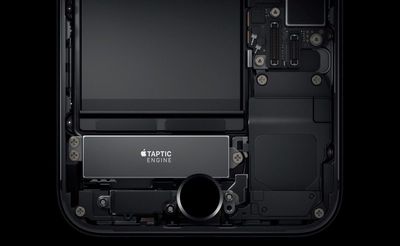
The redesigned Home button in the iPhone 7 is no longer a physical button -- it's flush with the iPhone and uses haptic feedback to give the sensation of button presses. Because it's requiring capacitive contact to unlock the device, it's likely the iPhone 7 is using the Touch ID fingerprint sensor to register touch.

While capacitive contact is required to unlock the phone, the new "Raise to Wake" functionality still allows the Lock screen to be viewed without a touch, so it continues to be possible to view incoming notifications. Fully unlocking the phone will require a free finger that's unobscured by fabric or one of the brands of capacitive gloves that are functional.

Update: As MacRumors forum members point out, there is the option of turning on AssistiveTouch in Accessibility, which offers a way to bypass the home button with screen-only control options.


Related Forum: iPhone

Top Rated Comments

larrylaffer Avatar
124 months ago
The other 92% of the surface has the same restriction, so uh, I don't really care.
Score: 41 Votes (Like | Disagree)
surfingarbo Avatar
124 months ago
Remember folks, some people wear gloves ALL THE TIME...

Score: 24 Votes (Like | Disagree)
124 months ago
Doesn't matter because if one uses Touch ID then needs skin contact anyways.
Score: 19 Votes (Like | Disagree)
124 months ago
"You're touching it wrong"
Score: 18 Votes (Like | Disagree)
btrach144 Avatar
124 months ago
Not sure how this is really an issue. All you could do before, assuming you have touch ID enabled, is check the lock screen by pressing the button with gloves on.
Score: 18 Votes (Like | Disagree)
124 months ago
Press the power button instead?
Score: 17 Votes (Like | Disagree)

Popular Stories

imac video apple feature

Apple Released Yet Another New Product Today

Friday March 20, 2026 2:39 pm PDT by
Apple has unveiled a whopping nine new products so far this March, including an iPhone 17e, iPad Air models with the M4 chip, MacBook Air models with the M5 chip, MacBook Pro models with M5 Pro and M5 Max chips, the all-new MacBook Neo, an updated Studio Display, a higher-end Studio Display XDR, AirPods Max 2, and now the Nike Powerbeats Pro 2. iPhone 17e features the same overall design as...
iPhone 18 Pro Deep Red Feature

iPhone 18 Pro Launching Later This Year With These 12 New Features

Wednesday March 18, 2026 7:39 am PDT by
While the iPhone 18 Pro and iPhone 18 Pro Max are not expected to launch for another six months or so, there are already plenty of rumors about the devices. It was initially reported that the iPhone 18 Pro models would have fully under-screen Face ID, with only a front camera visible in the top-left corner of the screen. However, the latest rumors indicate that only one Face ID component...
ios 26 4 pastel

iOS 26.4: Top 10 New Features Coming to Your iPhone

Friday March 20, 2026 2:44 pm PDT by
iOS 26.4 isn't the major update with new Siri features that we hoped for, but there are some useful quality of life improvements, and a little bit of fun with an AI playlist generator and new emoji characters. Playlist Playground - Apple Music has a Playlist Playground option that lets you generate playlists from text-based descriptions. You can include moods, feelings, activities, or...
Related Apple News: Opinion | Iphone | Motoring | South Africa | Technology