Google Hangouts for iOS Gains Share Extension and Low Power Mode Support - MacRumorsOpen MenuShow RoundupsShow Forums menuVisit ForumsOpen Sidebar
Skip to Content

Google Hangouts for iOS Gains Share Extension and Low Power Mode Support

by

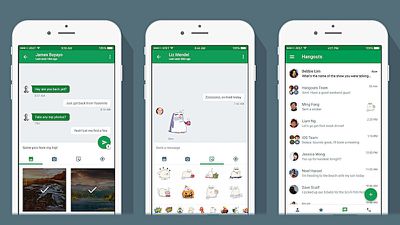
Google has updated its Hangouts app for iPhone and iPad with a native iOS Share Sheet extension and support for Low Power mode.

Google Hangouts for iOS enables users to send and receive instant messages and group messages, share photos, and make video and voice calls using the company's cross-platform communication service. Users can also connect up to Google Voice via the service to link their personal phone numbers, enable SMS and activate voice recognition.
google_hangouts_ios
The Share extension in version 9.0 of Hangouts means users can now share text, links, images, and video from other apps on their device, while the Low Power support essentially means that the app will now automatically turn off video when the device's battery is depleted to 20% or lower.

The Share extension can be activated by tapping the Share button within the app, selecting "More" at the end of the Share Sheet, and toggling the switch next to Hangouts to the ON position.

Google Hangouts is a free download on the App Store for iPhone and iPad. [Direct Link]

Tag: Google

Top Rated Comments

131 months ago
Isn't that supposed to be coming up in iOS v.whatever, shortly?
Well, there's FaceTime video and audio that can be used between Apple devices, but not for basically regular calling, and there's WiFi calling which iOS supports and the more recent iPhones support, but the use of that depends on your cellular provider as far as them actually offering it and how it works for example when you are outside of your home country and the like. Google Voice's calling abilities that use data have been around before WiFi calling and are still there now even when WiFi calling isn't an option.
Score: 1 Votes (Like | Disagree)
vertsix Avatar
131 months ago
I've been waiting for this feature for so long.

All they need to do is incorporate 3D Touch shortcuts and I'll be super happy.
Score: 1 Votes (Like | Disagree)
Keane16 Avatar
131 months ago
I just learnt that apps need to "support" low power mode. That's probably why it never works for me lol
It works at the system level, and the app level.

When enabled system level functionality will be reduced (networking, animations etc.). Additionally apps can detect Low Power Mode is enabled and can limit features, like the Hangouts app turns off video.

So Low Power Mode savings vary (quite a bit) depending on the apps you have and the settings they have enabled. This guy for instance saw substantial improvements:

http://birchtree.me/blog/wqoc7twm9a26g29pbwkvjikqju8tz7/
Score: 1 Votes (Like | Disagree)
Sirious Avatar
131 months ago
I just learnt that apps need to "support" low power mode. That's probably why it never works for me lol
Score: 1 Votes (Like | Disagree)

Popular Stories

google chrome vertical tabs

Google Brings Vertical Tabs and Improved Reading Mode to Chrome

Tuesday April 7, 2026 1:27 pm PDT by
Google today updated its Chrome browser with support for vertical tabs, which are displayed in a sidebar instead of at the top of the browser. The tab layout can be changed by right clicking on any Chrome window and choosing the "Show Tabs Vertically" option. Sidebar tabs feature full page titles and make it simple to organize tab groups. Google has also added a new full-page interface...
Chrome Feature 22

Gemini in Google Chrome Gets a Skills Library for Saving Custom AI Prompts

Tuesday April 14, 2026 10:00 am PDT by
Chrome has been updated today with a Skills library that's designed to let Chrome users turn AI tasks into repeatable skills that can be used on any website. Useful prompts you create for Gemini in Chrome can be saved as a Skill that can be accessed later with a single click. If you're shopping for skincare and ask Gemini about the ingredients in a product, for example, you can save the...
gemini for mac app google

Google Launches Native Gemini AI App for Mac

Wednesday April 15, 2026 10:46 am PDT by
Google is bringing Gemini to the Mac with a new native macOS app that's available starting today. Gemini for Mac can be activated with a keyboard shortcut, and it has built-in tools for generating images, analyzing what's on your screen, reviewing files, and more. Gemini is the last of the three major AI services to have a dedicated Mac app, because OpenAI and Anthropic have had Mac apps for ...
Related Apple News: News | Culture | World News | Education | South Africa